Search the Community
Showing results for tags 'cdlc'.
-
Is there any way to make old DLC available to buy again? I missed out a few song that I like and there seems to be no other way to play these songs on Rocksmith 2014. Specifically "Pumped Up Kicks". I tried the "CDLC" route but no success there, since the instructions for importing .dat files are very obtuse. At the very least, can someone direct me to an easy-to-understand guide for using the Rocksmith Toolkit. Cheers!
-
 Hello! I have purchased both Rocksmith versions (remastered and original) on Steam. I have been trying a few cdlc, original dlcs (I already got Foo Fighters and of course Cherub Rock)... but i cannot find any way of purchasing or downloading any .psarc version of Bohemian Rhapsody. Ignition4 search brings me to Steam but the DLC is not available to purchase. I have also tried to purchase a code somewhere (g2a, allkeyshop...) and all the keys seem to be sold out. Can I download it from anywhere else? I desperately WANT Bohemian Rhapsody Thank you in advance
 -
is there a way to get the cdlc to work? i have a copy of my old DLL from the computer. I'm new to linux so not sure if running the .exe from the tutorial will work for linux. Thanks for any info
-
Блок питания порушил мне всю систему вместе с одним из хардов на котором собсна были все все наработки, за сим всё придётся делать заново, но не задолго до этого я успел сделать небольшой бэкап всех наработок и готовых кастомов. Вес порядка 1гб Список демо кастомов в сборке Rocksmith 2014 Edition Rocksmith 2012 Edition
-
Hi I have only recently started playing RS14 after some time off and a new laptop my question is my Game runs perfectly and all 1500+ DLC'S work fine but I installed some CDLC files from my old machine on to the dlc folder of my new Laptop but when I open them I get the issue where you only see the amps and no songs show up or the note highway. However I have followed Chainbrains tutorial and have downloaded the patch to try to sort out my issue of the CDLC'S not working, But when I click the patch enabler a window pops up saying that (we cannot detect where you have Rocksmith located. Please try reinstalling your game on Steam). so does anyone know why this won't work and why I keep getting the error message above and more importantly how to fix it? Thanks
-

Open string not displaying in Rocksmith but displays in EOF
tavitane posted a question in Rocksmith Remastered
I made a CDLC, however the open strings do not display when played in Rocksmith. They display in EOF, so I'm not sure how to fix it. Does anybody have any ideas? Thank you. https://www.mediafire.com/file/elzttfps1v8rtnk/Dexcore_Savior_v1_p.psarc/file - link to CDLC.
-
Hi guys, I have Rocksmith 2014 remastered and the official Cherub rock DLC. Both legal and official and all. I am trying to get the CDLC to work but they just won't show up in the list. I use Windows 10. I am 100% sure I have put the D3DX9_42.dll file in the root directory. The spelling of the file is right: I copy-pasted it from the file in the post here for you to be sure. I have the right file types for pc (p_psarc) and I put them in the DLC folder. I unblocked all files right after downloading (right click>properties>unblock). Rebooted the pc several times. The CDLC's I'm trying to install both have Cherub rock as their package ID. I tried several versions of the D3DX9_42.dll file and none made it work. Since I saw someone ask for a screencap from the root folder, I made a screencap from the rootfolder. The only thing I haven't tried is uninstalling and reinstalling Rocksmith as I am afraid that will delete my savegames. I hope someone of you can help me because Google won't get me any further and I am at my wits end. Here are the links of the songs I'm trying to install: http://customsforge.com/index.php/page/customsforge_rs_2014_cdlc.html/_/pc-enabled-rs-2014-cdlc/fish-on-r37782 http://customsforge.com/index.php/page/customsforge_rs_2014_cdlc.html/_/pc-enabled-rs-2014-cdlc/human-r26853 Since I saw someone ask for a screencap from the root folder, I made a screencap from the rootfolder. http://www.freeimagehosting.nl/site2/image.php?di=JBKU
- 14 replies
-
- 2
-

-
- CDLC
- troubleshooting
- (and 1 more)
-
I have recently just got Rocksmith and wanted the CDLC install on RS through steam. I found the latest video on here and followed all the instructions but it is not working. I have looked back and realised that I need to install cherub rock for it to work. HOWEVER, the steam DLC seems to have removed cherub rock pack and I cannot find it anywhere. Can someone please point me in the right direction to download cherub rock as this frustrating me now. I feel like I am being completely stupid here
-
I realize that this has been posted before in video form ( http://customsforge.com/topic/841-how-to-make-cdlc-full-in-depth-tut-completed/ ), but seeing as people still ask about it, and there are still CDLCs showing up without sections or very few sections, I thought It'd be a good idea to make a quick, easy tutorial (no video!) on how to add sections to your arrangements. Here goes: Sections are what separates your full arrangements into, well, sections e.g. Chorus, Verse, Bridge, which are selectable in RR (Riff Repeater). So, how do we go about making them? 1) Load up your eof file 2) Select the BEAT MARKER where you want the section to BEGIN. Do this by clicking on the beat marker (the arrow): http://thumbnails112.imagebam.com/34538/2edcca345370955.jpg 3) Press Shift + S 4) Select one from the list of names. Enable "Also add as RS phrase". Note: The DDC might make its own phrases. I still have "Also add as RS phrase" enabled and ddc works without a hitch. 5) If you want the section start to be just for your current arrangement, enable "Specific to <Part x>" http://thumbnails111.imagebam.com/34538/a17db1345371221.jpg 6) Press Ok 7) Repeat for every beat marker where you want a section to BEGIN. 8) ??? 9) Profit! Now, some notes: 1) Use the "noguitar" section name (second to last one in the list) if you have a long part without any notes being played. This allows you to skip this section in RS2014. 2a) Always start a section on a beat that has a note on it. If your section starts on a beat marker that has no note at the same time, the section will not be selectable in RS2014. So, do NOT do this: http://thumbnails111.imagebam.com/34538/ea8f0c345371670.jpg 2b) In the rare case that your notes will start before or after a beat marker, cheat. Only do this AFTER you've synced up everything (in every arrangement) and AFTER you've confirmed that the section is not selectable if you put in on the beat marker before a note, like so: http://thumbnails111.imagebam.com/34538/56834a345371859.jpg If the section is not selectable in RR, just do the following: Make sure you do not have "Auto adjust notes" enabled Anchor the previous beat marker (select it and press "a") Drag the beat marker over the note Set the BPM back to what it was, and do NOT enable "Adjust Notes" Done! 3) There is nothing to "end" a specific section, besides the "noguitar" section. Sections end where the new section starts. Plan accordingly. 4) Don't be too stingy, and don't be too generous with sections. 5) If you have too many sections (I believe this starts to become a problem around 25 sections or so), RR might bug out a bit visually, and not show any bars. RR will still work, but the bars visual representation will just be bugged. If this is the case, refer back to note 4 (so, don't be too generous!) 6) RS2014 does not care how many choruses or verses there are. That's it. If I see any new CDLC from now on without proper sections I'll hunt you down!
- 19 replies
-
- 10
-
-
 You don't need Cherub Rock to be able to play CDLC. If you already bought a song, then that's good. If you haven't, then go get Cherub Rock, save yourself some time. Anyway, there is a program in which you change the ID of CDLC. It is called Rocksmith Toolkit GUI. You can get it here: http://www.rscustom.net/. 1. Download the file. 2. Open it. 3. Click on RocksmithToolkitGUI. 4. Once you have opened the program, go to the 2nd tab on the top (from left to right). 5. You'll see that there is an option to choose a song. Choose a song which you have bought, then click on 'Choose DLC'. Choose any CDLC you have and then, voila, you may now play it! For a more detailed tutorial, go here:
- 4 replies
-
- 3
-
-
- Rocksmith 2014
- Cherub Rock
- (and 2 more)
-
Hello all! This is my first post so please let me know if I am doing anything incorrectly here. As I understand it The Goo Goo Doll's song "Long Way Down" used to be in the database, but doesn't seem to be anymore. I am not sure why, but I was just wondering if anyone still had the file on their computer? I reached out to the creator of this video on Youtube where they are playing it using the Rocksmith CDLC. Just thought I would ask here as well. Thank you!
-
I'm searching for the song; Before we disappear, from Chirs Cornell and i wanted to make the request if some one make the cdlc i'll really appreciated
-
I specifically remember the song Paralyzed from As I Lay Dying working, but since this update it crashes when loading. Any reason why specific customs crash with this new update?
-
Problem has only developed as I'd added a bunch of new CDLC only 3 days ago without issue. Launch CFSM after adding new CDLC to the folder and it hangs while parsing the new track, cancelling hangs also. Doesn't seem to be a particular CDLC as I've tested with different numbers and combinations of new tracks as well as by themselves. Did another test where I removed one of the songs I added 3 days ago(and had played and confirmed working) and launched CFSM without issue and then added that song back and am now having the same issue as above with that working track. Note that just removing the new songs from the folder leads to CFSM loading properly, error behaviour only seems to occur when trying to add tracks to the folder for some reason. Hoping someone can help before I resort to reinstalling. Last 3 error logs- Log 1: Brand new song added to dlc folder, left parsing/hanging for 12mins to see if it would do anything to no avail. Similar behaviour regardless of the individual track(s), amount or combination of. Closed program. [2023/06/03 00:01:58]: ==== This is the start of a new CFSM run log ===== [2023/06/03 00:01:58]: Validated RS2014 Installation Directory: D:\SteamLibrary\steamapps\common\Rocksmith2014 [2023/06/03 00:01:59]: DownloadVersionInfo Web Exception: The request was aborted: Could not create SSL/TLS secure channel. ... [2023/06/03 00:01:59]: DownloadVersionInfo Web Exception: The request was aborted: Could not create SSL/TLS secure channel. ... [2023/06/03 00:02:00]: DownloadVersionInfo Web Exception: The request was aborted: Could not create SSL/TLS secure channel. ... [2023/06/03 00:02:00]: DownloadVersionInfo Web Exception: The request was aborted: Could not create SSL/TLS secure channel. ... [2023/06/03 00:02:00]: DownloadVersionInfo Web Exception: Connection Timed Out ... [2023/06/03 00:02:00]: + CustomsForge Song Manager (v1.6.0.0 - PC BUILD) [2023/06/03 00:02:00]: + OS Microsoft Windows NT 6.2.9200.0 (64 bit) [2023/06/03 00:02:00]: + .NET Framework (v4.0.30319.42000) [2023/06/03 00:02:00]: + CultureInfo (en-IE) [2023/06/03 00:02:00]: + Current Local DateTime [03/06/2023 00:02:00] [2023/06/03 00:02:00]: + Current UTC DateTime [02/06/2023 23:02:00] [2023/06/03 00:02:00]: + RocksmithToolkitLib (v2.9.2.1-4fe239f9) [27/02/2020 18:35:45] [2023/06/03 00:02:00]: + Dynamic Difficulty Creator (v3.6) [2023/06/03 00:02:00]: + App.config Status (Load Successful) [2023/06/03 00:02:00]: + System Display DPI Setting (96) [2023/06/03 00:02:00]: + System Display Screen Scale Factor (100%) [2023/06/03 00:02:00]: Populating SongManager GUI ... [2023/06/03 00:02:00]: Loaded File: appSettings.xml [2023/06/03 00:02:00]: Loaded File: dgvSongsMaster.xml [2023/06/03 00:02:00]: Loaded File: songsInfo.xml [2023/06/03 00:02:01]: Performing quick rescan of song collection ... [2023/06/03 00:02:01]: Raw songs count: 1756 [2023/06/03 00:02:02]: Starting multi-thread task in core (0) ... [2023/06/03 00:02:02]: - Parsing took 169 (msec): D:\SteamLibrary\steamapps\common\Rocksmith2014\dlc\Alkaline-Trio_Time-To-Waste_v1_0_p.psarc [2023/06/03 00:14:27]: Application is closing ... [2023/06/03 00:14:27]: Populating SongManager GUI ... [2023/06/03 00:14:27]: Loaded File: appSettings.xml [2023/06/03 00:14:27]: Loaded File: dgvSongsMaster.xml [2023/06/03 00:14:27]: Loaded File: songsInfo.xml [2023/06/03 00:14:27]: Performing quick rescan of song collection ... [2023/06/03 00:14:27]: Raw songs count: 1756 [2023/06/03 00:14:28]: <WARNING> User cancelled process ... [2023/06/03 00:14:28]: <WARNING> User cancelled process ... [2023/06/03 00:14:28]: SongManagerFilter Available: None [2023/06/03 00:14:28]: Song Manager GUI Activated ... [2023/06/03 00:14:28]: Saved File: dgvSongsMaster.xml [2023/06/03 00:14:28]: Song Manager GUI Deactivated ... [2023/06/03 00:14:28]: Application closed normally ... [2023/06/03 00:14:28]: <WARNING> User cancelled process ... [2023/06/03 00:14:28]: SongManagerFilter Available: None [2023/06/03 00:14:28]: Song Manager GUI Activated ... [2023/06/03 00:14:28]: <ERROR> Unhandled.Exception: Source: System.Windows.Forms Target: Void CreateHandle() System.ObjectDisposedException: Cannot access a disposed object. Object name: 'frmMain'. at System.Windows.Forms.Control.CreateHandle() at System.Windows.Forms.Form.CreateHandle() at System.Windows.Forms.Control.get_Handle() at System.Windows.Forms.Control.SetVisibleCore(Boolean value) at System.Windows.Forms.Form.SetVisibleCore(Boolean value) at System.Windows.Forms.Control.set_Visible(Boolean value) at System.Windows.Forms.Application.ThreadContext.RunMessageLoopInner(Int32 reason, ApplicationContext context) at System.Windows.Forms.Application.ThreadContext.RunMessageLoop(Int32 reason, ApplicationContext context) at System.Windows.Forms.Application.Run(Form mainForm) at CustomsForgeSongManager.Program.RunApp() at CustomsForgeSongManager.Program.Main() Log 2: Removed new song and the slightly older working one, loads without issue. [2023/06/03 00:21:46]: ==== This is the start of a new CFSM run log ===== [2023/06/03 00:21:46]: Validated RS2014 Installation Directory: D:\SteamLibrary\steamapps\common\Rocksmith2014 [2023/06/03 00:21:47]: DownloadVersionInfo Web Exception: The request was aborted: Could not create SSL/TLS secure channel. ... [2023/06/03 00:21:47]: DownloadVersionInfo Web Exception: The request was aborted: Could not create SSL/TLS secure channel. ... [2023/06/03 00:21:47]: DownloadVersionInfo Web Exception: The request was aborted: Could not create SSL/TLS secure channel. ... [2023/06/03 00:21:48]: DownloadVersionInfo Web Exception: The request was aborted: Could not create SSL/TLS secure channel. ... [2023/06/03 00:21:48]: DownloadVersionInfo Web Exception: Connection Timed Out ... [2023/06/03 00:21:48]: + CustomsForge Song Manager (v1.6.0.0 - PC BUILD) [2023/06/03 00:21:48]: + OS Microsoft Windows NT 6.2.9200.0 (64 bit) [2023/06/03 00:21:48]: + .NET Framework (v4.0.30319.42000) [2023/06/03 00:21:48]: + CultureInfo (en-IE) [2023/06/03 00:21:48]: + Current Local DateTime [03/06/2023 00:21:48] [2023/06/03 00:21:48]: + Current UTC DateTime [02/06/2023 23:21:48] [2023/06/03 00:21:48]: + RocksmithToolkitLib (v2.9.2.1-4fe239f9) [27/02/2020 18:35:45] [2023/06/03 00:21:48]: + Dynamic Difficulty Creator (v3.6) [2023/06/03 00:21:48]: + App.config Status (Load Successful) [2023/06/03 00:21:48]: + System Display DPI Setting (96) [2023/06/03 00:21:48]: + System Display Screen Scale Factor (100%) [2023/06/03 00:21:48]: Populating SongManager GUI ... [2023/06/03 00:21:48]: Loaded File: appSettings.xml [2023/06/03 00:21:48]: Loaded File: dgvSongsMaster.xml [2023/06/03 00:21:48]: Loaded File: songsInfo.xml [2023/06/03 00:21:48]: Performing quick rescan of song collection ... [2023/06/03 00:21:49]: Raw songs count: 1754 [2023/06/03 00:21:50]: Removed (1) obsolete songs/inlays from songsInfo.xml ... [2023/06/03 00:21:50]: Finished parsing took: 00:00:00.1850731 [2023/06/03 00:21:51]: Saved File: songsInfo.xml [2023/06/03 00:21:51]: SongManagerFilter Available: None [2023/06/03 00:21:51]: Song Manager GUI Activated ... [2023/06/03 00:21:56]: Application is closing ... [2023/06/03 00:21:56]: Saved File: dgvSongsMaster.xml [2023/06/03 00:21:56]: Song Manager GUI Deactivated ... [2023/06/03 00:21:57]: Saved File: songsInfo.xml [2023/06/03 00:21:57]: Application closed normally ... Log 3: Re-added previously working track, now causes the hang on parsing issue too. Closed program. [2023/06/03 00:22:38]: ==== This is the start of a new CFSM run log ===== [2023/06/03 00:22:39]: Validated RS2014 Installation Directory: D:\SteamLibrary\steamapps\common\Rocksmith2014 [2023/06/03 00:22:39]: DownloadVersionInfo Web Exception: The request was aborted: Could not create SSL/TLS secure channel. ... [2023/06/03 00:22:39]: DownloadVersionInfo Web Exception: The request was aborted: Could not create SSL/TLS secure channel. ... [2023/06/03 00:22:40]: DownloadVersionInfo Web Exception: The request was aborted: Could not create SSL/TLS secure channel. ... [2023/06/03 00:22:40]: DownloadVersionInfo Web Exception: The request was aborted: Could not create SSL/TLS secure channel. ... [2023/06/03 00:22:40]: DownloadVersionInfo Web Exception: Connection Timed Out ... [2023/06/03 00:22:40]: + CustomsForge Song Manager (v1.6.0.0 - PC BUILD) [2023/06/03 00:22:40]: + OS Microsoft Windows NT 6.2.9200.0 (64 bit) [2023/06/03 00:22:40]: + .NET Framework (v4.0.30319.42000) [2023/06/03 00:22:40]: + CultureInfo (en-IE) [2023/06/03 00:22:40]: + Current Local DateTime [03/06/2023 00:22:40] [2023/06/03 00:22:40]: + Current UTC DateTime [02/06/2023 23:22:40] [2023/06/03 00:22:40]: + RocksmithToolkitLib (v2.9.2.1-4fe239f9) [27/02/2020 18:35:45] [2023/06/03 00:22:40]: + Dynamic Difficulty Creator (v3.6) [2023/06/03 00:22:40]: + App.config Status (Load Successful) [2023/06/03 00:22:40]: + System Display DPI Setting (96) [2023/06/03 00:22:40]: + System Display Screen Scale Factor (100%) [2023/06/03 00:22:40]: Populating SongManager GUI ... [2023/06/03 00:22:40]: Loaded File: appSettings.xml [2023/06/03 00:22:40]: Loaded File: dgvSongsMaster.xml [2023/06/03 00:22:40]: Loaded File: songsInfo.xml [2023/06/03 00:22:41]: Performing quick rescan of song collection ... [2023/06/03 00:22:41]: Raw songs count: 1755 [2023/06/03 00:22:42]: Starting multi-thread task in core (0) ... [2023/06/03 00:22:42]: - Parsing took 153 (msec): D:\SteamLibrary\steamapps\common\Rocksmith2014\dlc\Bullet-For-My-Valentine_Suffocating-Under-Words-Of-Sorrow_v1_DD_p.psarc [2023/06/03 00:23:03]: Application is closing ... [2023/06/03 00:23:03]: Populating SongManager GUI ... [2023/06/03 00:23:03]: Loaded File: appSettings.xml [2023/06/03 00:23:03]: Loaded File: dgvSongsMaster.xml [2023/06/03 00:23:03]: Loaded File: songsInfo.xml [2023/06/03 00:23:03]: Performing quick rescan of song collection ... [2023/06/03 00:23:03]: Raw songs count: 1755 [2023/06/03 00:23:04]: <WARNING> User cancelled process ... [2023/06/03 00:23:04]: <WARNING> User cancelled process ... [2023/06/03 00:23:04]: SongManagerFilter Available: None [2023/06/03 00:23:04]: Song Manager GUI Activated ... [2023/06/03 00:23:04]: Saved File: dgvSongsMaster.xml [2023/06/03 00:23:04]: Song Manager GUI Deactivated ... [2023/06/03 00:23:04]: Application closed normally ... [2023/06/03 00:23:04]: <WARNING> User cancelled process ... [2023/06/03 00:23:04]: SongManagerFilter Available: None [2023/06/03 00:23:04]: Song Manager GUI Activated ... [2023/06/03 00:23:04]: <ERROR> Unhandled.Exception: Source: System.Windows.Forms Target: Void CreateHandle() System.ObjectDisposedException: Cannot access a disposed object. Object name: 'frmMain'. at System.Windows.Forms.Control.CreateHandle() at System.Windows.Forms.Form.CreateHandle() at System.Windows.Forms.Control.get_Handle() at System.Windows.Forms.Control.SetVisibleCore(Boolean value) at System.Windows.Forms.Form.SetVisibleCore(Boolean value) at System.Windows.Forms.Control.set_Visible(Boolean value) at System.Windows.Forms.Application.ThreadContext.RunMessageLoopInner(Int32 reason, ApplicationContext context) at System.Windows.Forms.Application.ThreadContext.RunMessageLoop(Int32 reason, ApplicationContext context) at System.Windows.Forms.Application.Run(Form mainForm) at CustomsForgeSongManager.Program.RunApp() at CustomsForgeSongManager.Program.Main()
-
How do install cdlcs on my ps3. I have already installed HEN and coverted the p.psarc files to _ps3.psarc.edat but my PS3 doesn't even notice that it's there. Anyone know what is causing this and know how to fix it?
-
I'm searching for Pink Floyd's Sorrow CDLC. In the request list appears as completed but I can't find it in the database. Anyone has the link? thanks! \m/ \m/
-
HI, Has anyone used the new version of Guitar Pro 8 to sync songs instead of using Go Play Along 4? If so, what changes? I'm trying to figure out the best way to sync my tab with a track in GP8. I could do it pretty quickly with GPA4, but if I can rely on one less tool, that would be great! Thanks for any insight, L
-
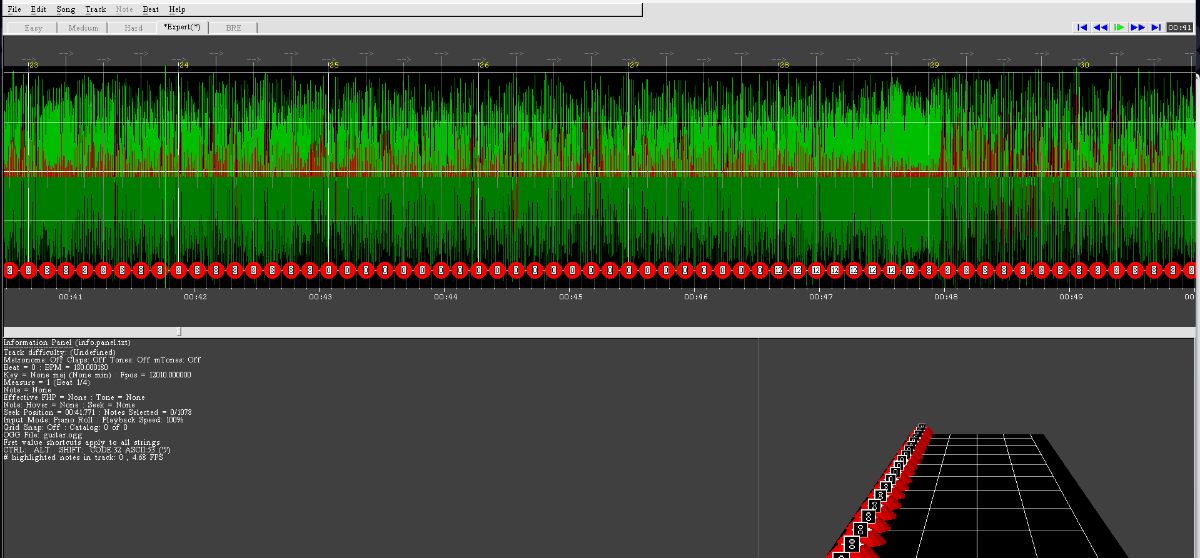
Hi ! Second post on this part of the forum and once again requiring assistance Little background story : I have been working on a CDLC and everything was going well, the Rhythm part is finished i just need to arrange the tones, the vocals are fine BUT i have a big problem with my lead which is now messed up and i don't know why. After seeing that my lead had a bug which i couldn't understand, i started working on another project thinking that i wouldn't have this problem but the same bug came along... To put it simply, on EOF everything is fine, no problems then i use DLCBuilder and make my package and then make the DD using RSToolkit BUT when i put the song on Rocksmith the parts are completly messed up and i don't know why or how. I use TuxGuitar with the tab that i export and save as a .gp5 and then put it on EOF and sync the song with the tab i use, i still follow the tuto even though it's kinda starting to be natural to use both of these softwares. If someone has an answer for this kind of visual bug i would really be grateful because as of now i can't go forward if this bug keep on blocking me. Thank you very much in advance for your answers ! To show examples, it looks like this to me :
-
Hi! Due to me recently trying to learn to play the guitar while using Rocksmith. I stumbled upon Custom Forge and it's Ignition4 Search which made it nicer to learn to play guitar with the songs i like. Obviously, like many of us there aren't all the songs that i like, which is why i decided to take on the challenge of creating my own CDLC and also to share them once they are finished and good enough! But, as i started today, having downloaded all the softwares needed to do so except for Wwise 2013 version which is available on the website in the tutorial section but that doesn't want to work for me saying that "it couldn't start" and i don't really know why, so if someone can help me with that i would be really glad! I'll try to download the 2021 version later during the day to see if it works though. On another note, i would really welcome all the advice that you guys could give me! In fact, i have a few questions that if someone who find and read this could answer : 1st : Is the default tone on the RStoolkit good? and if it's better to have custom or re-used (such as the tones from Rocksmith) would it be better to do so? And how would i be able to create my own tones if necessary? 2nd : i use TuxGuitar as it is free, but is it similar to GuitarPro? Are there any things that i can't do on TuxGuitar that i could do with GuitarPro? 3rd : When making CDLC, what type of tabs do you use ? Do you rather go for quality ones or do you rather trust your ear? Personally i can't trust my ear i don't have enough experience for that... 4th : Editor On Fire, i honestly find it difficult even when using the "c" button which allow a sound to be heard on the note, do you guys have any advice to make it "easier"? Are there things i should learn that could be useful to use on this software? i think taking your time is key but it is sometimes neverwracking ahah 5th (and final question for now) : If there are more than 1 or 2 guitars on the TAB on your .gp what do you do? Do you add some some part to one already existing to avoid creating too many arrangements? I don't know if all of my questions will be understandable, if not do not hesitate to tell me and i'll try to write them in a more understandable way! I'm really grateful to those who will help me on those matters and give me the answers i'm seeking, Thanks in advance ! See you around UPDATE Hi Again! I have read all the responses that have been posted! Firstly, thank you guys for your honesty! Indeed i know that jumping right in the process of creating CDLC while having no or next to no knowledge of musicality and all of that and while beging a beginner is in fact going to make the task even harder and honestly it scared me at first and i have paused 2 of the 4 projects i had in mind after trying to chart them on EOF ahah. So secondly, I have decided to take one of the project that i really wanted to add to RS, that nobody ever made but which i wanted to be able to play so bad and try and chart it. For now it is going surprisingly well, BUT i have one major problem and it is that RStoolkit won't recognize the path to my Wwise and it gives me this message : If i can find a way to correct this, i will soon be able to test what i've been working on for the past 6 hours! For you to know, i have downloaded on the link in the tutorial the .rar which for me is a .zip which gave me the "WwiseLauncher" and a Bundle with "prerequisites" and i only executed the launcher, so is there a step that i missed which may cause thise problem? It is my first time installing this software, so there may be some informations that i don't have on the installation process But just as some of you said, indeed i'll try my best to keep on learning the guitar before actually putting so much work into making CDLC because it's really time consuming and tiring when you're not prepared ahah! Once again thank you all for your kindness and answers!
-
Hi Everyone I hope i have posted this in the correct forum I want to create some CDLC but i am really struggling to find accurate tabs on which to base the CDLC on, also the more obscure bands that i want to create the CDLC from there just doesn't seem to be a lot of accurate tabs around, i might be able to find tabs occasionally but when i load then into Eof they just wont fit with the actual Music. so my probably quite Nooby question is-is there any auto tab writing software available where i can play the track i want to create the CDLC on and the prog will write the TAB for me ? I have wondered for a while where some of you guys who create CDLC for less mainstream bands actually get your tabs from or do you create them yourselves ? I am primarily interested in creating the Bass lines because its the bass lines that i want to play and there are so many brilliant bass lines out there that have never been turned into CDLC and i would like to add something more to the Community by creating CDLC myself but it is so far proving to be far more difficult and time consuming than i had previously imagined primarily due to the lack of accurate TABs Thanks in advance for your assistance
-
Hi Guys, hope you're all fine. I got a weird problem with CFSM as it doesn't detect new CDLC added in my CDLC folder (which was working fine just 2 weeks ago for my last CDLC adding). I put the CDLC in the folder but CFSM scan see nothing new. I try rescan, reinstall but it always fail to see the new songs. Does this ring a bell to anyone here ? Br.
-
Can we get more Skating Polly songs please...
-
Hola a todos! Acá les traigo una lista de mis Cdlcs, Wip, etc. My Channel https://www.youtube.com/channel/UCt7o3Y2Nau7yqkpJ07HYajw?view_as=subscriber CDLCs (International) Action Needs in Audience - Jimmy Eat World Don't Tell Me - Avril Lavigne Electable (Give it up) - Jimmy Eat World Losing Grip - Avril Lavigne Love is a Battlefield - Pat Benatar Nobody's Home - Avril Lavigne Psychosocial - Slipknot So Yesterday - Hilary Duff Shadows of the Night - Pat Benatar Unwanted - Avril Lavigne We Owe This to Ourselves - Anberlin CDLC (Latam & españoles) 20 de Enero - La Oreja de Van Gogh Afuera - Caifanes Deseos de cosas imposible - La Oreja de Van Gogh El Otro dia Para ser - Hermética Eres - Cafe Tacuva La Playa - La Oreja de Van Gogh Magia Veneno - Catupecu Machu Mil Demonios - Moderatto Muñeca de Trapo - La Oreja de Van Gogh Nada fue un Error - Coti y Andrés Calamaro Nunca te doblaras - Jaguares Pasos al Costado - Turf Puedes Contar Conmigo - La Oreja de Van Gogh Rosas - La Oreja de Van Gogh Olvidalo y volvera por mas - Hermetica Outdated CDLC - CDLC Descontinuados Dull Life - Yeah Yeah Yeahs Esta Saliendo el Sol - Intoxicados Flaca - Andrés Calamaro Florecita Rockera - Aterciopelados Persiana Americana - Soda Stereo Red Orange Yellow - The Photos Atlas Tragic Kingdom - No Doubt Y Control - Yeah Yeah Yeahs -------WIP------ No dejes que - Caifanes Welcome To the Jungle - Guns´n Roses (GH3) Destino Final - Mario Freiria Dirt - Alice in Chains Circle in the Sand - Belinda Carlisle In Love - Scout of St Sebastian (GH3) Donde estan los ladrones - Shakira Mitos - Soda Stereo Diapositivas - JAF Sigue girando - Ratones Paranoicos Floricienta Para un futuro - For a future Guitar Battle Slash - Guitar Hero 3 Detenidos - Work Stopped Chop Suey - Tongo Pan con aji - Tongo Vestido Azul - La Oreja de Van Gogh Dime Jaguar - Jaguares A Hope in Hell - Glamour of the Kill Adios - Gustavo Cerati Oh my God - Kaiser Cheif Corre - Jesse & Joy Piensalo dos veces - Rolando Mora Friction - Bz Girlfriend - Avril Lavigne
- 6 replies
-
- 1
-
-
- canciones en español
- rock latino
- (and 3 more)
-
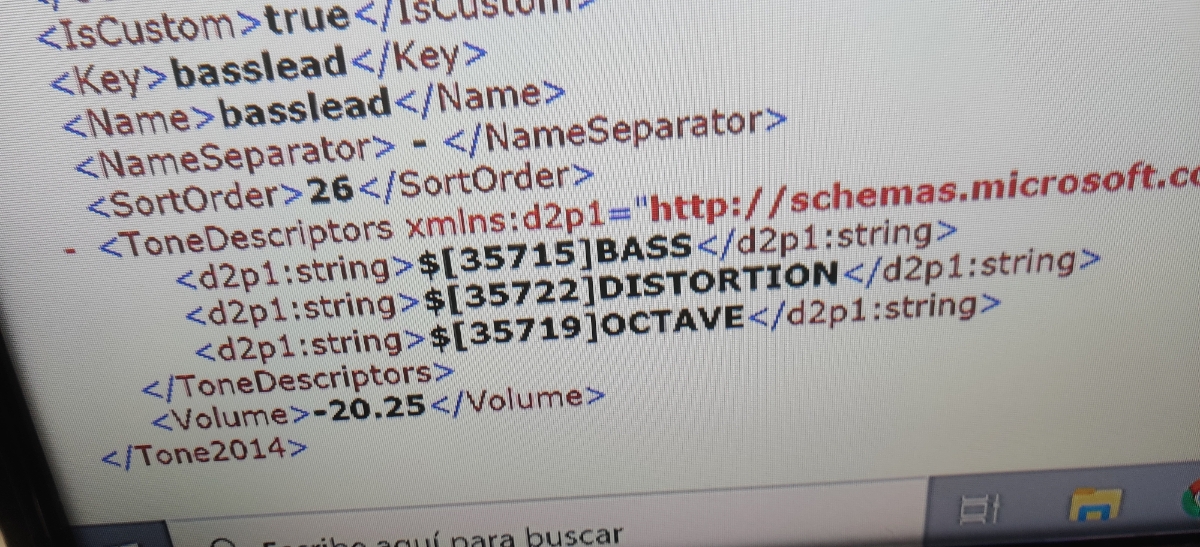
How can I make tones like 'lead phaser', 'distortion processed', 'acoustic octave' etc.? I've seen these kind of tones even in cdlcs so I know it's possible I've tried importing the tone, for example 'overdrive tremolo' from 'spiderwebs' by no doubt In the toolkit the tone type is marked as 'tremolo' and also in the game it just shows as 'tremolo' There's also a cdlc ('how did we get so dark' by royal blood) with a bass distortion lead (or something like that) tone I saved the tone as a .tone2014.xml file and I notice that on the image I'm guessing the two numbers after 357 define the tone I already tried that too, with different numbers, but it will just stay, either as 'bass distortion lead', or just with the name of the first tone (bass in this case)
-
I recently changed my hard drive to an SSD and some of the CDLC's I've gotten from Custom Forge site have quit working. Any suggestions would be appreciated.