# tuning
-
I’m wondering if anyone has or know a mod for the game that fixes the tuning. I’m trying to play a song on bass with B E A D tuning but the game has TROUBLE trying to register the low B. It keeps putting +999 on it and it’s frustrating me. Is there any mod that has a fix or something of that sorts?
- 4 comments
- 474 views
-
Hi. Just purchased locksmith after someone recommended it to learn how to play lead on certain songs. Purchased cherub pumpkins and went through the steps to run the cdlc. I can put any of them in, but when I open them I can only get through to the tuning section. After I finish tuning, it starts loading and then freezes. Any suggestions? Running Mac OS High Sierra 10.13.4, MacBook pro 2015 Rocksmith- latest update as of 7/9/18 Thanks
- 7 comments
- 13,165 views
-
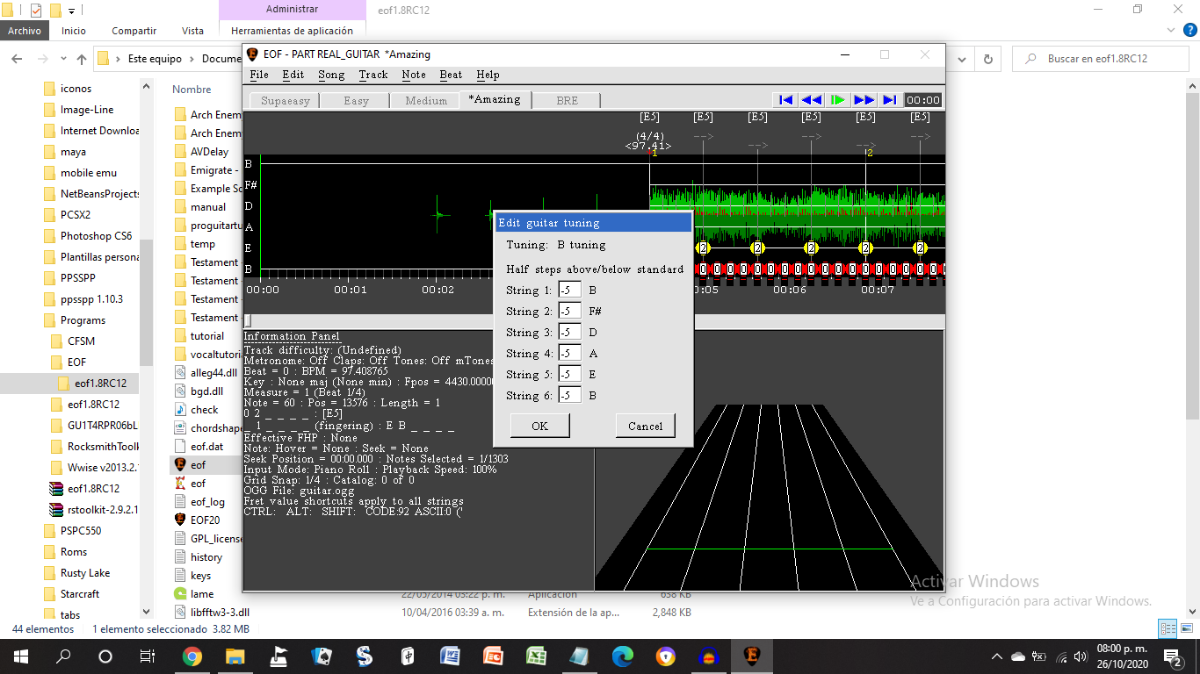
I'm just start having this issue today, EoF doesn't change the notes to the new tuning (Standard B) and it still displays them on Standard E. This is wierd considering that it did change the notes before in a previous project with Standard C# tuning. Also, in another project, EoF doesn't recognize the Drop C tuning and displays it as "Unknown tuning". Even the Power Chords on the 6th string are charted as "7sus4" like on Standard E again.
- 2 comments
- 2,376 views
-
Hi everyone, very first topic in here ! Got an issue with some really, REALLY low bass tuning that are not being detected even with the "fix low tuning" trick (the one where you use the A220 trick to make the game detect it) Basically, when a song has a tuning that goes lower than A (Recently a song form Architects that was requested from me on stream, can't remember wich one ), the game goes nuts and I can't tune properly. Is there any way to fix that ? I've heard about the "emulated bass"
- 3 comments
- 4,894 views
-
Im definitively puzzled by this behaviour. Ive already tried to check files integrity in Steam, which lead it to download some files. It started a few months ago. Ironically more or less when Ubisoft dropped Rocksmith. Ive reached the point where i'll only play a capo song as the last one of the day knowing i'll get it freezed after that. Ive also discovered that the game indeed crashes as soon as you tune with the capo as once it enters the song, it APPARENTLY plays as normal, BUT if you pres
- 1 comment
- 2,646 views
-
Hi, I just started working on a "Fields Of Fire"-CDLC-project when I ran into this problem: The song is in non-standard tuning. "All the studio versions of Fields of Fire (except the demo version) are mastered at too fast a speed. As a result they end up midway between the key of E and the key of F instead of D." "As with many Big Country songs, the version on Buffalo Skinners is mastered at the wrong speed so you'll need to re-tune your guitar by half a semi-tone if you want to play along
- 2 comments
- 1,608 views
-
Bass Tuning Always stuck on E Standard since updating... trying to finish v2 of Gojira - Oroborus like many of Gojira's Tracks... everything should be in D Standard... i did the usual in the tookit... the Guitars seems to work fine... but the bass is always E Standard in-game when i check.... even tried to see if it was just off by 2 steps... and tried C Standard setting for bass in the toolkit in hopes of bypassing the problem but it still came out E instead of D... :( and i've never had this
- Gojira
- Bass
- Tuning
- E Standard
-
Tagged with:
- 3 comments
- 2,361 views
-
Hi, I'm new to CustomsForge, and to Rocksmith in general, and I was wondering how feasible it would be to convert DLC--whether custom or official--to use a custom tuning? I'm learning to play in P4 tuning ( https://en.wikipedia.org/wiki/All_fourths_tuning ), and, given the dearth of learning materials for non-standard tunings, it would be a big help if I could easily change DLC to P4 (mostly lead guitar, I imagine, since playing, e.g., cowboy chords is more difficult). I can do some scripting us
- 5 comments
- 2,701 views
-
I want to delete all not E-standard-tuning CDLC. I can see tuning information by right-click -> infomation. But I can't see from Song Manager -> Results Grid as column. If you add tuning column, I can sort by them and delete all except E-standard tuning. Thanks in advance.
- 8 comments
- 3,119 views
-
im trying to figure out how to do custom tuning editor on the tool kit, what does it mean by -2, -1, 0, 1 etc..? im trying to get it to this tuning : A# F A# D# G C how would i go about doing this? thanks in advance.
- custom
- tuning
- how to
- custom tuning
-
Tagged with:
- 5 comments
- 2,717 views
-
I've tried to make CDLC. https://yadi.sk/d/Cc0wGG6w3JXWN2 Everything seemed OK in EOF. But when I tried to play I just hear notes that are not in tune with melody. Looked up another source (I used gp5 file for my CDLC), the tuning here is also Open D with Capo on 4th fret, https://www.songsterr.com/a/wsa/message-to-bears-mountains-tab-s402220t0?c=45171 What could be wrong?
- 14 comments
- 3,018 views
-
So I have come to find that after multiple calibrations, double checking my bass and all, using my 6 string bass I cannot get some tunings to work that involve using my low B string, such as Prison Sex by Tool, it will not work.. Anyone else had this problem?
- 4 comments
- 3,155 views
-
Hey Guys, so I just downloaded "Fade To Black" by Metallica. It's an amazing song but there is one problem. I'm a little confused about the song's tuning. Is it E Standard or something else? I played with E standard and it sounded very bad. Any help? Thanks in advance!
- 3 comments
- 13,811 views
-
Hello and good day. I have a question, I have downloaded around 20 Dream theater songs where alot of them have a custom tuning which forces my bass to tune to a REALLY low tune where the strings just bounce and stuff. I searched in what the Song was tuned in the database and tuned my bass that way, but it didnt help. I have simply no idea whatsoever to do at this moment
- 2 comments
- 1,979 views
-
Hey Everyone, I have run into an issue that I could use some guidance on. Certain bands that drop tune like Mudvayne, Breaking Benjamin and Parkway Drive use custom A220 tuning. I have put heavy strings on to drop down. Some songs for other tuning works but A220 on the E string will tune down to about 5-7 within tune then bounces to 999. From there it wont tune down. Any thoughts would be greatly appreciated!
- 8 comments
- 6,348 views
-
Hopefully this is the right place to post this. Recently I've been working on charting a song that's in drop D. There's three different guitarists, the latter of the which shows up for a solo in the end. I've been working on putting the "main" parts of each of the guitars all into one tab so that people playing will get the full experience of all of the solos. However, in the last solo, he's tuned in Eb Standard. Is there some way I can change the tab around, or change some sort of settings in
- 5 comments
- 2,771 views
-
Hi, I created a CDLC (Bass only) in E tuning. However, I realized toward the end that I needed a lower D on the 4th string. So I retuned to Drop D but now, I find it's very hard to play. Should the whole thing be retuned in D? Or can the fingering be altered to make it ewasier? If you want to test it, it's here: https://www.dropbox.com/s/59qpy0l7i3yfb8h/Mizik-Mizik_Ayizan_v5_p.psarc?dl=0 be warned, though, that it has a lot of problems since I'n still at the beginning stages. For examp
- 1 comment
- 1,814 views
-
Hey Guys, Having few issues with tuning, I am not a guitarist so have no clue about tunings really. I have a song with the tuning: BEADGBE to my understanding this is B Standard? How do I add this into the toolkit? When I open an arrangement and click the drop down, this tuning is not available. I see you can create or modify your own but I don't understand how to use this function to create the correct tuning. Also is there an actual way to find out what the tuning of a song is in Guitar
- 5 comments
- 1,901 views
-
I downloaded the version where I can fix the tuning problem for songs that are CDLC. But, the new problem that I have now is, I am not able to play the song at all after fixing it. It is like my keyboard decided to stop working. Any help would be great. I am very new at this and I am just getting a little frustrated. Thanks
-
So, I have a CDLC I'm working on where the Bass part is played on a 6 string bass and there is absolutely no way you can play it at all without a 6 string bass. Anyway, I tabbed it out and it sounded great and I was able to work around the 4 string limit by making it a guitar track. I used this workaround here to be able to play a 6 string bass in an actual 6 string format basically acting like a guitar part. The plan worked perfectly except when I got into the actual song I noticed it was hav
- 3 comments
- 3,722 views