# EoF
-
I realize that this has been posted before in video form ( http://customsforge.com/topic/841-how-to-make-cdlc-full-in-depth-tut-completed/ ), but seeing as people still ask about it, and there are still CDLCs showing up without sections or very few sections, I thought It'd be a good idea to make a quick, easy tutorial (no video!) on how to add sections to your arrangements. Here goes: Sections are what separates your full arrangements into, well, sections e.g. Chorus, Verse, Bridge, which are
- 20 comments
- 10,857 views
-
I tried creating my own CDLC, but all tutorials I found leave something out, so it´s more of a patchwork of various tutorials. I didn´t try it yet but everybody who takes a look at it will know that it will not work and it looks like a child with no arms drew with crayons. I desperately needs somebodies help because there is so little tutorials or documentation about all the things needed to create one. I believe I already have all the programs, but I could be wrong of course. If anybo
-
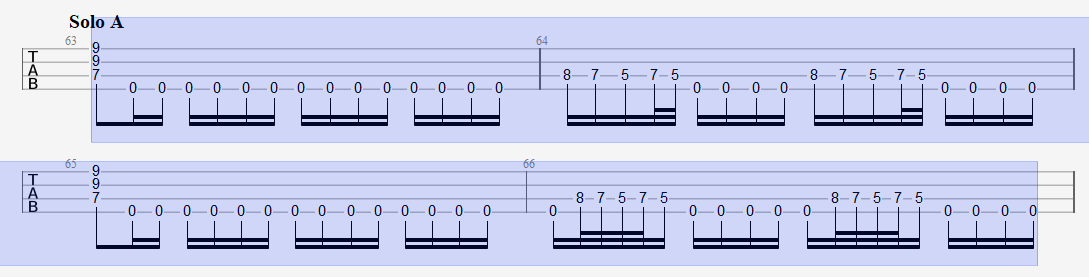
Hello guys! here is the thing. I'm working on the version 2.0 for the Legions Of The Dead cdlc and I only need this little assistence for the final part. For the Solo part in the song the bass and guitars have more notes than just the palm muted 0's. You can see it at minute 2:23 in the live video. https://www.youtube.com/watch?v=xO3wa-vEGqo And this is my tab in Guitar Pro. Can you tell if it's like the first 2 compasses or the other 2?
- eof
- wip
- tabs
- guitar pro
-
Tagged with:
- 1 comment
- 1,925 views
-
Hi, I have the following problems with a new version of a CDLC I have created. In the old one ghost notes did appear but it ran at the "correct speed" and the Rocksmith view scrolled to the notes beeing played. See video here: In the new one I have the impression of scroll speed beeing too fast (so it is not out of sync) and the Rocksmith view is stuck at the notes/fret from the beginning. Where can I fix these errors? Is that an EOF thing or a Song Creator problem? Some more inform
-
Hey is there a way to change the highlighted BMP from the start to the end in one go ? or do i mannualy need to set change every BMP ? i need some parts to be 220 and some to be 274 https://drive.google.com/file/d/1d0qy554qxOiQdzwq72ZNhmP8EE5MzN8R/view?usp=sharing Didnt know how to upload a picture so i just share it
- 4 comments
- 2,694 views
-
Hey Guys, I got a problem with the song toolkit... When I try to generate a song this error pops up Dont really know what to do... I got the recommended Wwise Version and the path in the tool is the correct one... I did everything exactly as in this video: https://www.youtube.com/watch?v=pL_PDEhoc7Y (as far it was possible) Does anyone know what I could do there?
- 8 comments
- 2,816 views
-
Hello everybody. There is this one piece in the song "The Brain Dance - Animals As Leaders" that I have been having trouble learning, so I wanted to turn it into a cdlc to help me kinda visualize the tabs better. Unfortunately, the part im trying to learn is towards the end of the song, and there is a lot of BPM changes before it. When I put the tab in EOF, I can never get the part of the song im trying to learn to be synced with the audio because of all the notes before it and the BPM changes i
- 6 comments
- 4,054 views
-
Hello all, while digging deeper into the EOF settings while tracking down an error (Rocksmith crashing) I found this settings under preferences and I don't know, if they are correct. There is this section "Input method". And it has the entries: - Classic - Piano Roll -.... In my EOF "Piano Roll" is selected. Is that correct? I am working on a guitar project. Or what does this setting mean? Best, Adrian
- 2 comments
- 2,029 views
-
so I have a gp7 tab converted to gp7 (in guitar pro 7.5) but once imported in eof (1.8RC12 + hotfix) only 3/4 of the tab appears in eof I also tried to convert the tab with tuxguitar and either I get the same result or the tab is stretch to 5/4 of the song I have idea why it's the first and only tab to do that I forgot to mention that once converted in gp5 the tab is correct and it's only in eof that their is 1/4 missing also the tab is correct because it comes from the band itself
- 3 comments
- 2,838 views
-
Hello I was asked to add this to the EOF fourm section so that EOF devs can have a read and see if this can be added into the software or atleast explain it for anyone else to do this double stop bedn with different values. I wanted to add a double stop bend to my CDLC Rock n Roll Star by Oasis this bend is in the chorus of the song and requires the strings to bend at different values as show. http://i67.tinypic.com/25klyef.jpg To get the desired effect i tried many things but could get the resu
- 13 comments
- 5,151 views
-
Hi everyone, Ive been AWOL from rocksmith and guitar playing for a while due to carpul tunnel but im back and want to finish some CDLC that ive started but when importing the project from eof1.8RC10 to eof1.8RC12 its not loading up the chart and when i trying to import it from Guitar Pro 5 it says it already has notes already but nothing is visible. Any ideas on how i can sort this out id love to just import the whole project as it only needs small changes then its finished. thanks. Edit
- 3 comments
- 2,428 views
-
I'm trying to sync up my chart by dragging the beat marker to make the first note in the song the first note on the chart like I think you're supposed to, but it only lets me drag it when I drag the marker extremely quickly and far, or just doesn't let me drag it at all. This makes it near impossible for me to sync this way. So I found a temporary workaround with the offset button under track, but there's also a part later on where i'd like to move the notes forward a bit, which I can't do with
- 3 comments
- 1,612 views
-
Hi, EOF seem to have room for three guitars only (real guitar, real guitar 22, real guitar bonus). How are the CDLC with four guitars made? Is there need to create two EOF songs to be able to import all of them to toolkit? Thanks, Seppo
- 7 comments
- 4,544 views
-
Is there a way to force repeat chord boxes to show up when there are notes between chords? In this example I am trying to have the first C5 chord show up fully and the subsequent C5 chords show as repeat boxes even though there are palm muted open notes between them. I know this happens in offiicial DLC, but I don't recall seeing it in CDLC. I have searched the forum for an answer, but all I found was a post from 4 years ago and at that time it was not possible. I'm hoping there is a way to do
- 7 comments
- 4,188 views
-
I've never had this happen to me befre making a cdlc. I've edited the gp file so much and nothing works. Here's what the log says 703: Logging started during program initialization at 01/22/19 22:45:27 703: EOF v1.8RC11703: eof_load_config() entered703: set_default_config() entered703: eof_controller_read_button_names() entered703: eof_controller_read_button_names() entered703: eof_controller_load_config() entered703: eof_controller_read_button_names() entered703: eof_controller_load_config() e
- 10 comments
- 3,468 views
-
This is my basic workflow for making the song. This is also good approach for quick check if it's worth to do the song (checking out the tab). Disclaimer: This is not the only one approach but it's the best practice for minimizing manual frustrating error-prone work and it allows you to actually go back and fix anything in the sync, tab, sections or phrases easily. (You can use this tutorial even if you later decide to maintain chart completely in EoF.) Note for tabbing: I have found GP/GPA co
- sync
- EoF
- GPA
- Go PlayAlong
-
Tagged with:
- 50 comments
- 25,416 views
-
Hi @ all, my first attempt to use EOF stuck on a frozen start. After appearing of a grey programm window several black ones seemed to open in background. Title shows EOF - No song. No menu available. Quitting programm only via task manager. Facts: Version eof_1.8RC12 with Hotfix 12-20-2018 Windows 10 64Bit Install path D:\Downloads\Programme\CDLC\EOF eof.exe excluded from antivirus scanning (McAfee) tried win8 compatibility mode no unblock button on file preferences logfile attached Any furth
- 4 comments
- 3,479 views
-
So I have no clue what the problem is. When I open up EOF everything runs slow but in an odd line scan way. So if I click on a tab it opens a grey box then the text quickly fills in. I'm not sure why it does this because it runs fine on my laptop. The main problem this causes is that the audio and note playback is out of sync so you can make songs with it. Any ideas for how to fix this?
- 11 comments
- 4,012 views
-
I have multiple slide down notes that aren't working. I have notes connected with "Linknext", selected as "Slide Down", and even set the end fret (ctr + shift + L) and the slides still aren't working. I have slide lines highlighted with purple that are working but the slides that aren't working have a black line instead of purple. Any ideas? https://www.dropbox.com/s/o41oslvei0v92au/slidesOnPurpleOffBlack.png?dl=1
- 3 comments
- 4,487 views
-
EDIT: Never mind. EOF UI is just horrible to me so I'm looking at using something to create GP5 to import into EOF so I don't really care what the answers are to these questions. ;) New to EOF and have two questions: 1) How can I get the first beat of a song to not be the 1st beat of the measure? I've got a song with a lead in or two and it feels wrong that the 1 beat is not on the 1 beat. 2) How can I make a slide off a note and how do I make the destination not be another note? TIA!
- 3 comments
- 1,581 views