# tutorial
-
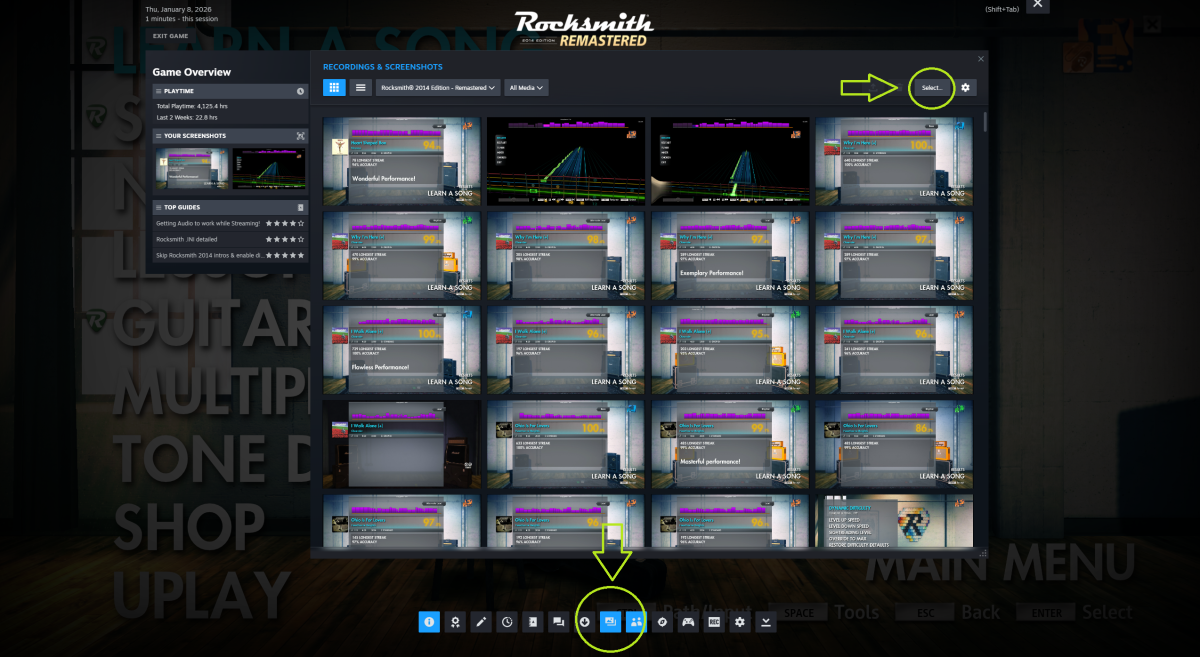
Basic steps simplfied by drand : ->Download songs from the current week (Usually the top post, the one with the highest week number or the most recent reply. Sorting by start date can also help) -> Play the songs in Hard score attack or in Learn a Song mode (Score attack will count the decimal points meanwhile L.A.S will only take the first two digits in consideration. So if you are in it to win, play in score attack cause the extra 2 digits will always benefit you) -> Press F12 t
- 4 comments
- 2,777 views
-
Hello every one just figured I would give a quick rundown for how I use custom rocksmith songs for my rgh xbox. Rgh or jtag xbox is required. first download the rocksmith tool kit. Then you will need a dlc song you have already downloaded. (to do this I looked through the toolkit too see what codes are available, I had purchased a few songs on my retail xbox and sure enough i had a song that was in the toolkit, crazy on you) Copied the song from my retail hdd to a usb stick and then op
- 7 comments
- 17,293 views
-
Greetings friends, after encountering both problems which I just named in the title I did a lot of research to find a solution which fixes everything in a fine way and I am making this post because I'm quite certain that more people will encounter this problem after a Windows 10 upgrade. So, what is this all about? Many of you might not know this problem. You can encounter a crackling noise in Rocksmith which you might have read you will get away with turning Win32UltraLowLatencyMode to 0. This
- 7 comments
- 41,617 views
-
Внизу поста видео для создания custom к 1-ой части. По аналогии можно сделать и к 2-ой части. Отличается только программы и автотон (вроде бы). ПОСТ ИМЕЕТ БОЛЕЕ МЕНЕЕ ГОДНЫЙ ФОРМАТ, ДОБАВЛЕНЫ БОЛЬШЕ 20 ВОПРОСОВ-ОТВЕТОВ, ЕСТЬ ВОПРОС? ПИШИТЕ, РЕШИМ И ДОБАВИМ. ВСЕМ ДОБРА И ХОРОШИХ КАСТОМОВ ) Быстрый Вопрос-Ответ Привет всем пользователям сайта customsforge.com, я решил заново переписать гайд, чтобы было более понятно, напишу пошагово. Чуть позже загружу все необходимые файлы на dropbox.(
- Ru
- tutorial
- russian
- create custom
-
Tagged with:
- 38 comments
- 25,802 views
-
Hi guys, I am already playing Rocksmith with a lot of CDLC on PC But recently, my PC cannot stand the heat produced by Rocksmith (yeay, it's an old laptop) And I had tried google and search around the forum on how to Import CDLC to Xbox 360, but no result. Yes, I do realize that some of the CDLC have format for xbox. But, I could not find any tutorial on how to import them into my Xbox External HDD My Xbox is modded, JTAG, and has lot of experience using Horizon So, may I know the steps to
- 8 comments
- 20,848 views
-
Hi! First, let me start by saying I've searched for this in Google, Reddit and this forum, but I couldn't find a clear answer. I'm on Mac and I'd like to contribute with some cdlcs to the community. But I can't seem to find a tutorial for Mac users. I found, however, a comment in this forum from 2015 stating that it was impossible then to create customs on Mac Quote: [However, unless you have a PC to use instead of your Mac, I wouldn't invest too much time trying to create customs. Unless s
- 4 comments
- 2,762 views
-
Please note that I did not create this but that this is a combination from my own research. All files / programs were testing and scanned with my virus software ESET. I did not receive any errors / false positives or any virus,malware,data collection, etc.. The items are required in order for this method to work Daw (Reaper or similar) - Click Here This will be the guitar you 'hear' Rocksmith guitar will be set to 0 volume but will still detect input Bias FX or similar guitar VST - Click Her
- 19 comments
- 30,893 views
-
This is my basic workflow for making the song. This is also good approach for quick check if it's worth to do the song (checking out the tab). Disclaimer: This is not the only one approach but it's the best practice for minimizing manual frustrating error-prone work and it allows you to actually go back and fix anything in the sync, tab, sections or phrases easily. (You can use this tutorial even if you later decide to maintain chart completely in EoF.) Note for tabbing: I have found GP/GPA co
- sync
- EoF
- GPA
- Go PlayAlong
-
Tagged with:
- 50 comments
- 25,956 views
-
OK, so after watching the video tutorial on making CLDC's made by @@SkepticSquid here: http://customsforge.com/topic/841-how-to-make-cdlc-full-in-depth-tut-completed/ some of us still have difficulties so I thought that a non-video tutorial with screenshots and text instead might also be helpful, let's start: I've divided everything into 6 sections, some of them are currently in progress, but in the end you will be able to make your own customs for Rocksmith 2014. Here's the basic table of
- cldc
- screenshots
- tutorial
- how to
-
Tagged with:
- 101 comments
- 85,496 views
-
So, I keep seeing songs where the lyrics do not have sustain, the words are not properly synced or are not broken up in syllables. Let's fix that! What you need: Ultrastar Creator: http://sourceforge.net/projects/usc/ EoF (duh) The lyrics for the song Got it? Let's start. 1) Open USC. 2) Click on the folder icon next to "mp3" to load the mp3 3) Select the language of the song (required), and fill in the artist/title (optional) 4) Copy and paste the lyrics into the nice, big white box (
- 15 comments
- 7,995 views
-
I was asked to try to explain working with multitracks, so here goes. I don't think I've written a tutorial before, so there's your warning. Images are hidden behind spoilers currently because I think most of them aren't necessary to the general public, I can remove the spoiler tags if this proves to be untrue. Preamble Ramble: This tutorial assumes you know the general process of creating CDLC and focuses mainly on the differences in the process for using multitracks. Reading The Third Way to
- 4 comments
- 3,339 views
-
This tutorial will show you how to add an automatically generated metronome sound to any CDLC of your choice. It works really fast and enables you to play a song completely solo. Mute the original music, play only with the metronome and find out how good you really sound! Don't know what this means? Check out one of these customs, they have been updated with metronome bonus arrangements! Contents: Introduction How to set up the metronome How to use the metronome Known issues How to make sure y
- 38 comments
- 12,144 views
-
So, you downloaded a CDLC but it's not showing up? Awww. Maybe it's shy? Or maybe you haven't read this thread yet: http://customsforge.com/topic/901-how-to-use-custom-dlcs-in-rs2014/ Or, maybe, you haven't bought any official DLC. Most people got Cherub Rock when they preordered the game, and most CDLC use that app id. You don't have to buy it, as you can just update the appid of every CDLC you download to the app id that you DO have. Do that, then read this: 1) Download and extract the too
- 18 comments
- 13,202 views
-
I'm not sure if this was already mentioned here, but there's a free little app that you can use to figure out the tuning frequency (438, 440, 442...whatever) of a song. Technically it's a demo of the tONaRT library, which the company is licensing to pro audio software manufacturers, but it serves our purposes just fine. You can download it here: http://www.zplane.de/index.php?page=description-tonart ("download demo" button in the top right corner). The song you wish to analyze has to be in
- 1 comment
- 2,079 views
-
In order to be reading this, you should have a basic idea of how customs work, and what to do in order to make them. This topic is intended for people who already know the very basics of how to chart, but want to make sure that their customs are nice and polished. If you don't know what you're doing, click here. This will give you a very in-depth look at how to actually make CDLC. Also, it will help a ton if you have a general idea of how to count and read sheet music and tab (trust me, I know).
- tutorial
- custom
- tech notes
- official
-
Tagged with:
- 14 comments
- 6,900 views
-
hi, i saw/found that there is a way to make CDLC playlists by cozy1cgi: https://sites.google.com/site/cozy1cgi/tutorial-6 there are many steps to do it and it is a bit hard to me to understand everything by words... i wanted to ask,can some someone make and upload video on YouTube (tutorial) how to do it and also post it here please ? thanks.
- 1 comment
- 2,398 views
-
Got some time to waste, got bored, and noticed that there were still some sub-par CDLCs being released. I've already noticed that a lot of songs have incorrect chord sustains (usually this concerns repeated chords that are seperated by a rest, but are not drawn that way in RS2014), some are lacking sections, some have their guitar volume too soft. Easy to fix, if you only know how ;) Now I would like to ask the audience: what's your sticking point? What don't you understand? What do you think
- 37 comments
- 9,160 views
-
Notes in sync with the rhythm : All the logic of DDC is based on the position of the notes and the chords in the beats and measures. So to obtain the best result : - Correctly define the time signature in EOF (multiple signatures allowed in the same track) - Move the beat positions in EOF to synchronize the tab with the soundtrack (and not the notes and chords) - If you have to move a few notes, define a grid snap in EOF (1/16 or 1/32 or 1/64) - Before generating DD levels, check
- 3 comments
- 3,263 views
-
While I was messing around in TexMod I discovered that all the textures within rocksmith are changeable!!! So I thought I could make a tutorial on changing random stuff! c: Step #1: Download texmod Step #2: Click on target application and choose your rocksmith2014.exe http://i1382.photobucket.com/albums/ah254/connorgioia/Steptwojpg_zps9db0f037.jpg Step #3: Click on Logging mode, Check off: Draw control and texture info, Show texture on upper left corner, Replace Texture (with a green tex
- 6 comments
- 4,356 views
-
Greetings, all!I just came to announce that I am now offering 1-on-1 lessons on how to create CDLC via Skype or Teamviewer.If there are a lot of people asking how, I POSSIBLY will do group sessions and stop every now and then to cover questions and everything.If you are interested, please feel free to message me or add me on Skype!Regards,SkepticSquid. :DSkype: meop90
- 15 comments
- 5,081 views