->Download songs from the current week (Usually the top post, the one with the highest week number or the most recent reply. Sorting by start date can also help)
-> Play the songs in Hard score attack or in Learn a Song mode (Score attack will count the decimal points meanwhile L.A.S will only take the first two digits in consideration. So if you are in it to win, play in score attack cause the extra 2 digits will always benefit you)
-> Press F12 to Screenshot your results at the end of the song, needs to include both streak and accuracy %
-> Find the screenshot in Steam→View→Recordings & Screenshots
->Click on the image and find Share→Share on Steam, then select Unlisted and click Upload
->Click View on my Profile once it opens the screenshot in the community page
->Right click the image and select Copy link address and paste it onto your forum reply editor box or drag and drop
(Make sure the image appears and not just the url link as the automatic scoring detects pictures not links)
Play it as many times as you want or Practice (rr, slow it down, memorize it) the song as much as you want! Have fun and hope to see you there 🤟
More in depth:
Check your rocksmith game settings are correct:
For the automatic scoring to work set your ingame language to English else it will have issues recognizing scores.
Difficulty settings :
Start the game -> Main menu -> *press the space bar -> Difficulty settings Change the following settings: 1- Dynamic difficulty-> off 2- Sightreading Level -> MAX
This will make it so that you will see all the notes of the song at all times regardless of how well you play it. If done correctly the skyline in songs (the top bars/rectangles will be purple).
They should not be orange. The only exception is if we are using an old cdlc that didnt have DynamicDifficulty (dd) but Ideally hosts will not pick old CDLCS
If you don't see difficulty settings when pressing space bar and get this instead: It means your version on rocksmith is older you can either: Update Rocksmith or Make sure all the sections are purple before playing the song and submitting a playthrough by manually making the dd to 100 on every song.
How to take a screenshot:
there are lots of ways, choose the best one for you:
Windows + Mac :
1- F12 (Press 1 button) This is the default shortcut for steam You can also change the shortcut + location of where the images are saved by: Steam -> Settings -> ingame -> screenshots -> take a screenshot (press the button to the right and youll be able to switch it to whatever button you want) or while playing any game: Shift+ tab -> settings-> ingame -> screenshots -> take a screenshot (press the button to the right and youll be able to switch it to whatever button you want)
Windows (11):
1- Windows key and print screen (Press 2 buttons) Will save the screenshot in your gallery folder.
2- Windows key , SHIFT and S (Press 3 buttons) This will only save a picture of the area you select, Will save the screenshot in your gallery folder.
3- PRT SC / Print screen/ impant pet sis (Press 1 button, the button is named differently depending on your location) This will copy current screen to clipboard, you then have to paste it in paint and save the image
But if you want it to work like the windows key shif and s ( 2 ) then:
Open Settings (press Win + I).
Go to Accessibility > Keyboard.
Find and toggle on the setting: "Use the Print screen button to open screen snipping".
After this, pressing PrtScn will open the Snipping Tool for you to select a snip
Mac 1- SHIFT, COMMAND(CMD) and 3 (Press 3 buttons) This will only save a picture of the area you select,
Uploading to steam or an image hosting site
You can theoritically just drag the image to the forums. However there is a space limit so we strongly encourage you to use steam or any image hosting site to avoid any issues in the future.
You can check what way any participant is doing by right clicking the image and pressing open image in new tab and looking at the url
heres the example of the song we will be uploading (notice how it says steam in the url) :
STEAM
Steam will always be the safest bet, as we've had issues with other image hosting sites (such as imgur) where it was no longer accessable to everyone around the word.
There are lots of ways to do it on steam (And all of them require you to screenshot with the steam determined button aka -> f12) :
STEP 1: Click view -> Recordings and screenshots
OR:
ingame-> Shift+tab (to activate steam overlay)
If you dont see screenshots when pressing shift tab then toggle/click the icon with an image at the button, now you should see the screenshots you took with f12. press select to choose multiple pictures.
OR :
Click your username-> Content -> Upload screenshots (but this is one more click)
After clicking upload screenshots a new window should appear and look like the image bellow;
STEP 2:
Select all screen shots you want to upload (by clicking them, a tick will display if its selected , if there isnt a tick then it wont be shared) -> click the upwards arrow -> click share on steam
select either public or unlisted, choice is yours. For this example i put unlisted cause i didnt want my steam friends to see my rocksmith posts. And then press upload
STEP 3:
find the picture in your screenshots (the place when you select username + content) -> right click -> copy link adress and paste this link in the comments of the current week:
First create your account (free). -> Sign in -Upload images
2: find your screenshots on your pc (these were in gallery cause i used windows+prnt screen) -> Select the ones you wish to upload -> drag them to the site -> upload -> right click image copy image adress and paste into forums comment
how it looks like when you drag multiple cdlc: Copy Image Address:
once the link is pasted in the comments you should be able to see a preview of it before posting: usually the link has to end in .png or jpg for it to show up in the preview unless its from steam
Choose what works best for you, and hope to see you soon in the championship! (any other questions or additions let me know)
You can post now and register later.
If you have an account, sign in now to post with your account.
Note: Your post will require moderator approval before it will be visible.


Basic steps simplfied by drand :
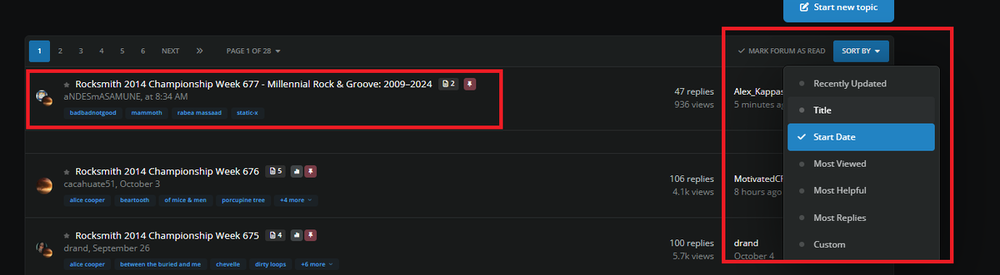
->Download songs from the current week
(Usually the top post, the one with the highest week number or the most recent reply. Sorting by start date can also help)
-> Play the songs in Hard score attack or in Learn a Song mode
(Score attack will count the decimal points meanwhile L.A.S will only take the first two digits in consideration. So if you are in it to win, play in score attack cause the extra 2 digits will always benefit you)
-> Press F12 to Screenshot your results at the end of the song, needs to include both streak and accuracy %
-> Find the screenshot in Steam → View → Recordings & Screenshots
->Click on the image and find Share → Share on Steam, then select Unlisted and click Upload
->Click View on my Profile once it opens the screenshot in the community page
->Right click the image and select Copy link address and paste it onto your forum reply editor box or drag and drop

(Make sure the image appears and not just the url link as the automatic scoring detects pictures not links)
Play it as many times as you want or Practice (rr, slow it down, memorize it) the song as much as you want! Have fun and hope to see you there 🤟
More in depth:
Check your rocksmith game settings are correct:
For the automatic scoring to work set your ingame language to English else it will have issues recognizing scores.
Difficulty settings :
Start the game -> Main menu -> *press the space bar -> Difficulty settings
Change the following settings:
1- Dynamic difficulty-> off
2- Sightreading Level -> MAX
This will make it so that you will see all the notes of the song at all times regardless of how well you play it. If done correctly the skyline in songs (the top bars/rectangles will be purple).
They should not be orange. The only exception is if we are using an old cdlc that didnt have DynamicDifficulty (dd) but Ideally hosts will not pick old CDLCS


If you don't see difficulty settings when pressing space bar and get this instead:
It means your version on rocksmith is older
you can either:
Update Rocksmith
or
Make sure all the sections are purple before playing the song and submitting a playthrough by manually making the dd to 100 on every song.
How to take a screenshot:
there are lots of ways, choose the best one for you:
Windows + Mac :
1- F12 (Press 1 button)
This is the default shortcut for steam
You can also change the shortcut + location of where the images are saved by:
Steam -> Settings -> ingame -> screenshots -> take a screenshot (press the button to the right and youll be able to switch it to whatever button you want)
or while playing any game:
Shift+ tab -> settings-> ingame -> screenshots -> take a screenshot (press the button to the right and youll be able to switch it to whatever button you want)
Windows (11):
1- Windows key and print screen (Press 2 buttons)
Will save the screenshot in your gallery folder.
2- Windows key , SHIFT and S (Press 3 buttons)
This will only save a picture of the area you select,
Will save the screenshot in your gallery folder.
3- PRT SC / Print screen/ impant pet sis (Press 1 button, the button is named differently depending on your location)
This will copy current screen to clipboard, you then have to paste it in paint and save the image
But if you want it to work like the windows key shif and s ( 2 ) then:
Open Settings (press
Win + I).Go to Accessibility > Keyboard.
Find and toggle on the setting: "Use the Print screen button to open screen snipping".
After this, pressing PrtScn will open the Snipping Tool for you to select a snip

Mac
1- SHIFT, COMMAND(CMD) and 3 (Press 3 buttons)
This will only save a picture of the area you select,
Uploading to steam or an image hosting site
You can theoritically just drag the image to the forums. However there is a space limit so we strongly encourage you to use steam or any image hosting site to avoid any issues in the future.
You can check what way any participant is doing by right clicking the image and pressing open image in new tab and looking at the url
heres the example of the song we will be uploading (notice how it says steam in the url) :
STEAM
Steam will always be the safest bet, as we've had issues with other image hosting sites (such as imgur) where it was no longer accessable to everyone around the word.
There are lots of ways to do it on steam (And all of them require you to screenshot with the steam determined button aka -> f12) :
STEP 1:
Click view -> Recordings and screenshots
OR:
ingame-> Shift+tab (to activate steam overlay)
If you dont see screenshots when pressing shift tab then toggle/click the icon with an image at the button, now you should see the screenshots you took with f12.
press select to choose multiple pictures.
OR :
Click your username-> Content -> Upload screenshots (but this is one more click)
After clicking upload screenshots a new window should appear and look like the image bellow;
STEP 2:
Select all screen shots you want to upload (by clicking them, a tick will display if its selected , if there isnt a tick then it wont be shared) -> click the upwards arrow -> click share on steam
select either public or unlisted, choice is yours. For this example i put unlisted cause i didnt want my steam friends to see my rocksmith posts. And then press upload
STEP 3:
find the picture in your screenshots (the place when you select username + content) -> right click -> copy link adress and paste this link in the comments of the current week:
now you know how to post from steam :)
Img.bb or any other hosting site.
First create your account (free). -> Sign in -Upload images
2: find your screenshots on your pc (these were in gallery cause i used windows+prnt screen) -> Select the ones you wish to upload -> drag them to the site -> upload -> right click image copy image adress and paste into forums comment
how it looks like when you drag multiple cdlc:
Copy Image Address:
once the link is pasted in the comments you should be able to see a preview of it before posting:
usually the link has to end in .png or jpg for it to show up in the preview unless its from steam
Choose what works best for you, and hope to see you soon in the championship! (any other questions or additions let me know)
How to post scores/ participate in the championship
/m/ Genre Custom dlc Playlists + Weekly Rocksmith championship on Spotify @midi ogre
Current Championship Song Selection Submissions + 2025 and Guidelines here
(you can use Scowalts app to download your liked spotify songs)