# Bass
-
Hi all, I've been building RockForge, a free and open-source (MIT) app that turns a Guitar Pro file plus a recording into a Rocksmith 2014 CDLC. It's in public beta and I'd love the community's feedback. Download (Windows installer or portable zip, no Python needed, ffmpeg included): https://github.com/F100Pilot/RockForge/releases/ Source, guide and tutorial video: https://github.com/F100Pilot/RockForge WHAT IT DOES Input • Guitar Pro GP3/GP4/GP5 and GP7/GP8 (.gp): notes, techniques, tempo chang
- bass
- cdlc
- guitar pro
- psarc
-
Tagged with:
- 10 comments
- 741 views
-
This is probably a really stupid way to learn an instrument, but my method has kept me coming back to play at least a few times a week. The "Could probably play it in a cover band" Method: Sight read as much as possible, trying not to play tracks more than once (unless they're really good songs). If I get a 90% or better, no need to play it again, because if I'm already at 90% or above, if I had a week, I could surely practice that song well enough to play a gig at the local dive bar. Over th
- 1 comment
- 908 views
-
would love it if the customforge community check out my channel, only a few days into it, so far so good. led zep, rush, the who, ratm...only the best tunes (riffs,solos,covers etc) cheers x O'Neil Bass
- 1 comment
- 2,015 views
-
Hey guys, I wanted to learn the bassline to Remind Me by Patrice Rushen so I went ahead and learned how to make CDLC. I've uploaded v2 to the database here. I got the tab from DarthMart (YouTube link). While I'm not done yet, much of the work was done for me, so props to him for the awesome work. So far, I still need to do the lyrics but after looking at a tutorial for how to do them, I haven't had the time and I'm not 100% familiar with the song yet. I'll get to it but if anyone's u
- 2 comments
- 2,210 views
-
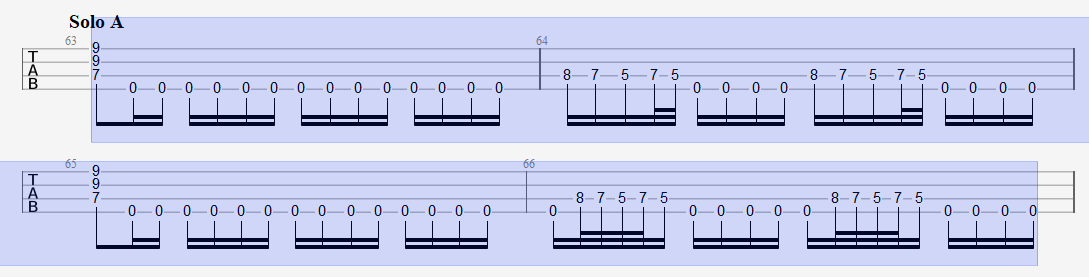
Hello guys! here is the thing. I'm working on the version 2.0 for the Legions Of The Dead cdlc and I only need this little assistence for the final part. For the Solo part in the song the bass and guitars have more notes than just the palm muted 0's. You can see it at minute 2:23 in the live video. https://www.youtube.com/watch?v=xO3wa-vEGqo And this is my tab in Guitar Pro. Can you tell if it's like the first 2 compasses or the other 2?
- eof
- wip
- tabs
- guitar pro
-
Tagged with:
- 1 comment
- 2,006 views
-
Hi everyone, very first topic in here ! Got an issue with some really, REALLY low bass tuning that are not being detected even with the "fix low tuning" trick (the one where you use the A220 trick to make the game detect it) Basically, when a song has a tuning that goes lower than A (Recently a song form Architects that was requested from me on stream, can't remember wich one ), the game goes nuts and I can't tune properly. Is there any way to fix that ? I've heard about the "emulated bass"
- 3 comments
- 4,894 views
-
Would anybody be kind enough to create a CDLC for me of Beatles song "The Night Before", I don't know what i'm doing when it comes to creating them so I would greatly appreciate it. It's an awesome song on bass and would love to play it on the game. Thanks for any feedback or help in advance guys! Song in question: https://www.youtube.com/watch?v=7tD40D7jk-Q
- 6 comments
- 2,941 views
-
Hi ! I was trying to make my first CDLC on the bass part for the song Reach on by George Duke and after the intro the tab is going completely out of sync but when i play it with Guitar pro it syncs with the song how can i manage to avoid that problem ? Otherwise is there a way to select multiple notes in EOF ? Thanks in advance for your responses ! :)
- 2 comments
- 1,640 views
-
Looking for a workout, what are your longest songs? So far the longest I've been able to find is Karn Evil - Emerson, Lake & Palmer.
- 8 comments
- 5,186 views
-
Hi all, I've been playing Rocksmith for about a year now. Progress has been slow but steady and right now I am trying to master hammer-ons and pull-offs. I just can't seem to get the hang of it? So do any of you have recommendations of (©dlc) songs to practice those with? Preferably not too fast as I really hate to play slower with riff repeater (it sounds so bad!), I rather just play a song that is just a little slower in itself. I like virtually all genres that use a bass guitar so in that r
- 1 comment
- 1,406 views
-
Bass Tuning Always stuck on E Standard since updating... trying to finish v2 of Gojira - Oroborus like many of Gojira's Tracks... everything should be in D Standard... i did the usual in the tookit... the Guitars seems to work fine... but the bass is always E Standard in-game when i check.... even tried to see if it was just off by 2 steps... and tried C Standard setting for bass in the toolkit in hopes of bypassing the problem but it still came out E instead of D... :( and i've never had this
- Gojira
- Bass
- Tuning
- E Standard
-
Tagged with:
- 3 comments
- 2,361 views
-
I was thinking about on making a list of cdlc songs that have amazing basslines. I'm a bass player so it's kind of hard to find a song in the whole cdlc library that has a really cool basslines. Sometimes, the songs that have a cool basslines are the ones that have bass charted only, but that doesn't happend frequently. So this is list of songs that you must try (in my opinion). You can submit songs as well. This list is not a top 100 or somthing like that. It's just a list for bass play
- 19 comments
- 48,865 views
-
As I've grown more accomplished, I've come to notice that some transcriptions make choices in note placement that aren't as simply as they could be. An example would be playing an A on the fifth fret of the E string... instead of simply using an open A where it would make an easier transition. Obviously, transcriptions originate with someone hearing or picking out the notes, but some bass lines seem to jump all over the place instead of staying closely packed together. When learning a new s
- 6 comments
- 3,871 views
-
Hey everybody - I just bought a 5-string bass (Epiphone Thunderbird Pro 5), and thought it would be fun to use for the few custom songs that use a tuning involving a B or lower for bass. However, I ran into a few issues. Things I know: I know Rocksmith only "supports" a 4 string bass; at least in the sense that if you are in the bass path it will only show 4 strings (red, yellow, blue, orange). Can't get it to display a 5th string, although I suppose it MIGHT be possible to use the lead or
- 6 comments
- 9,470 views
-
I still have pretty much no idea what to do with tones (especially for guitar, since I don't have one). If anyone could advise on the most common types of adjustments (EQ, pedals, whatever) that would be a great help! I recently (as of Feb. 2016) started adding the notes.eof files to my download folders. For some of the older ones I think the .ini files were different which can cause the sync to get screwed up, so I'll try to update the older ones (I'll probably be wanting to do serious update
- 120 comments
- 46,915 views
-
SEALS & CROFTS Hummingbird https://youtu.be/3WT2Tz6SV68 download Summer Breeze https://youtu.be/ywL6tMQdG4c download Yellow Dirt https://youtu.be/Q1nMDCvxePw download Wisdom https://youtu.be/CP7K6B6cE8o download Ledges https://youtu.be/5y88R7iTy0A download Thunderfoot https://youtu.be/p5jHDCChU0c download ---------------------------------------------------------------------------------------------------------------------- Bert Jansch Avocet https://youtu.be/laROagHBwbs dow
- 1 comment
- 1,589 views
-
KYUSS - FATSO FORGOTSO (QOTSA+KYUSS EP) Started on this last night... been a few months since i did anything in EoF so it was a bit slow going... Thought i'd Share the INCOMPLETE File... Tested and Working in-Game... It's an over 8 min song and only the first 2 min have been synced... http://s000.tinyupload.com/index.php?file_id=30279591233120576034
- 13 comments
- 3,545 views
-
Trent REZNOR (NIN), Dave GROHL (NIRVANA+FOO) & Josh HOMME (QotSA / KYUSS) (Sound City Players) - MANTRA INCOMPLETE (WORK IN PROGRESS) Couldn't Find Perfect tabs so did some of it and correcting what i can tell is wrong... still lots to do... WORKS In-Game... TESTED :) FUN + No Crash... Ends early around halfway mark... http://s000.tinyupload.com/index.php?file_id=02486372049251218254
- 5 comments
- 2,548 views
-
Following the discusssion here about bass recognition problem below C1 note and possible creation of 5 strings bass part here is the tutorial to get the recognition to work and to actually make possible a 5 strings bass part in Rocksmith 2014! I. Bass recognition workaround First off, it's only necessary to do this when the bass part have note below the C1. Which means any B Standard or lower and C# drop B and lower tuning need to go through this operation. Step 1 : EOF Tuning change Selec
- 10 comments
- 14,480 views
-
Hi everyone! I'm making CDLC for bass part. In .gtp file this part is made for 5-string bass, so for Rocksmith bass I have to make custom tuning C-A-D-G. When I import .xml file in Rocksmith Custom Toolkit I get this: And what I don't understand at all: Ingame when I start the song it checks the tuning as I supposed C-A-D-G, but afterwards not starting the 'highway' the game crashes. How can I correct all this?
- 13 comments
- 3,950 views