# Steam
-
Hi all - I have been trying to introduce my kids to some great new music and ways to enjoy playing. While doing this I realized that some songs have non-kid friendly album art. Is there a mod that can hide album art? Or do I need to go and modify every single psarc file? Any suggestions are appreciated. Thanks!
- 1 comment
- 1,618 views
-
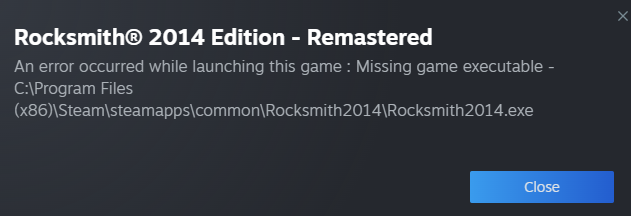
Just got Rocksmith on sale... I downloaded it and I can't launch it because Steam says it's missing the .exe. I check the file directory, and Steam is right. Did I miss something? What should I do?
- 10 comments
- 4,887 views
-
So, the problem I'm having is getting RS2014 to even start at all. When I try to launch from Steam I get a white box for about 1.5 sec and crash. No errors - nothing. I used the CDLC enabler and still nothing. Although when I try to enable it, it asks me to locate my game folder and once I point it to it, it says it was successful. When it worked before it was with the CDLC enabler before the current one. I have done a full re install multiple times on my main C Drive and also on the 2nd ssd - n
- 9 comments
- 7,577 views
-
I have recently just got Rocksmith and wanted the CDLC install on RS through steam. I found the latest video on here and followed all the instructions but it is not working. I have looked back and realised that I need to install cherub rock for it to work. HOWEVER, the steam DLC seems to have removed cherub rock pack and I cannot find it anywhere. Can someone please point me in the right direction to download cherub rock as this frustrating me now. I feel like I am being completely s
- 6 comments
- 6,829 views
-
New here! I recently acquired Rocksmith, awesome game, can’t get my hands of it (literally), especially with CustomsForge. I have however been having some issues with the old NoCableLauncher so I’ve been working the last few days to improve the work Maxx53 has done and finally got it to a release state. My onboard soundcard allows me to play without any notice'able latency so I'll not be acquiring a hardware dongle or an extra audio card, the reason why I decided to improve the software is b
- no cable
- cable
- nocablelauncher
- nocable
-
Tagged with:
- 14 comments
- 46,829 views
-
The Mumford and Sons Songpack on Steam seem to be unavailable in Australia (possibly for legal reasons). Does anyone know how to get it? I've tried to buy it on Steam several times over the years, but Steam just won't let me.
- 8 comments
- 3,081 views
-
I've done everything required and it's still not working. I downloaded D3DX9_42.dll and put it in the Rocksmith2014 folder, I have Cherub Rock (as well as that I have the Smashing Pumpkins song pack and the Rush II Song Pack), I've restarted my computer, I've verified game cache twice, I've restarted Steam, nothing. I'm using Windows 10 if that matters. Please help.
- 5 comments
- 5,347 views
-
I started RSR last night from Steam and I received a not-unusual message about RS already running; I applied the usual fix by starting the program directly. Program started. Except my profile was missing. Applied the usual fix by verifying local file integrity. One file was missing. Yay! Problem solved. Started RS. No profile. Turned to Google for help and surprisingly found this has happened before and no one knows why. I don't really care that I lost my hard-earned points - those are skills I
- 4 comments
- 4,653 views
-
Hi, When I tried starting Rocksmith 2014 today i got a window that said it was updating. After like 5 seconds it said the game was ready. When I then clicked start I got a popup that said "An error occured while updating Rocksmith 2014 Edition Remastered (missing executable)". I followed the link and did all the steps (except reinstall steam, I have a lot of games installed), but none of them work. When I uninstalled Rocksmith and installed it again, I saw when installing it that it onl
- 20 comments
- 11,757 views
-
So, I've followed the tutorials, and everything worked, up until I launched. the game still worked, but it did not show any of the installed cdlc. there are no error codes. anybody know how to fix this? if it helps, I'm running Rocksmith 2014 remastered, from a custom p-bass, through a new realtone cable, into windows 10, on steam
- 2 comments
- 2,838 views
-
Basically what the title says. I bought some official DLC through steam's summer sale, it installed in the same folder where all my CDLC is but now none of my CDLC is showing up in the game. It's all still in the folder and I tried to repack it all, but it's not working.
- 2 comments
- 1,875 views
-
Hi, I'm new to RS2014 (Remastered version on PC - Steam) and having a quite annoying issue with it. Songs from RS2012 are not available. I checked the dlc folder. I have the rs1compatibilitydlc_p-psarc file but don't have the rs1compatibilitydisc_p.psarc one. According to what I found on the Internet, I have to own RS2012. So I bought RS2012. New thing now is, when I lauch the game, I have a message telling me it detected I own RS2012 and inviting me to buy/import RS2012 songs. If I selec
- 3 comments
- 5,942 views
-
Hi guys. I am new here :) I just registered to Steam and downloaded the steam client especially for buying and playing Rocksmith. Unfortunately, the Steam client alone is 600MB (wtf?) and I have no use for it except for Rocksmith. Therefore, I want to use Rocksmith without Steam: So I extracted the Rocksmith game folder out of the Steam folder and uninstalled Steam. However, Rocksmith is not working anymore because I am getting this error message: "Unable to Initialize Steam API". What
- 5 comments
- 14,595 views
-
Man I was having fun with this game till Steam automatically updated my old version to "remastered" 2014 Rocksmith. Made the game go all wonky. Had to get the patch from here, but it still acts funny. Is there anyway I can take the auto-update feature off line?
- 2 comments
- 3,375 views
-
(PC) Hello! I have about 21 DLC's now (All bought over multiples sales) and I recently discovered this amazing website! My question is, what is the best time / platform / website to purchase Rocksmith 2014 DLC on sale? Normally I see on steam songs being sold 2-3+$ (CAD), but I still desire to buy quite a few more songs, and that $ adds up quick. Thanks in advance! -Klean
- 3 comments
- 4,780 views
-
Hi all. First post here. Thanks for everyone's hard work and support of this awesome tool. I've got a question: can I transfer DLC files that I have purchased from PSN on PS3 over to my PC and use it in the game? I've got about $100 or more worth of DLC that I'd like to play on my computer. Is this something that can be done with the infamous toolkit? Thanks in advance, Shane L.
- 4 comments
- 3,926 views
-
Hello all, I did have a quick search for a topic like this but nothing came into view in the tiny amount of time I was looking so my impatience has got the better of me, and here I am; bothering you guys... So my installation of Win8 finally upgraded itself to 10, without really asking me, but it's inevitable in the end I suppose. Now, I don't really like upgraded operating systems as they always seem soooo slooow and for this reason, I usually opt for a clean install, which is what I'll be
- 1 comment
- 3,025 views
-
Hello all, I've recently moved from XBOX to PC, I'm now using Steam to Play Rocksmith 2014. Since I can't import purchased songs from my XBOX account, I'll be buying some of them again and one of them is: Born under a Bad Sign: by Albert Collins and Stevie Ray Vaughan. Looking in the Steam DLC's, this is only available for Rocksmith, not Rocksmith 2014. So, is there a difference between what's available for XBOX RS2014, and what's available for the same game on Steam? Sorry if this is
- 4 comments
- 3,787 views
-
Does this work for anyone else? I've broadcasted, but nothing shows up. Shows me as live, but clicking on it just gives the broadcasting splash page. I've heard something about the .dll that we put in the folder for customs messing everything up. Anyone come up with a workaround or know more details?
- 2 comments
- 3,523 views
-
Does anyone know where to find it? I have seen you tubes of a nearly perfect one. So far I have found only a PC version. Can it be easily converted? If not is there a mac version? I'm having a hell of a time finding this :(
- 20 comments
- 6,626 views