# PS3
-
I have created a video guide for anyone who may want to install CDLC on the PS3 version of Rocksmith 2014 remastered. The video can be found here: https://youtu.be/jAQgaTU0sFw
- 1 comment
- 979 views
-
Hi people, I am trying and trying to put CDLCs in my PS3 HEN but it doesn't work 😞 I've read different tutorials but I have some question: 1.-Do I need to buy the Cherub song with HEN? 2.-Have I convert the CDLCs to PS3 format? (I have all the CDLCs from torrent) 3.-I try to put the CDLCs in differents folders but... nothing!! /dev_hdd0/game/BLUS31182/USRDIR/DLC /dev_hdd0/GAME/BLUS31182/USRDIR/DLC /dev_hdd0/games/BLUS31182/USRDIR/DLC /dev_hdd0/GAMES/BLUS31182/USRDIR/DL
- 9 comments
- 9,606 views
-
How do install cdlcs on my ps3. I have already installed HEN and coverted the p.psarc files to _ps3.psarc.edat but my PS3 doesn't even notice that it's there. Anyone know what is causing this and know how to fix it?
- 1 comment
- 2,177 views
-
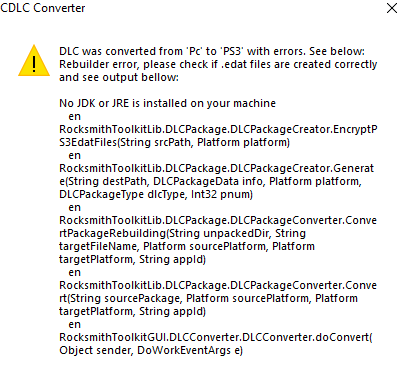
Hi everyone, I've played rocksmith for a while, but this is my first voyage into CDLC. I've been attempting to convert PC CDLC files to ps3 through the toolkit, but I always get an error message. I've attempted different songs and tried two different computers, but the error message always pops up. I've seen a couple other users mention the error, but never a fix. Any suggestions would be much appreciated!
- 3 comments
- 3,082 views
-
At first I thought there was a problem with CDLCs I installed before I got the disc, but after deleting them, or save or update, then trying again, problem still persists: In RealTone mode, after calibrating and tuning, background lights up, background rock plays for a while, before silencing, after that game is stuck like so completely, but it's not frozen, as output and speakers animation still works: After trying aforementioned options, trying to fix it, I've tried Disconnected, but after s
- 4 comments
- 2,338 views
-
Hey Guys, I love playing Rocksmith 2014 and I want to add CDLC. Just I have a problem that keeps bugging me since a few days, I have a jailbroken PS 3 (CFW: Rebug 4.46 REX) and still dont know how to add to instal CDLC to my ps3. A tutorial here in the forum said PS3: Install files: "_ps3.psarc.edat" to "/dev_hdd0/game/BLUS31182/USRDIR/DLC", if the folder DLC does not exist, just create it I know that "_ps3.psarc.edat" is the cdlc itself for ps3 but how can I find the "/dev_hdd0/game/BL
- CDLC
- DLC
- PS3
- Playstaiton #
-
Tagged with:
- 23 comments
- 41,540 views
-
Hi, I downloaded some DLCs to play on my PS3, but I found that they are for PC. I would like to know if there is any way to convert from one platform to another, or if there is compatibility between them. (Note: these are original DLCs, not CDLCs)
- 3 comments
- 4,872 views
-
This is my first post here but anyways my dad has gotten back into bass playing so he wants to know if custom songs can be put on PS3 (Btw he has no intentions of jail breaking his PS3) without custom firmware so is there a way to put it on there without CFW? TL;DR - can you put cdlc on PS3 RS2014 without CFW?
- 3 comments
- 2,842 views
-
Hello people im wanna be fast, i have the CDLC's on a folder named "DLC" but simply does not appear on the set list on the game. I have the BLUS31182 also its no creating a save data, always when i turn the console on the game start from the begnning, if someone can bring me savedata it would be cool. My PS3 has CFW Rebug 4.82, thanks.
- 8 comments
- 3,152 views
-
Hey Customforge Community, Im new here and was wondering if someone could answer my questions :) I got Rocksmith 2014 for my Playstation Super Slim (250 GB Version 4.55) a few weeks ago and I think its an awesome tool to learn guitar. Just the songs that are avaible are not that much what I want to play. (besides Slayer Iron Maiden, and System of a Down) Here my question towards downloadable custom songs here. 1. After downloading the PS3 version of the songs do I need to convert them or
- Rocksmith
- custom songs
- DLC
- 2014
-
Tagged with:
- 5 comments
- 5,581 views
-
I'm new to the CDLC world for RS 2014 can anyone walk me through the process of getting a CDLC into RS 2014 for PS3.
- 1 comment
- 1,951 views
-
Hi all. First post here. Thanks for everyone's hard work and support of this awesome tool. I've got a question: can I transfer DLC files that I have purchased from PSN on PS3 over to my PC and use it in the game? I've got about $100 or more worth of DLC that I'd like to play on my computer. Is this something that can be done with the infamous toolkit? Thanks in advance, Shane L.
- 4 comments
- 3,926 views
-
Hi, I'm getting an error when I try to generate the PS3 & XBox files for one of my CDLC. This is the first time I have experienced this. Before posting I verified my Java was up to date, it is version 8 (build 1.8.0_66-b18). Here is my project folder, and here is the error: Any help anyone can give is appreciated.
- 11 comments
- 2,422 views
-
Are there differences between platforms in trms of core components? I tried to batch convert a few filees from PC to PS3 and noticed some errors. Ive searched around and cant seem to find anything to let me know what theese differences may be and figured id ask here before reading through the RST source files on github to figure it out.
- 6 comments
- 3,626 views
-
A very silly and basic question, but after making a few cdlc and following available tutorials, something still isn't entirely clear to me: how does one author cdlc for non-pc platforms, like Mac, Xbox, and Playstation? My intuition tells me that in WWise you select all the platforms for conversion and check all platforms in the Rocksmith Toolkit, but I'm not actually able to test the function without these other platforms. What's the short of how to do it? Oh! Bonus question: when using a .wa
- 2 comments
- 2,579 views
-
Alright Customsforge. You're a great community that always gave me help and a lot of DLC to practice. I want to give something in return. We all know that running CDLCs on PS 3 is a bit of a hazel and its easier to play them on PC. No videos out there explain it properly on how to do them. Yet I found out how to make them run on PS3 that works legit . (But you need a Jailbroken PS3!!!!) Just wanted to know out of curiosty how many would like me to make a Video on how to run CDLC on PS3 ?
- Rocksmith 2014
- DLC
- PS3
- Playstation 3
-
Tagged with:
- 5 comments
- 3,682 views
-
Alright Customsforge. You're a great community that always gave me help and a lot of DLC to practice. I want to give something in return. We all know that running CDLCs on PS 3 is a bit of a hazel and its easier to play them on PC. No videos out there explain it properly on how to do them. Yet I found out how to make them run on PS3 that works legit . (But you need a Jailbroken PS3!!!!) Just wanted to know out of curiosty how many would like me to make a Video on how to run CDLC on PS3 ?
- 3 comments
- 3,143 views
-
So I've been trying to convert PC customs to PS3 but it's not happening. Toolkit always gives an error. When I open rebuilder it says Java not detected, even though java is installed. I have tried on four different windows PCs. If Java is the problem, how do I get it to work? Anybody had this problem before? Any help is much appreciated.
- 3 comments
- 2,108 views
-
Hey guys. I just wanted to know a way to use Wwise TO TAB FOR for xbox and ps3. As is, I can only use Wwise for PC, Mac, iOS, and Android. How can I do it for other platforms? Thanks for looking, pls leave a reply.
- 2 comments
- 2,608 views