Skip to content

Welcome to the CF Rocksmith 2014 Championship!

-= Week 624 =-

=> How and Why join the Championships?
=> Rocksmith 2014 Championships rules

Previous' week Winners are:
Lead:
- Beginner: @ Argh1992 @Argh1992 (94)
- Intermediate: @ Zimarulis  @Zimarulis (91.79)
- Advanced: @ Mikson @Mikson (94.5)
- Masterclass: @ veggs95  @veggs95 (98.36)
- God of Guitar: @ veggs95 @veggs95 (93.09)

Rhythm:
- Beginner: @ rosefog  @rosefog (96.96)
- Intermediate: @ Vodka @Vodka (93.79)
- Advanced: @ robolechuga @robolechuga (97.19)
- Masterclass: @ veggs95 @veggs95 (97.88)

Bass:
- Beginner: LOST TROPHY
- Intermediate: @ MaltaSoron @MaltaSoron (91)
- Advanced: @ shotfirer  @shotfirer (100)
- Masterclass: @ JobwanMojo @JobwanMojo (99.74)
- God of Bass: @ JobwanMojo @JobwanMojo (93.15)
 
Congrats to all winners. Well done!
 
This week's songs are:


Lead Path:
Beginner: Djo - End of Beginning (2.5) (E Standard) selected by cacahuate51
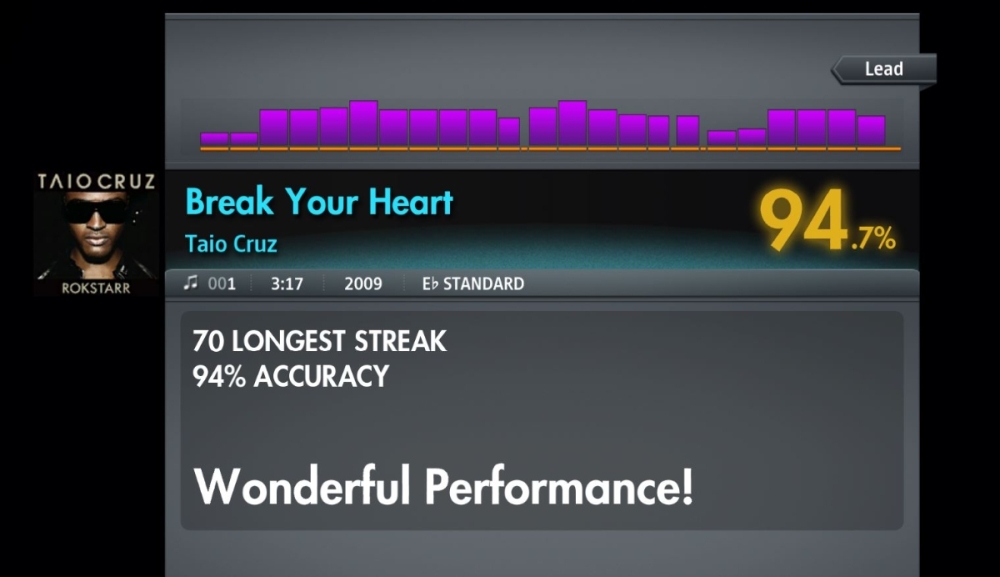
Intermediate: Taio Cruz - Break My Heart (4) (Eb Standard) selected by Daz40
Advanced: My Chemical Romance - The Ghost of You (2025 Mix) (6) (E Standard) selected by cacahuate51
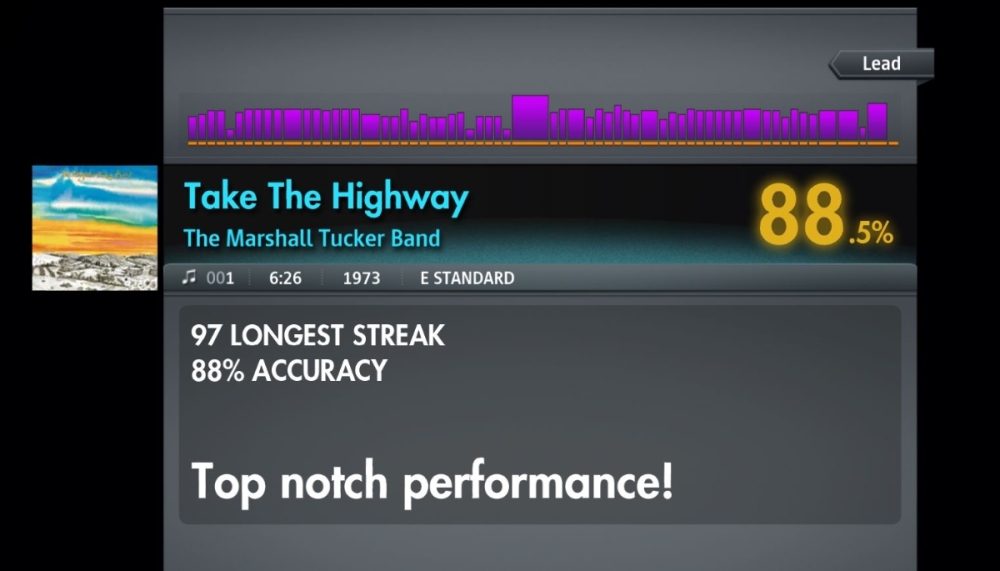
Masterclass: The Marshall Tucker Band - Take The Highway (8) (E Standard) selected by cacahuate51

Rhythm Path:
Beginner: Djo - End of Beginning (2.5) (E Standard) selected by cacahuate51
Intermediate: Taio Cruz - Break Your Heart (4) (Eb Standard) selected by daz40
Advanced: My Chemical Romance - The Ghost of You (2025 Mix) (6) (E Standard) selected by cacahuate51
Masterclass: The Marshall Tucker Band - Take The Highway (7.5) (E Standard) - Alt. Rhythm path!!!! selected by cacahuate51

Bass Path:
Beginner: Djo - End of Beginning (2.5) (E Standard) selected by cacahuate51
Beginner Bonus: My Chemical Romance - The Ghost of You (2025 Mix) (3*) (E Standard) selected by cacahuate51
Intermediate: The Marshall Tucker Band - Take The Highway (5.5^) (Drop D) selected by daz40
Advanced: Taio Cruz - Break My Heart (5.5) (E Standard) selected by cacahuate51
Masterclass: The Brothers Johnson - Streetwave (8) (E Standard) selected by cacahuate51

(N) - difficulty rating
(N*) - highest difficulty rating for the class (promotion to higher class possible)
(N^) - difficulty rating higher than the highest for the class (promotion possible)


Check current week Rocksmith Championship Leaderboard


You can submit your song suggestions for the championship here
NEW! - easly add songs even on your mobile!:
Add Song Suggestion

Song Suggestions List available to view here: Google Sheets Spreadsheet

Share with us your opinion on this weeks songs difficulty scores (1-10).

Do you want to host a week? Join the Championship organizing team!!!
The process is smooth and there is a tutorial as well. If you are interested, send a personal message to Rodman.
 
  • Replies 90
  • Views 11.2k
  • Created
  • Last Reply

Top Posters In This Topic

Most Popular Posts

  • Missed last week, not gonna miss this one

  • Have a nice musweek evryone! Djo - End of Beginning. Good easy song. I would say 2.    Taio Cruz - Break Your Heart. Seems like nothing hard but chords. I thought the chart is

  • robolechuga
    robolechuga

    Jumped one chord towards the end, 16 notes away from a perfect. Focused my energy on where it counts most.

Posted Images

Featured Replies

7UuOD5F.jpeg

D1hKE0k.jpeg

h1YxJLE.jpeg

drand.png

Click here or image above to open the championship companion site! Claim your profile to get your own banner, vote on ratings, or sign up to host if you have joined the hosting team!

Just post a screenshot showing BOTH accuracy % and streak in current week's forum post to play! 🤘😎

How to post a screenshot

On Steam: Press F12 to take a screenshot in the game then find it in Steam → View → Recordings & Screenshots

Click on the image and find Share → Share on Steam, then select Unlisted and click Upload

Click View on my Profile once it opens the screenshot in the community page

Right click the image and select Copy link address and paste it onto your forum reply editor box or drag and drop

Other Image Hosting Site: Drag and drop is the best way to get the image to load

Don't forget to make new posts, not edit posts or it will not show up on scoreboard!! 🚨

BGadoYL.jpeg

GyFWEXr.jpeg

drand.png

Click here or image above to open the championship companion site! Claim your profile to get your own banner, vote on ratings, or sign up to host if you have joined the hosting team!

Just post a screenshot showing BOTH accuracy % and streak in current week's forum post to play! 🤘😎

How to post a screenshot

On Steam: Press F12 to take a screenshot in the game then find it in Steam → View → Recordings & Screenshots

Click on the image and find Share → Share on Steam, then select Unlisted and click Upload

Click View on my Profile once it opens the screenshot in the community page

Right click the image and select Copy link address and paste it onto your forum reply editor box or drag and drop

Other Image Hosting Site: Drag and drop is the best way to get the image to load

Don't forget to make new posts, not edit posts or it will not show up on scoreboard!! 🚨

Jumped one chord towards the end, 16 notes away from a perfect.

?imw=5000&imh=5000&ima=fit&impolicy=Letterbox&imcolor=%23000000&letterbox=false

Focused my energy on where it counts most.

?imw=5000&imh=5000&ima=fit&impolicy=Letterbox&imcolor=%23000000&letterbox=false?imw=5000&imh=5000&ima=fit&impolicy=Letterbox&imcolor=%23000000&letterbox=false

robolechuga.png

@ Rodman  I found you 😄

QHBfRAs.jpeg

Alien Ant Farm, great show.. ears still ringing

drand.png

Click here or image above to open the championship companion site! Claim your profile to get your own banner, vote on ratings, or sign up to host if you have joined the hosting team!

Just post a screenshot showing BOTH accuracy % and streak in current week's forum post to play! 🤘😎

How to post a screenshot

On Steam: Press F12 to take a screenshot in the game then find it in Steam → View → Recordings & Screenshots

Click on the image and find Share → Share on Steam, then select Unlisted and click Upload

Click View on my Profile once it opens the screenshot in the community page

Right click the image and select Copy link address and paste it onto your forum reply editor box or drag and drop

Other Image Hosting Site: Drag and drop is the best way to get the image to load

Don't forget to make new posts, not edit posts or it will not show up on scoreboard!! 🚨

Everything's better with Slayer's tone

54836889780_fd5fa317d5_b.jpg  54836800054_1be387780e_b.jpg

On 8/8/2024 at 10:09 AM, Rodman said:

Give your heart and your soul.....
        ....... for that damn Rock´n´Roll!

---
I'm not a native English speaker. Sorry for mistakes.

Improvement (but my hand needs to rest 🤣  )

?imw=5000&imh=5000&ima=fit&impolicy=Lett

alsrc.png

love take the highway, its really hard but i feel like i could do it possibly maybe 

bN1NZ09.png2VJTmEB.pngder9iF5.png0SJlqWG.pngCHIybrZ.pngcuyIg4C.png6HU7q93.png

Thanks for the new week!

8eye1GT.jpeg

wOHroDE.jpeg

I think I could definitely improve on this with an hour of practice; it's only a few riffs that look harder than they probably are. But the washing machine is acting up, so I don't have the time today 😞 

YTFTvDU.jpeg

ZyRq1PG.jpeg

DaNjDqo.jpeg

drand.png

Click here or image above to open the championship companion site! Claim your profile to get your own banner, vote on ratings, or sign up to host if you have joined the hosting team!

Just post a screenshot showing BOTH accuracy % and streak in current week's forum post to play! 🤘😎

How to post a screenshot

On Steam: Press F12 to take a screenshot in the game then find it in Steam → View → Recordings & Screenshots

Click on the image and find Share → Share on Steam, then select Unlisted and click Upload

Click View on my Profile once it opens the screenshot in the community page

Right click the image and select Copy link address and paste it onto your forum reply editor box or drag and drop

Other Image Hosting Site: Drag and drop is the best way to get the image to load

Don't forget to make new posts, not edit posts or it will not show up on scoreboard!! 🚨

UxOrJ9v.jpeg

drand.png

Click here or image above to open the championship companion site! Claim your profile to get your own banner, vote on ratings, or sign up to host if you have joined the hosting team!

Just post a screenshot showing BOTH accuracy % and streak in current week's forum post to play! 🤘😎

How to post a screenshot

On Steam: Press F12 to take a screenshot in the game then find it in Steam → View → Recordings & Screenshots

Click on the image and find Share → Share on Steam, then select Unlisted and click Upload

Click View on my Profile once it opens the screenshot in the community page

Right click the image and select Copy link address and paste it onto your forum reply editor box or drag and drop

Other Image Hosting Site: Drag and drop is the best way to get the image to load

Don't forget to make new posts, not edit posts or it will not show up on scoreboard!! 🚨

0146hQ8.jpeg

drand.png

Click here or image above to open the championship companion site! Claim your profile to get your own banner, vote on ratings, or sign up to host if you have joined the hosting team!

Just post a screenshot showing BOTH accuracy % and streak in current week's forum post to play! 🤘😎

How to post a screenshot

On Steam: Press F12 to take a screenshot in the game then find it in Steam → View → Recordings & Screenshots

Click on the image and find Share → Share on Steam, then select Unlisted and click Upload

Click View on my Profile once it opens the screenshot in the community page

Right click the image and select Copy link address and paste it onto your forum reply editor box or drag and drop

Other Image Hosting Site: Drag and drop is the best way to get the image to load

Don't forget to make new posts, not edit posts or it will not show up on scoreboard!! 🚨

V1BhCzp.jpeg

drand.png

Click here or image above to open the championship companion site! Claim your profile to get your own banner, vote on ratings, or sign up to host if you have joined the hosting team!

Just post a screenshot showing BOTH accuracy % and streak in current week's forum post to play! 🤘😎

How to post a screenshot

On Steam: Press F12 to take a screenshot in the game then find it in Steam → View → Recordings & Screenshots

Click on the image and find Share → Share on Steam, then select Unlisted and click Upload

Click View on my Profile once it opens the screenshot in the community page

Right click the image and select Copy link address and paste it onto your forum reply editor box or drag and drop

Other Image Hosting Site: Drag and drop is the best way to get the image to load

Don't forget to make new posts, not edit posts or it will not show up on scoreboard!! 🚨

There is something wrong in the Championship Leaderboard on Taio Cruz (at least Lead and Bass).

It seems that it is not updating the scores (there is no score on Bass)

alsrc.png

Really digging playing this song 😍

?imw=5000&imh=5000&ima=fit&impolicy=Lett

?imw=5000&imh=5000&ima=fit&impolicy=Lett

alsrc.png

First scores

Easy, but I managed to miss something. 2.5 ok.

M1eeihd.jpeg

This is a more rhythmic chart, but I'd give this 4/4.5 because the transitions between chords are awkward (I couldn't feel the up/down strokes) and you have to quickly play single notes several times and then switch back to the chords.

gHNGVL4.jpeg

6 ok. Lots of quick transitions into double stops.

mYIsNTm.jpeg

Wow, what a fun song to play! Lots of soloing, 8 yes.

nNssMv6.jpeg


  • Moderator

excited to have 2 songs make it into the championship, can't wait until theres a week where its "Oops all Hiki!" XD   I should have time tomorrow to put in my entries as well, they were really fun to chart but wow is that lead for marshall tucker a long one.

vT86OR4.jpeg

t4zh0w5.jpeg

drand.png

Click here or image above to open the championship companion site! Claim your profile to get your own banner, vote on ratings, or sign up to host if you have joined the hosting team!

Just post a screenshot showing BOTH accuracy % and streak in current week's forum post to play! 🤘😎

How to post a screenshot

On Steam: Press F12 to take a screenshot in the game then find it in Steam → View → Recordings & Screenshots

Click on the image and find Share → Share on Steam, then select Unlisted and click Upload

Click View on my Profile once it opens the screenshot in the community page

Right click the image and select Copy link address and paste it onto your forum reply editor box or drag and drop

Other Image Hosting Site: Drag and drop is the best way to get the image to load

Don't forget to make new posts, not edit posts or it will not show up on scoreboard!! 🚨

0DUCvakr_o.jpg


I think I'd rate the rhythm and lead of this song a 2 or 2.5.

giOeU3f.jpeg

UQwXSR5.jpeg

drand.png

Click here or image above to open the championship companion site! Claim your profile to get your own banner, vote on ratings, or sign up to host if you have joined the hosting team!

Just post a screenshot showing BOTH accuracy % and streak in current week's forum post to play! 🤘😎

How to post a screenshot

On Steam: Press F12 to take a screenshot in the game then find it in Steam → View → Recordings & Screenshots

Click on the image and find Share → Share on Steam, then select Unlisted and click Upload

Click View on my Profile once it opens the screenshot in the community page

Right click the image and select Copy link address and paste it onto your forum reply editor box or drag and drop

Other Image Hosting Site: Drag and drop is the best way to get the image to load

Don't forget to make new posts, not edit posts or it will not show up on scoreboard!! 🚨

Join the conversation

You can post now and register later. If you have an account, sign in now to post with your account.
Note: Your post will require moderator approval before it will be visible.

Guest
Unfortunately, your content contains terms that we do not allow. Please edit your content to remove the highlighted words below.
Reply to this topic...

Recently Browsing 0

  • No registered users viewing this page.


Search

Search

Configure browser push notifications

Chrome (Android)
  1. Tap the lock icon next to the address bar.
  2. Tap Permissions → Notifications.
  3. Adjust your preference.
Chrome (Desktop)
  1. Click the padlock icon in the address bar.
  2. Select Site settings.
  3. Find Notifications and adjust your preference.