# Support
-
I am having issues getting my OBS/Voicemeter setup in a way that allows me to record my audio input to an OBS video, but also let me have my audio input to the game so it can keep score. I have attached screenshots of my setup. Can someone more experienced than me point out where I went wrong? I am using a PreSonus AudioBox iOne, I have reinstalled the drivers. As far as I can tell, everything is set at 48khz. When opening OBS, my audio input, which is et to the right source, senses n
- 3 comments
- 4,858 views
-
First concerning issue I've come across with CFSM. I noticed today when loading the program, the log states Thinking maybe CFSM got corrupted I uninstalled, deleted the documents folder, downloaded a fresh copy and installed. On the upside, multi-thread scan is truly working for the first time I've enabled it, and the auto monitor feature is back again [lost that earlier today as well]. However, that log message continues. As I understand it, that rs1comp is the import tool
- 2 comments
- 2,371 views
-
RS audio disappears from my headphones during the loading splash screens - when I alt-tab and switch my audio to my headphones directly (instead of via my Elgato mixer) it returns. It happens at that EXACT SPOT - the little Rockstar logo - every time. My boss is potentially having the same issue and while his is more critical than mine, if I can get mine fixed, I can hopefully get his fixed. Full video of mine here: Any ideas??
- 3 comments
- 2,774 views
-
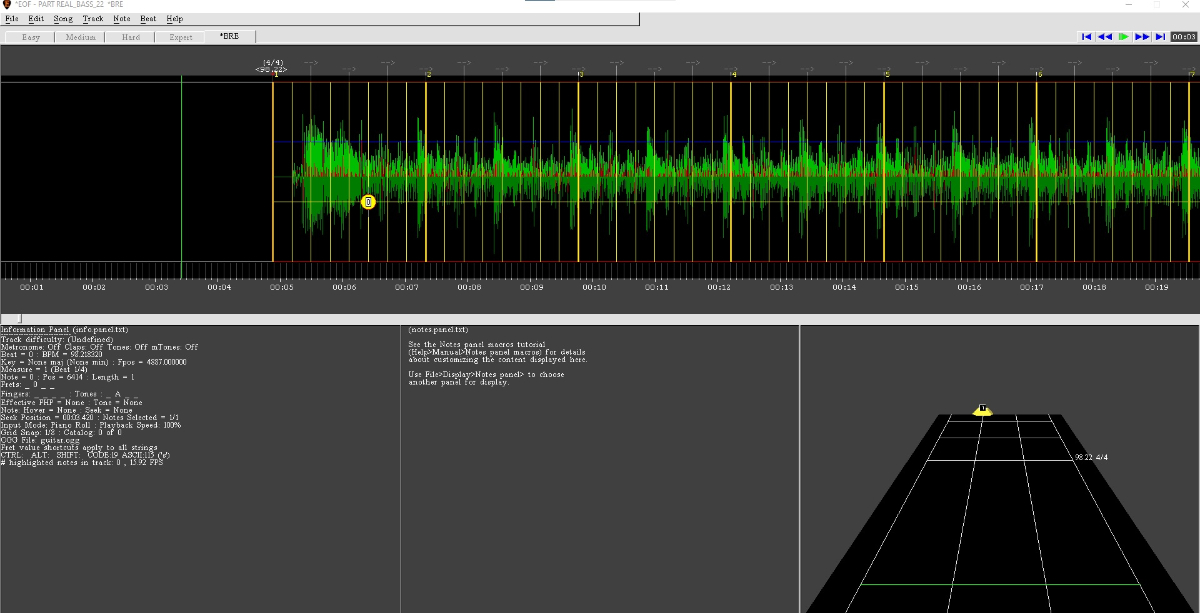
Hi all! For the last year, or so, I've been using Ignition4 to enhance my musical library and now I've decided that it was time for me to give some contribuition. I'm trying to create Audioslave's Wide Awake bass CDLC, but I'm running at some unusual problem that is a desynchronization of my waveform and the actual song, after I've added the Leading Silence. You can see from the screen shot below that my wave starts and after a second the sound begin (yellow dot). What is most intrig
- 2 comments
- 2,807 views
-
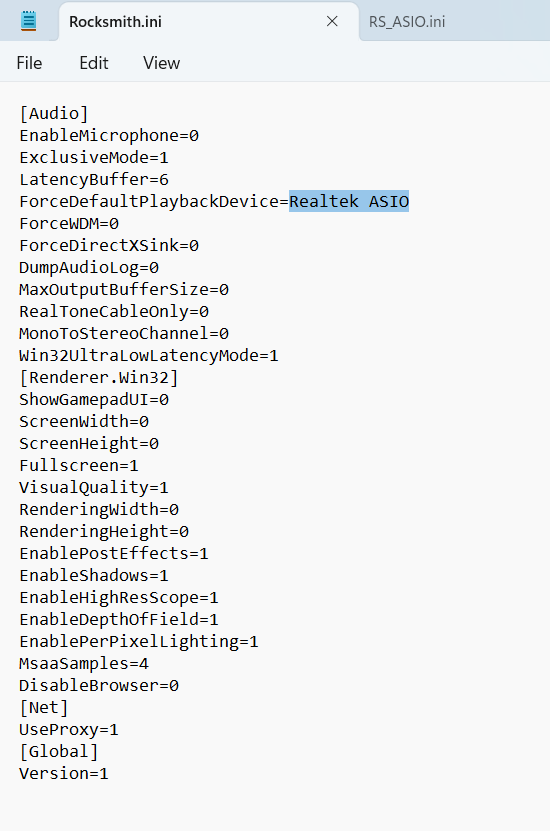
Hey Everyone - I just bought a new HP laptop and installed Rocksmith 2014 Remastered from Steam. However, the sounds is not working at all. As in from the moment the load up sounds and music start it is popping and choppy and robotic. Same thing persists through menu navigation and songs. It's pretty much got me dead in the water as I've tried 3-4 options for the settings in the Rocksmith.ini file. Nothing is resolving it so I thought I would turn to this community. My PC specs are below. If
- 2 comments
- 2,798 views
-
I have not been able to play rocksmith on my laptop for over a month now and i cant seem to figure out whats wrong, the game used to work perfectly and out of nowhere it stopped working, I've contacted ubisoft, steam support and i even looked around in Reddit and no luck please help. here's a link of what is happening to my game. ps this is my own video that i uploaded to youtube https://www.youtube.com/watch?v=Opx0-EKrxZs
- 6 comments
- 2,792 views
-
I was going to dowload "no boudaries", but the file is missing from the dowload link. http://customsforge.com/index.php/page/customsforge_rs_2014_cdlc.html/_/pc-enabled-rs-2014-cdlc/no-boundaries-r4530 Please help =)
- 2 comments
- 1,583 views
-
I don't recall this ever happening in the past, but the past day I've been experiencing tone problems. The tone is the usual distorted one when the game starts, but once I start up a song... it goes clean. I have tones saved on my keyboard, and even when changing those it's still clean. The only way to fix it is to restart the game, and when I do the tone might stay for a song or two; that's it though. Is there a fix for this? Would CDLC be an issue?
- 7 comments
- 4,753 views
-
Hey I’m new guys having trouble finding KISS songs. I’m not really sure how the search engine works on this thing all I know is I can’t find hardly any at all. Thanks to anyone who offers advice!
- 2 comments
- 1,818 views
-
Hi everyone, When I try to open the tool kit I keep getting this error: https://imgur.com/DGC1err I'm not sure what I need to do to resolve this. Any advised would be much appreciated.
- 4 comments
- 3,668 views
-
Everything's been working fine up until a few weeks ago, now whenever I repair songs, they don't show up on my song list! I'm running the latest version, what's going on?
- support
- issue
- songs dont show up
- rocksmith
-
Tagged with:
- 5 comments
- 2,741 views
-
Hey. This is regarding the available songs on Rocksmith and the artists that made those songs. I think we should make a deal with Ubisoft and get the artists onboard so we can make this into something that will make people have to pay the artists for their songs. We already remove any songs that the artists have made available for money. Why not take that a step further and get both the musicians and Ubisoft onboard and create a new form of income for the musicians we love?! Let's make our favou
- 3 comments
- 2,773 views
-
Hi! I'm new here and new to CDLC for Rocksmith. I got the d3dx9_42.dll and the cherub rock dlc and got some cdlc songs to play, but there's a huge problem. I open one of the cdlc songs and it takes me to the tuner, and then once I'm done tuning the game is stuck at the wall and two speakers, but the game doesn't progress and I don't get any menus or navigation or anything, and I have to restart the game because of this. I tried looking for 3 separate versions of the dll and all 3 have failed. Is
- 3 comments
- 2,028 views
-
Does rocksmith only support 4 tone changes in one arrangement or that's just EOF or RS Toolkit's stuff?
- Rocksmith
- tone
- arrangement
- support
-
Tagged with:
- 4 comments
- 3,320 views
-
Hi! I've been playing Rocksmith for a few months on bass and it's been awesome. The CDLC on this site has been great for helping me grow as a bassist, so I really appreciate the community here! The problem I'm having is a few days ago the sound input to Rocksmith stopped working correctly. I still get a sound from my bass, but it's octaves too low and is just a barely decernable rumble. I tried listening to the cable outside of Rocksmith in the recording devices tab and it sounds perfect, just
- 4 comments
- 3,469 views
-
I purchased the Good Charlotte song pack this week but Lifestyles of the Rich and Famous, the only song I really cared about, did not download properly and does not show in the game. I contacted UbiSoft support and they have been unable to provide a solution. Late last night I received message from Dan Amrich which indicated that if I am using CDLC then I have unauthorized files in RS2014 and am asking for support that because of the "modifications" I have chosen to use they may be unable to pro
- 18 comments
- 9,046 views
-
Hi there! I am Saka and I have an important question regarding EOF ( It's BPM specifically) if anyone can answer. So, What I'm trying to do; Sync Lead, Rhythm, and Bass arrangements up. What was accomplished; I've Synced the starting note for all arrangements at the beginning and up to 1/2 to 2/3 of the way through. Problem; When I change the ending BPM to a faster beat after slowing the beat down for the last BPM change, the notes are cutoff for going off-track/ending of song. So far I'v
- 12 comments
- 6,371 views
-
Can any Admin/Supporter delete this page? http://customsforge.com/page/customsforge_rs_2014_cdlc.html/_/pc-enabled-rs-2014-cdlc/a-gentlemens-coup-r15220 I just added the Music Video and it appeared twice on the Customsforge Search.. (with different URLs)
- 2 comments
- 1,775 views
-
I've only made a couple cdlc's, But when I use the toolkit I always Generate PC Only. Because I don't own a mac, ps3, or xbox 360. But:Should I generate them anyway? Even If I cannot support them? I still feel bad for the people on consoles
- 6 comments
- 2,021 views