# lag
-
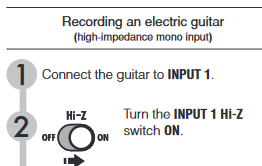
ok... finally i drew a diagram of my setup; i got asked a lot about using real amp and how to get that mixed with the Rocksmith sound, so here is how i do it Guitar or Bass is connected to Input of the Bigshot ABY (100€) -- Output A - RS Cable to USB of PC -- Output B goes to Input of a Cheap ABY Switch (30€) -- Output A - Input of Line 6 Spider IV Guitar Amp (110€) with Line6 FBV Express MKII Floorboard (100€) or a Bass Amp with LineOut (!) (100€) - as i am usi
- 9 comments
- 17,321 views
-
Created a custom song. Added 3 seconds of leading silence in EOF. When I play that back it is fine. When I generate the file and put it into rocksmith, the audio track starts immediately and is out of sync with fret board. Can someone help me know what I did wrong.
- 2 comments
- 1,833 views
-
So I've had RockSmith going on the trifecta of systems since the original RockSmith, that is on Xbox, PC, and on a Mac. When RockSmith2014 hit the streets, it *felt* at the time (especially on the Xbox) that there was more latency in the game (especially processing time to produce sound, so string time to sound felt super laggy)- to remedy this I created this setup: Guitar/Bass ---> Lehle Sunday Driver ---> Lehle P-Split ---> RockSmith Cable to PC/Xbox/Mac
- connection
- split
- amp
- cables
-
Tagged with:
- 2 comments
- 2,660 views
-
Hello Everyone, so I've been playing Rocksmith 2014 on PC for over a year now and I absolutely love it due to this community and the openness of the program compared to when I played it on PS3. Anyways, I just switched headphones recently and I've noticed that there is a slight delay when I play a note and when I hear it on RS. Since these headphones don't do a great job at isolating outside sounds, it's very difficult to play fast passages cleanly. Does anyone know how I can fix this through au
- 3 comments
- 3,992 views
-
When I start a song ( from a custom dlc ) the music freeze every time. What can i do to solve the probleme ? Ps: sorry for my bad english :)
- 2 comments
- 2,657 views
-
I havent really had any issues with rocksmith for a long time untill now. I thoght maybe it was due to rocksmith cdlc so i deleted all of it but it still doesnt work properly ive also tried updating my graphics card but that doesnt help the problem either. The issue is that the game goes reaaaallly slow even though the only thing that is running is rocksmith. whats weird is that games that require higher graphics work just fine and no lag like mmos such as swor. so im not quite sure what the pro
- 8 comments
- 3,387 views
-
Hello all, The very helpful fellows over in this thread have got me swapped over from XBOX to Steam with RS2014 for a measley £7 and a little bit of learning. So, I am delighted overall with things but the game is suffering from audio lag, and this makes it very difficult to play! I wonder if any of you guys are using RS2014 with Win8 successfully, as the blurb only mentions that Win7 is supported. If I need to upgrade the board or whatever else, then that's fine. Also, I would even downgr
- 13 comments
- 5,166 views
-
http://s12.postimg.org/zchpg3wgp/laksdjflksd.jpg I'm wondering what's everyone's settings because mine are here as shown and I know this has to do with computer specs as well but ever since the game came out I've been struggling with making it sound right and I'm tired of it. I've read countless forums and tweaked here and there but now I just want to know yours and I'll input those numbers and see which one works for me but for now I see no lag which was a problem long ago for me. My so
- 6 comments
- 8,674 views
-
Hi ! When i play some songs at 100 % speed i have video lag! Any thoughts?
- 2 comments
- 1,975 views