Skip to content

How to use Custom DLCs in RS2014 Remastered [Updated for 2023]

  • Popular Post

DOWNLOAD CUSTOM SONG FOR YOUR PLATFORM
INSTALL INSTRUCTIONS:


  • Mac:
  • XBox 360: Place files: "_xbox" to "Content>0000000000000000>555308C0>00000002";
     
  • PS3: Install files: "_ps3.psarc.edat" to "/dev_hdd0/game/BLUS31182/USRDIR/DLC",
    if the folder DLC does not exist, just create it.

Note: If you are intending on using Custom DLCs on a PS3 or XBox, you MUST jailbreak your console first! 
Hacking or jailbreaking a console is beyond the scope of what we are doing here, and if you are not comfortable with doing it, you may want to simply buy the PC version of the game.


JUST PLAY IT !
 
All credit to MarineIguana, he created this, I am merely echoing it here.

  • Replies 1.5k
  • Views 2.6m
  • Created
  • Last Reply

Top Posters In This Topic

Most Popular Posts

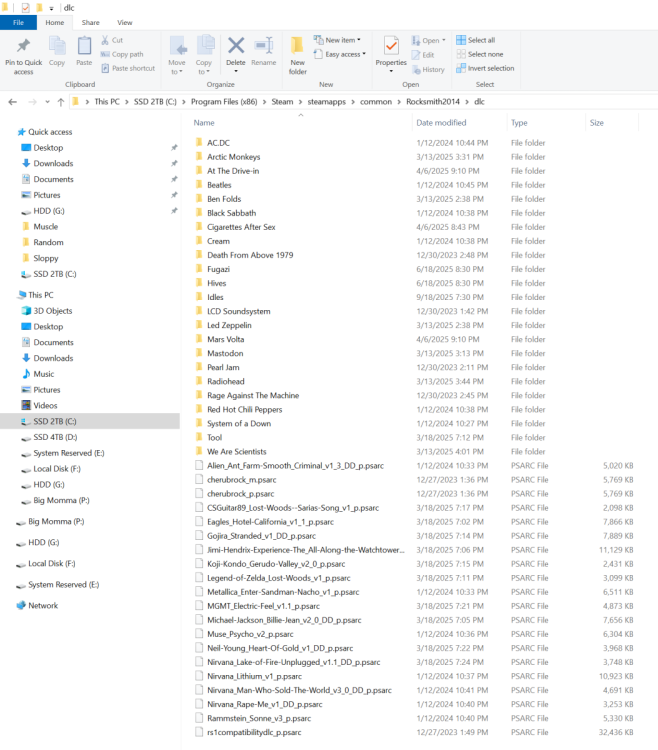
  • PC: Copy file: "_p.psarc" to "<Rocksmith2014 folder>dlc"; <-------- HUH ???? What does that mean ?

  • dscottintexas
    dscottintexas

    Hello all - thanks for the awesome site and content.  I'm pretty new to Rocksmith and want to load up some of the CDLC songs available here - I also look on the Anvil site (also awesome).  Here is my

  • Forgive my ignorance, but I'm an older fellow and not very knowledgable in computers. It took me approximately 2 hours to set up Rocksmit on my computer. The Steam thingy really threw me off. So with

Posted Images
Featured Replies

On 4/4/2026 at 5:45 AM, killer27mega said:

i need help with linux, i have the dll file and the CDLC don't appear

  • Download the 117k old dll from Phantatsy post above then do the following:

  • Locate Game Folder: Find the Rocksmith 2014 folder (copy it as lower case since we will add as lower case in winecfg)

cd ~/.local/share/Steam/steamapps/common/Rocksmith2014/
cp ~/Downloads/D3DX9_42.dll d3dx9_42.dll
  • Configure DLL Override:

    • Open terminal and run: protontricks 221680 winecfg.

    • Go to the Libraries tab.

    • Type d3dx9_42 in "New override for library" and click Add.

    • Ensure it shows d3dx9_42 (native, builtin).

    • Click Apply and OK.

  • Download CDLC files (.psarc)

    • Place them in your game's DLC folder:

      cd ~/.steam/steam/steamapps/common/Rocksmith2014/dlc/
      cp ~/Downloads/<song_file>_p.psarc

    • Change song permission to match the permission on the other song files

      chmod +x <song_file>_p.psarc

Join the conversation

You can post now and register later. If you have an account, sign in now to post with your account.
Note: Your post will require moderator approval before it will be visible.

Guest
Unfortunately, your content contains terms that we do not allow. Please edit your content to remove the highlighted words below.
Reply to this topic...

Recently Browsing 2


Important Information

By using this site, you agree to our Guidelines. We have placed cookies on your device to help make this website better. You can adjust your cookie settings, otherwise we'll assume you're okay to continue. - Privacy Policy

Account

Navigation

Search

Search

Configure browser push notifications

Chrome (Android)
  1. Tap the lock icon next to the address bar.
  2. Tap Permissions → Notifications.
  3. Adjust your preference.
Chrome (Desktop)
  1. Click the padlock icon in the address bar.
  2. Select Site settings.
  3. Find Notifications and adjust your preference.