Skip to content

How to use Custom DLCs in RS2014 Remastered [Updated for 2023]

  • Popular Post

DOWNLOAD CUSTOM SONG FOR YOUR PLATFORM
INSTALL INSTRUCTIONS:


  • Mac:
  • XBox 360: Place files: "_xbox" to "Content>0000000000000000>555308C0>00000002";
     
  • PS3: Install files: "_ps3.psarc.edat" to "/dev_hdd0/game/BLUS31182/USRDIR/DLC",
    if the folder DLC does not exist, just create it.

Note: If you are intending on using Custom DLCs on a PS3 or XBox, you MUST jailbreak your console first! 
Hacking or jailbreaking a console is beyond the scope of what we are doing here, and if you are not comfortable with doing it, you may want to simply buy the PC version of the game.


JUST PLAY IT !
 
All credit to MarineIguana, he created this, I am merely echoing it here.

  • Replies 1.5k
  • Views 2.7m
  • Created
  • Last Reply

Top Posters In This Topic

Most Popular Posts

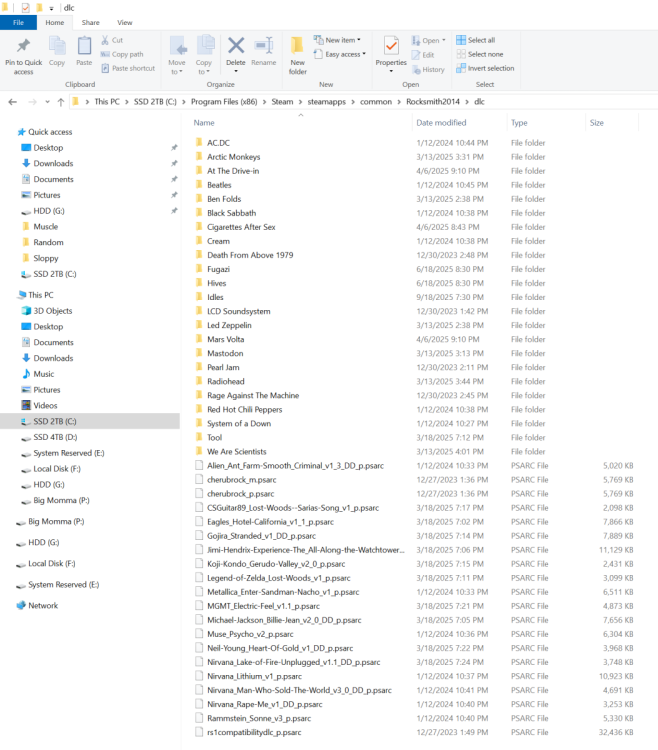
  • PC: Copy file: "_p.psarc" to "<Rocksmith2014 folder>dlc"; <-------- HUH ???? What does that mean ?

  • dscottintexas
    dscottintexas

    Hello all - thanks for the awesome site and content.  I'm pretty new to Rocksmith and want to load up some of the CDLC songs available here - I also look on the Anvil site (also awesome).  Here is my

  • Forgive my ignorance, but I'm an older fellow and not very knowledgable in computers. It took me approximately 2 hours to set up Rocksmit on my computer. The Steam thingy really threw me off. So with

Posted Images

Featured Replies

Ran through the whole guide again this morning to see if I missed anything, but no dice :(

By the way, the game takes really long to load, like up to ten minutes. Is that normal on Linux?

And it hangs at the moment the pick appears in the bottom right corner. Maybe that means it has trouble finding the .DLL?

Fixed it! I just tried using the new DLL and that did work. Now the game is running quite well; the only hiccup is the long loading time. (Also, I have to plugin the cable before starting the game, and it doesn´t seem to remember the DLC, but those are mostly a nuisance because of the long loading time.)

By the way, I followed these instructions (archive), but with Proton 9.0-4. It's basically Nizo's quick and dirty ALSA guide (archive) with some extra elements.
Then I just downloaded the installer and ran it with protontricks 221680 --> "Run an arbitrary executable (.exe/.msi/.msu)" --> Select the file and execute it. It seems like this is all that was necessary.

(I spent a lot of time trying to set up ASIO, but without any luck, so I'm happy that it's working so well now.)

Quick test to check whether the upload is working well, so I'm all set up for the Championship:

?imw=5000&imh=5000&ima=fit&impolicy=Lett

Edited by MaltaSoron
Added archive links for posterity

This isn’t something I could help with, but just a quick note to thank you for posting about the solution, as that may help another person!

  • 3 weeks later...
  • 2 weeks later...

Hi there!

I've downloaded and redownloaded rocksmith on my PC but trying to install the pc version still won't work - it says it can't find it. Any help or advice or anything? would greatly appreciate it!

44 minutes ago, gwendollyn9933 said:

trying to install the pc version still won't work

Rocksmith doesn't work, or the enabler isn't working?

45 minutes ago, gwendollyn9933 said:

- it says it can't find it

I assume that you mean that the enabler isn't working for you, that it can not find the Rocksmith installation. Sometimes the enabler, although it should be able to run from downloads or the desktop, needs to be placed in the Rocksmith installation folder in order to see Rocksmith.exe and properly work. Usually C:\Program Files (x86)\Steam\steamapps\common\Rocksmith2014. As that is the message that you are seeing and relaying here, I assume is the problem. I am saying this as Windows Defender and some antivirus see the enabler as a threat, you may need to temporarily disable them, run the enabler from the Rocksmith install folder, then re-enable Windows Defender, antivirus or anything else you turned off.

I hope this works for you.

  • 1 month later...

Greetings community,

Was using RS2014 on Steam/PC for years. Used the old Cherubrock technique back in the day and downloaded lots of songs using Ignition. Well, I've followed the tutorial posted by Chainbrain to resolve the cldc issue but I've got a hiccup. Game opens up through Steam just fine and I can see my cldc songs when I choose "Learn a Song". The audio comes through, it shows my previous progress, it even goes to guitar tuning. Problem is after I click through, the game goes to the generic background of speakers in a room, but the songs never start playing. No audio from the song (though I can still hear my guitar when I hit a note), no guitar stings appear and no notes start. Been trying to figure this issue out for over a year now and could use the communities' assistance.

image.png

image.png

13 hours ago, lbbf84 said:

the game goes to the generic background of speakers in a room, but the songs never start playing.

Assuming that you are still using the same PC as before when using the Cherub Rock method, find the D3DX9_42.dll and rename it or delete it (in that same directory that you have screenshot, except up one folder (Rocksmith2014 folder)), go back to the first page, first post of the this thread, find the link for the CDLC enabler, download, and run that to give yourself a new current D3DX9_42.dll.

1 hour ago, Sniper Reload3d said:

Assuming that you are still using the same PC as before when using the Cherub Rock method, find the D3DX9_42.dll and rename it or delete it (in that same directory that you have screenshot, except up one folder (Rocksmith2014 folder)), go back to the first page, first post of the this thread, find the link for the CDLC enabler, download, and run that to give yourself a new current D3DX9_42.dll.

Followed your instructions to the letter, but that unfortunately that did not resolve the issue. I appreciate your input though.

1 hour ago, lbbf84 said:

Followed your instructions to the letter, but that unfortunately that did not resolve the issue. I appreciate your input though.

If you are getting to the amps and the cdlc track does not progress, it is 99.99% because the D3DX9_42.dll version being used does not match the game version being used.

If you are using the JustinCase beta version, you need a different D3DX9_42.dll version that matches it. As your first post states "Back in the Day", more than likely when you recently started the game up, it was updated. Ubisoft updated the game twice since Rocksmith+ was released.

Edit:

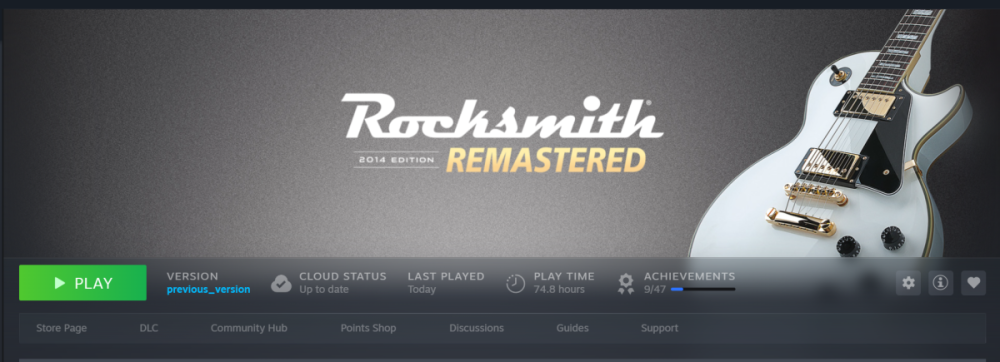
Having looked at your screenshots with fresh eyes, now seeing "Previous Version" you need the beta .dll in order to use the JustinCase beta version, as I said above.

You will have to find that [beta].dll or you will have to upgrade to the new version of the game to use the current enabler.

Join the conversation

You can post now and register later. If you have an account, sign in now to post with your account.
Note: Your post will require moderator approval before it will be visible.

Guest
Unfortunately, your content contains terms that we do not allow. Please edit your content to remove the highlighted words below.
Reply to this topic...

Recently Browsing 3


Account

Navigation

Search

Search

Configure browser push notifications

Chrome (Android)
  1. Tap the lock icon next to the address bar.
  2. Tap Permissions → Notifications.
  3. Adjust your preference.
Chrome (Desktop)
  1. Click the padlock icon in the address bar.
  2. Select Site settings.
  3. Find Notifications and adjust your preference.