Skip to content

Warning! macOS 15.4 update breaks Rocksmith Remastered

For anybody running Rocksmith on a recent Mac. Be aware that recent update to latest macOS 15.4 breaks the Rocksmith.

Rocksmith will crash on start, and it seems currently no fix is available. Repair or reinstall is not helping. Considering it is out of support, and has been replaced with cut down no dlc Rocksmith Learn and Play just recently, this is potentially permanent situation and may lock you out of all your dlc cdlc forever on recent Macs.

Really bad, as the steams drops support on older macOS versions as well, so I just recently switched to newer Mac because the old one was dropped from Steam support.


  • Replies 86
  • Views 42.3k
  • Created
  • Last Reply

Top Posters In This Topic

Most Popular Posts

  • I've received pretty much the same response as you: "A specialized team is looking into it to solve it ASAP, as it is an important issue for us." I guess the more complaints they get, the more tr

  • I've finally got it working using this DLL instead:      Haven't tried the true tone cable since I always play plugged to my axeFX instead, but I'll give it a try later to see if it wo

  • uberdown
    uberdown

    I opened a support ticket with Ubisoft directly on April 3rd. we had a couple messages back & forth with no real progress; last night  they asked me if I was still having issues with the game, to

Posted Images

Featured Replies

On 11/12/2025 at 4:04 AM, jsowers said:

How about 26.1? Anyone on that and good to go?

Yeah, it works. Nothing to worry about.

I see Tahoe is working well for several people, is this on intel or apple silicon (m* chips)?
I want to make sure my Intel Mac Pro will still run Rocksmith before upgrading...

On 10/11/2025 at 11:57 PM, Doc_echo92 said:

RS is opening up with  Mac OS Tahoe for me, and I can play bought DLC or songs organic to the game.  Seems like if I try to play any of the CDLC, though, the game lets me tune the guitar, but then never loads and eventually crashes.  Anyone else having this issue or found a fix for this?


I have the same problem.

  • 2 weeks later...
On 11/28/2025 at 6:58 PM, katzoff said:

never loads and eventually crashes.  Anyone else having this issue or found a fix for this?


I have the same problem.

mine stutters alot now I'm on the latest version of Mac OS

  • 3 months later...
1 hour ago, BadMrFrosty said:

2026 update - Brand new install on a brand new MacBook with 26.3.1 - Game works, patch works, no issues at all!

I get a few stutters whilst playing it

  • 1 month later...

OSX 26.5 & .4 break the game again. Tracks don't start, just sit there. Anyone else get this update and fix it?

  • 2 months later...

I was blocked too with my intel mac in Sequoia
I'm in 15.7.7 and for me Crossover and windows wasn't an option. So i digged with claude and ghidra and i think i have a sort of patch if you want.
There is a readme in the zip, the source code of the patch
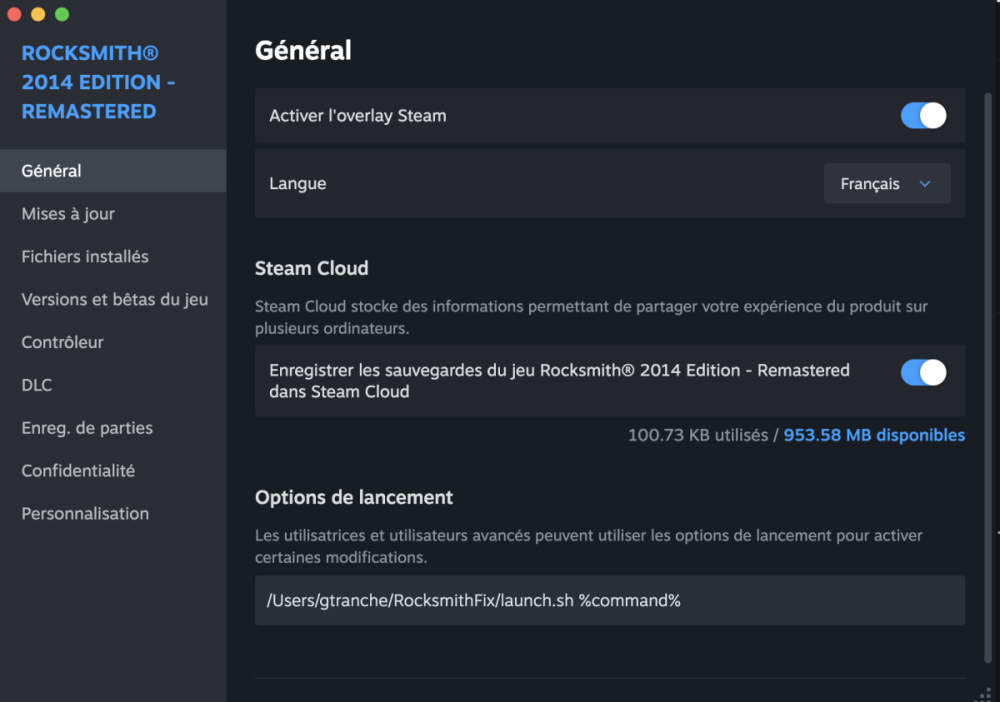
Basically you get the content of the zip and modify Rocksmith in Steam with launch options:Capture d’écran 2026-07-09 à 17.24.15.png

It's an install.sh which copy files from the zip directory to "RocksmithFix" in your home.

Let me know if it's working for you too
https://github.com/gtranche/RSFix154/releases/download/1.0/RocksmithSequoiaFix.zip

With source code in this repository

  • Author

gtranche, I think it is really impressive that you was able to solve this kind of broken copy protection and very informative to understand what was broken.

So it is sloppy programming in RS (hardcoded memory address) and a change in memory management in macOS.

Join the conversation

You can post now and register later. If you have an account, sign in now to post with your account.
Note: Your post will require moderator approval before it will be visible.

Guest
Unfortunately, your content contains terms that we do not allow. Please edit your content to remove the highlighted words below.
Reply to this topic...

Recently Browsing 0

  • No registered users viewing this page.


Account

Navigation

Search

Search

Configure browser push notifications

Chrome (Android)
  1. Tap the lock icon next to the address bar.
  2. Tap Permissions → Notifications.
  3. Adjust your preference.
Chrome (Desktop)
  1. Click the padlock icon in the address bar.
  2. Select Site settings.
  3. Find Notifications and adjust your preference.