Jump to content

Ignition4 Bug Reports and Issues

  • Administrator


If you encounter any issues or problems while using Ignition4, we appreciate your cooperation in reporting them to us. This thread is dedicated to collecting bug reports to ensure a smoother experience for everyone.

To help us identify and address the issues more effectively, kindly provide the following information when reporting a bug:

  • Operating System:
  • Browser:
  • Browser Version:
  • Description of the Problem:
  • Steps to Reproduce:

Please make sure to be as detailed as possible in your description. The more information we have, the better equipped we'll be to investigate and fix the issue promptly.

Thank you for your contribution to making Ignition4 better!


"Just remember: when something breaks, kick it as hard as you fucking can"

-Trent Reznor
Support Me (Via Patreon)

  • Replies 100
  • Views 21.3k
  • Created
  • Last Reply

Top Posters In This Topic

Most Popular Posts

  • Unleashed2k
    Unleashed2k

    12 hours ago, kozaka said: Hi! I am a bit confused on the new 'Submitted Reports' page. I think I know what you ment with the column, but actually, the status of a Submitted Report

  • On 7/27/2023 at 5:25 AM, Unleashed2k said: I have changed the wording to CDLC Status, hopefully that helps. Thank you!  

  • Unleashed2k
    Unleashed2k

    1 hour ago, MetalGoat said: Just edited my profile to show my guitar, and it doesn't so I guess same time tommorrow should be updated? Looks like it worked automatically, should b

Posted Images

Featured Replies

  • Author
  • Administrator
5 hours ago, Sniper Reload3d said:

Hmm. I'm on a desktop, using Firefox. How'd i get on the mobile version?

What is your screen resolution?

"Just remember: when something breaks, kick it as hard as you fucking can"

-Trent Reznor
Support Me (Via Patreon)

30 minutes ago, Unleashed2k said:

What is your screen resolution?

1080p 1920x 1080 

Same tower I use for gaming, streaming services, etc on a 4k tv.

I finally got my tower case today for my new build, no Idea when I will have a chance to put it together. I am going to do an AMD Ryzen build this time, and will go to Windows 11 then, so it isn't a huge deal. Just odd using a tower, Firefox 143 build. I do not recall hitting anything that would have turned this site to mobile. Hell, I don't even use internet on a phone or tablet. *shrug* ¯\_ (ツ)_/¯

  • Author
  • Administrator
26 minutes ago, Sniper Reload3d said:

1080p 1920x 1080 

Same tower I use for gaming, streaming services, etc on a 4k tv.

I finally got my tower case today for my new build, no Idea when I will have a chance to put it together. I am going to do an AMD Ryzen build this time, and will go to Windows 11 then, so it isn't a huge deal. Just odd using a tower, Firefox 143 build. I do not recall hitting anything that would have turned this site to mobile. Hell, I don't even use internet on a phone or tablet. *shrug* ¯\_ (ツ)_/¯

It switches dynamically one it reaches a certain resolutiion. Can you check your zoom level? You can do this by doing ctrl + mousewheel. 100% is default

And check your windows scale. See if it's 100% under display settings. 

image.png


"Just remember: when something breaks, kick it as hard as you fucking can"

-Trent Reznor
Support Me (Via Patreon)

16 minutes ago, Unleashed2k said:

Can you check your zoom level? You can do this by doing ctrl + mousewheel. 100% is default

And check your windows scale. See if it's 100% under display settings.

Sure. I will let you know in the a.m. Now that you say the zoom, when the other tv "died" a couple months ago, and switched to this 4k one, it changed the zoom on this and took me forever to figure that out, so that is probably what did it. 


edit; Thank you. Firefox was at 140%, so turning it down just to 130 put it back to normal view, i believe (100%-130 look the same, 140% goes to the funky mobile view.) I put it at 110% so I can read it.

windows was / is what it is supposed to be:display.thumb.png.0ddd9f9392304e881b2e77bac9710941.png

many many thanks, sorry, very sorry to waste your time on me like this. Thank you.

  • 2 weeks later...

So, a bunch of albums have broken album art now. Looks like they all started to use the automatic album art found on streaming services, despite havinng corect album art added manually in the past. Mostly seems to affect songs where the artist page is also completely incorrect.

It also replaced the old album art link in the field so it's a pain to fix. And also means the album art in ignition won't match the one found in game too.

Here's some examples,
https://ignition4.customsforge.com/cdlc/96193 (is completely wrong)
https://ignition4.customsforge.com/cdlc/95958 (is wining live 01 instead of 06)
https://ignition4.customsforge.com/cdlc/91956 (is completely wrong)
https://ignition4.customsforge.com/cdlc/95594 (is completely wrong)
https://ignition4.customsforge.com/cdlc/95274 (is now using "adultraz" instead of "adult" album art)
https://ignition4.customsforge.com/cdlc/89778 (Doesn't use the Yuri camp edition artwork)
https://ignition4.customsforge.com/cdlc/91953 (Is completely wrong)
https://ignition4.customsforge.com/cdlc/91954 (is completely wrong)

Hopefully this is fixable server side, I ain't manually fixing this for all my songs. Adding it as a tool to help with filling out the form is fine, but auto applying it site wide is mad.

And while I'm here, the album name field is misaligned from every other field, which has been driving me mad. Maybe it's only an issue at 2k, but it shouldn't be happening at any resolution lol.
image.png?ex=68f48f10&is=68f33d90&hm=681

Ea3cCUQ.png                                                                   「愛こそすべて ,ギルティキス」                                         Gh59blB.png

Utsu-P Discography                                           Modding thread (dead)                                        1000 songs hype

  • Author
  • Administrator
23 hours ago, coldrampage said:

So, a bunch of albums have broken album art now. Looks like they all started to use the automatic album art found on streaming services, despite havinng corect album art added manually in the past. Mostly seems to affect songs where the artist page is also completely incorrect.

It also replaced the old album art link in the field so it's a pain to fix. And also means the album art in ignition won't match the one found in game too.

Here's some examples,
https://ignition4.customsforge.com/cdlc/96193 (is completely wrong)
https://ignition4.customsforge.com/cdlc/95958 (is wining live 01 instead of 06)
https://ignition4.customsforge.com/cdlc/91956 (is completely wrong)
https://ignition4.customsforge.com/cdlc/95594 (is completely wrong)
https://ignition4.customsforge.com/cdlc/95274 (is now using "adultraz" instead of "adult" album art)
https://ignition4.customsforge.com/cdlc/89778 (Doesn't use the Yuri camp edition artwork)
https://ignition4.customsforge.com/cdlc/91953 (Is completely wrong)
https://ignition4.customsforge.com/cdlc/91954 (is completely wrong)

Hopefully this is fixable server side, I ain't manually fixing this for all my songs. Adding it as a tool to help with filling out the form is fine, but auto applying it site wide is mad.

And while I'm here, the album name field is misaligned from every other field, which has been driving me mad. Maybe it's only an issue at 2k, but it shouldn't be happening at any resolution lol.
image.png?ex=68f48f10&is=68f33d90&hm=681

Did you happen to use imgur?

"Just remember: when something breaks, kick it as hard as you fucking can"

-Trent Reznor
Support Me (Via Patreon)

1 hour ago, Unleashed2k said:

Did you happen to use imgur?

I did. Was imgur removed as a suported link host?

Ea3cCUQ.png                                                                   「愛こそすべて ,ギルティキス」                                         Gh59blB.png

Utsu-P Discography                                           Modding thread (dead)                                        1000 songs hype

  • Author
  • Administrator
8 hours ago, coldrampage said:

I did. Was imgur removed as a suported link host?

Unfortunately after Imgur blocked access to the EU: https://www.bbc.com/news/articles/c4gzxv5gy3qo


"Just remember: when something breaks, kick it as hard as you fucking can"

-Trent Reznor
Support Me (Via Patreon)

  • 3 weeks later...

Hello everyone.

Sorry if it's been answered to death before, but... I'm unable to fullfill a Wishlist request. It always ends up with "419 Page Expired", even if it takes me only 10 seconds to do so. Both in Chrome and Firefox, with and without adblock. 

Thanks in advance

Good afternoon,

Noticed I can't submit CDLC requests/Wishlist. Tried fresh logins from Safari and Chrome on Mac and Chrome on Windows. Get a 419 page expired trying to do so.

Don't think I've ever requested a song via Ignition before... apologies if I'm missing something.

Wishlist error.png


Edit: LOL! Guess it's not just me... 🙂

On 11/3/2025 at 9:23 PM, Cahill said:

Good afternoon,

Noticed I can't submit CDLC requests/Wishlist. Tried fresh logins from Safari and Chrome on Mac and Chrome on Windows. Get a 419 page expired trying to do so.

Don't think I've ever requested a song via Ignition before... apologies if I'm missing something.

Wishlist error.png

Edit: LOL! Guess it's not just me... 🙂

I never asked either, and I got the same message

I opened a Support Ticket and it closed as Resolved, but I still got the issue, so...
It looks like it's going to take some time...

EDIT: I managed to solve it. For me it works if I don't select a music genre and subgenre. If those fields are empty, I manage to create the request. @ 90s @ Cahill

4 hours ago, ChaosInJapan said:

I opened a Support Ticket and it closed as Resolved, but I still got the issue, so...
It looks like it's going to take some time...

EDIT: I managed to solve it. For me it works if I don't select a music genre and subgenre. If those fields are empty, I manage to create the request. @ 90s @ Cahill

Thanks, buddy. Your method works.

5 hours ago, ChaosInJapan said:

I opened a Support Ticket and it closed as Resolved, but I still got the issue, so...
It looks like it's going to take some time...

EDIT: I managed to solve it. For me it works if I don't select a music genre and subgenre. If those fields are empty, I manage to create the request. @ 90s @ Cahill

Thanks... Worked on a couple then started throwing the 419 again even without the selections. I'l just give Unleashed time to get it squared away.

  • 3 weeks later...

Hi, I reported this same issue a few days ago by creating an issue report. Someone replied to the ticket, but it was closed immediately after the response. Since I cannot view closed tickets, I’m unable to see what the reply was.

The problem is that I do not know how to get my filters working correctly. Filters are saved, and when I open https://ignition4.customsforge.com/, the interface shows that my filters are active. However, they have no effect. I use only one filter, “Guitar only,” yet I still see many songs that contain only bass parts. If I remove the filter and re-apply it, it works temporarily, but once I for example refresh the page, the filter stops working again.

OS: Windows 11
Browser: Chrome 142.0.7444.176

customsforgefilters.png

  • 1 month later...

Good afternoon,

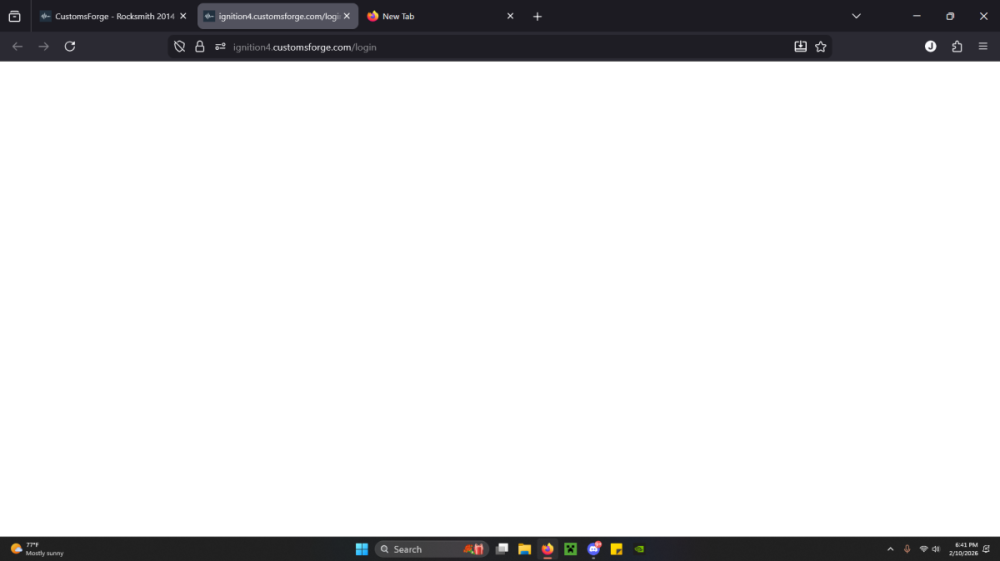
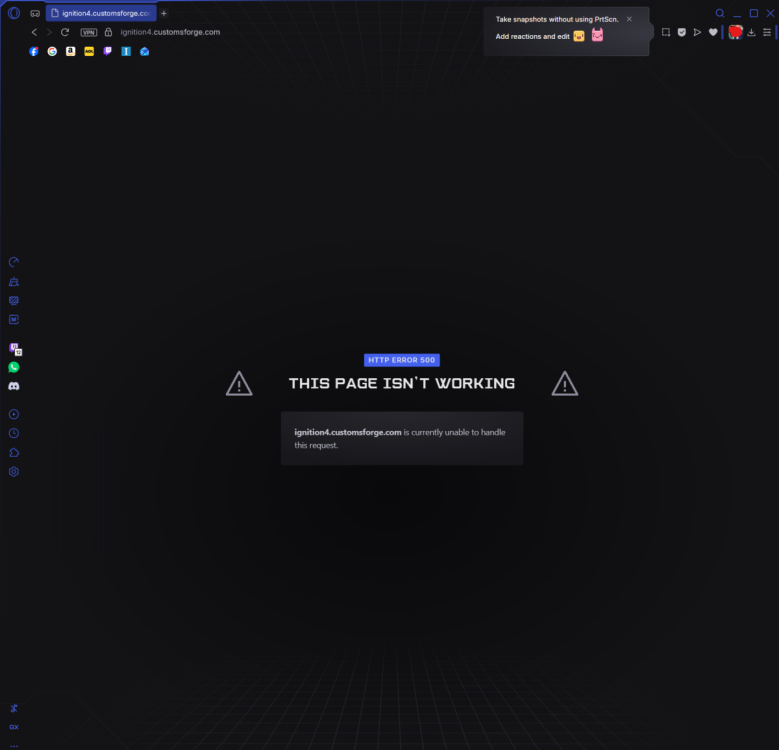
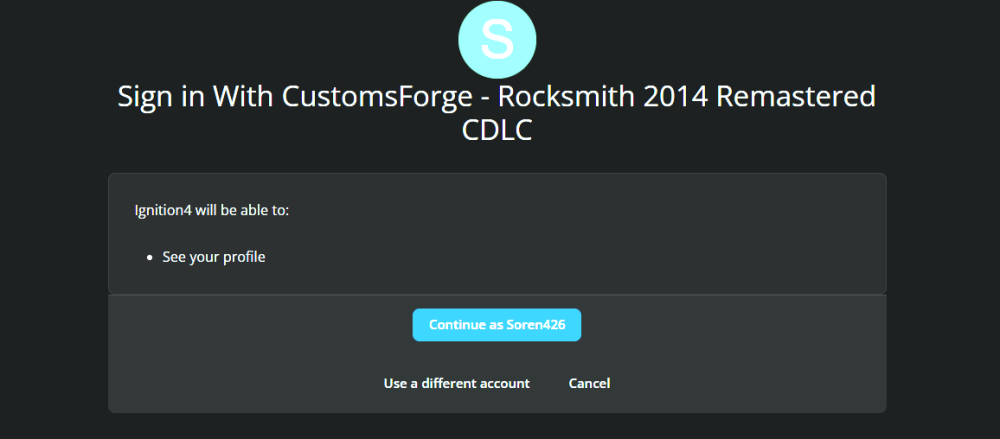
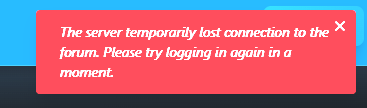
I am having a problem accessing ignition 4, but only on my pc and with two different browsers. The browsers in question are Edge Version 144.0.3719.82 and Opera version 125.0.5729.49. When I select my profile for signing in with my forum account, it opens Ignition 4 yet does not log me in saying "The server temporarily lost connection with the forum. Please try logging in again in a moment." No matter how long I wait, it doesn't let me in, except on my phone, even when using the mobile versions of the browsers i listed above.

image_2026-01-17_145029110.png

image_2026-01-17_145223213.png

1 hour ago, Soren426 said:

Good afternoon,

I am having a problem accessing ignition 4, but only on my pc and with two different browsers. The browsers in question are Edge Version 144.0.3719.82 and Opera version 125.0.5729.49. When I select my profile for signing in with my forum account, it opens Ignition 4 yet does not log me in saying "The server temporarily lost connection with the forum. Please try logging in again in a moment." No matter how long I wait, it doesn't let me in, except on my phone, even when using the mobile versions of the browsers i listed above.

image_2026-01-17_145029110.png

image_2026-01-17_145223213.png

same here...

2 hours ago, Soren426 said:

Good afternoon,

I am having a problem accessing ignition 4, but only on my pc and with two different browsers. The browsers in question are Edge Version 144.0.3719.82 and Opera version 125.0.5729.49. When I select my profile for signing in with my forum account, it opens Ignition 4 yet does not log me in saying "The server temporarily lost connection with the forum. Please try logging in again in a moment." No matter how long I wait, it doesn't let me in, except on my phone, even when using the mobile versions of the browsers i listed above.

image_2026-01-17_145029110.png

image_2026-01-17_145223213.png

also happening to me currently

2 hours ago, Soren426 said:

Good afternoon,

I am having a problem accessing ignition 4, but only on my pc and with two different browsers. The browsers in question are Edge Version 144.0.3719.82 and Opera version 125.0.5729.49. When I select my profile for signing in with my forum account, it opens Ignition 4 yet does not log me in saying "The server temporarily lost connection with the forum. Please try logging in again in a moment." No matter how long I wait, it doesn't let me in, except on my phone, even when using the mobile versions of the browsers i listed above.

image_2026-01-17_145029110.png

image_2026-01-17_145223213.png

i too am experiencing this. new user... thought i was missing something obvious.

36 minutes ago, Wade217 said:

i too am experiencing this. new user... thought i was missing something obvious.

Same here, new user. Attempted on mobile, Windows 10, Firefox and Chrome

4 hours ago, Soren426 said:

Good afternoon,

I am having a problem accessing ignition 4, but only on my pc and with two different browsers. The browsers in question are Edge Version 144.0.3719.82 and Opera version 125.0.5729.49. When I select my profile for signing in with my forum account, it opens Ignition 4 yet does not log me in saying "The server temporarily lost connection with the forum. Please try logging in again in a moment." No matter how long I wait, it doesn't let me in, except on my phone, even when using the mobile versions of the browsers i listed above.

image_2026-01-17_145029110.png

image_2026-01-17_145223213.png

I as well have this issue 🦕🦖☄️

Since a couple of months once in a while I am getting "Misdirected Request" error page when trying to open Ignition4 search from the link on a main customs forge main page. Using latest Safari 26.2 on Tahoe 26.2. I typically have to fiddle around like reloading page, closing safari and so on, sometimes it is solved on a first page reload and sometimes it is more stubborn and I have t0 spend 5 or 10 minutes until Ignition4 loads. Any idea what might be causing this?

20 hours ago, Hikikomori said:

Issue should be resolved now try again

thanks!

On 1/18/2026 at 7:58 PM, Hikikomori said:

Issue should be resolved now try again

Today I am getting "Misdirected Request" again. Reloading the Webpage and restarting the browser has not helped...

Join the conversation

You can post now and register later. If you have an account, sign in now to post with your account.
Note: Your post will require moderator approval before it will be visible.

Guest
Unfortunately, your content contains terms that we do not allow. Please edit your content to remove the highlighted words below.
Reply to this topic...

Recently Browsing 0

  • No registered users viewing this page.


Important Information

By using this site, you agree to our Guidelines. We have placed cookies on your device to help make this website better. You can adjust your cookie settings, otherwise we'll assume you're okay to continue. - Privacy Policy

Account

Navigation

Search

Configure browser push notifications

Chrome (Android)
  1. Tap the lock icon next to the address bar.
  2. Tap Permissions → Notifications.
  3. Adjust your preference.
Chrome (Desktop)
  1. Click the padlock icon in the address bar.
  2. Select Site settings.
  3. Find Notifications and adjust your preference.