Jump to content

  • Developer
Rocksmith Tools Launcher is compatible with macOS 10.14 (Mojave) and below ...
 
STOP - DO NOT UPGRADE to macOS 10.15 (Catalina), yet - looking for compatibility testers ...


There's a new application for Mac users named Rocksmith Tools Launcher.  The application includes and launches the Mac Wineskin ported versions of:

  1. CustomsForge Song Manager (CFSM)
  2. Custom Song Creator for Rocksmith (Rocksmith Toolkit), aka 'the toolkit'
  3. Custom Game Toolkit (CGT)

You can download RocksmithTools.dmg here.

Or Here.


After the download completes, double click on the RocksmithTools.dmg to mount the image.   (For Download Error Workaround ... LOOK HERE


The mounted image will look something like this:


RocksmithTools.png


Drag and drop the Rocksmith Tools Launcher icon onto the Applications shortcut icon to install the application.

Easter Egg: Drag the horizontal slider to the right to view the ReadMe.txt file.


ReadMe.png?width=500&height=351


Eject the RocksmithTools image.  Open the Lauchpad app, or Applications folder and double click the Rocksmith Tools Launcher icon to start the application.  WAIT PATIENTLY  for the application to start up (maybe a couple of minutes the first run so get some coffee).


RSTLauncher.png


Note: Rocksmith Tools Launcher for Mac is a replacement application for the individual Mac Wineskin ports of these tools.  The new app takes less disk space than the combined individual tools did.   Thanks goes to I)ark_Seph for his past Mac support of the individual tools.

How to use CDLC on Rocksmith 2014 Remastered Mac Version (click me)  Be sure to read and understand Steps 7 and 8.

Are you tired of AV False Positives???  Now accepting donations on my website (Click Here)  Your donation will be used towards buying a code signing certificate.   CGT is now compatible and safe to use with Rocksmith® 2014 Remastered ... 


Latest Build of Custom Game Toolkit (CGT) w/ Game Save Gigbox       Latest Build of Rocksmith Toolkit       Latest Build of Customs Forge Song Manager (CFSM)


All bug reports and help requests please include your: OS, CPU, AV, .NET Framework versions along with a description of the issue (include screenshots of error if possible).  It should go without having to say ... make sure you are using the latest build before submitting bug reports or asking for help.


*  Remember to use your magic words (please and thank you) if you would like a response.  Don't use phrases like 'thanks anyhow' as it is demeaning.

  • Replies 172
  • Views 95.9k
  • Created
  • Last Reply

Top Posters In This Topic

Most Popular Posts

  • cacafilho
    cacafilho

    hey Guys!!! I could made it work for macOS Catalina!!!  Just uploaded on my gdrive. used wineskin source (https://github.com/Gcenx/WineskinServer).. gave a lot of work, so enjoy!!!  this is for us!!!

  • rockatrubadur
    rockatrubadur

    If anyone had the same problem as me: This worked: https://www.youtube.com/watch?v=6fqzb4qpgcs&app=desktop   Edited by Dev (added  instructions from video): “App is Damaged Can’t Be Opened” or "Ap

  • l3st4t50
    l3st4t50

    Thanks a milion for your work, it just worked perfectly in my Catalina OS 10.15.4.   I would like to add a tutorial from a guy I found to stop Catalina not letting opeining it. Just watch the video an

Posted Images
Featured Replies

On 6/28/2021 at 3:27 AM, galixigen said:

Hi everyone, just started to use Rocksmith and faced need to convert packs to mac format but found out every existing easy solution for mac is outdated.
So i figured out how to run rs-toolkit on wine and considering lack of convenient ways to run it on mac, I decided to resolve it myself

https://github.com/helioxigen/rocksmith-toolkit-mac
Here you can download installer for Rocksmith Toolkit wrapped in wineskin with 32on64 support
Tested on latest Big Sur (11.4),  so any macOS 10.15+ should be  supported as well

Hey, I'm getting an error saying the DMG cant be opened. Also, your link to download the installer leads here: https://raw.githubusercontent.com/helioxigen/rocksmith-toolkit-mac/master/RocksmithTool.dmg - just seems to be text. 

On 7/8/2021 at 5:22 PM, galixigen said:

i see, github seems to have limits on downloads,

reuploaded to mega.nz

error when opened "RocksmithTool" is damaged and can't be opened

On 7/12/2021 at 10:12 PM, kufi said:

error when opened "RocksmithTool" is damaged and can't be opened

same here


On 7/13/2021 at 5:12 AM, kufi said:

error when opened "RocksmithTool" is damaged and can't be opened


18 hours ago, facepoppies said:

same here

I didn't tested on fresh mac, so i can only theorize, solution must be simple, try this, immediately after trying to open RocksmithTool:
System Preferences => Security & Privacy => Tab "General" => Allow anyway
 

6 hours ago, galixigen said:

I didn't tested on fresh mac, so i can only theorize, solution must be simple, try this, immediately after trying to open RocksmithTool:
System Preferences => Security & Privacy => Tab "General" => Allow anyway
 

So when I go to the general tab in security, there's not allow anyway option at all. Even when I do it right after trying to open the app and getting the "is damaged and can't be opened" message


  • 2 weeks later...
  • 2 weeks later...
On 7/27/2021 at 7:17 PM, juangvargas said:

Same here. I'm on MacOS Monterrey on a MacBook Pro M1 and can't run it!

Same here. No option to allow running in Security tab

6 hours ago, Shadeuss said:

Same here. No option to allow running in Security tab

"Open a Finder window and navigate to wherever you've installed the Rocksmith Tools Launcher app (looks like it's in the Applications folder). Leave that window open and launch Terminal. Paste this portion of the command into Terminal: xattr -cr

Make sure to include the space after "cr" then drag your Rocksmith Tools Launcher app into the Terminal window. This will autofill the directory and the name of the app, eliminating the chance of something going wrong due to spelling errors, use of spaces, etc.. When you drag the app into Terminal, it should appear as Rocksmith\ Tools\ Launcher.app

Give that a go, and good luck!"

  • 4 weeks later...

That doesn't work either; xattr doesn't seem to support either the c or r options in macOS 11.5:

xattr -cr /Applications/RocksmithTool.app
option -c not recognized

usage: xattr [-slz] file [file ...]
       xattr -p [-slz] attr_name file [file ...]
       xattr -w [-sz] attr_name attr_value file [file ...]
       xattr -d [-s] attr_name file [file ...]

The first form lists the names of all xattrs on the given file(s).
The second form (-p) prints the value of the xattr attr_name.
The third form (-w) sets the value of the xattr attr_name to attr_value.
The fourth form (-d) deletes the xattr attr_name.

options:
  -h: print this help
  -s: act on symbolic links themselves rather than their targets
  -l: print long format (attr_name: attr_value)
  -z: compress or decompress (if compressed) attribute value in zip format


  • 1 month later...
On 5/12/2020 at 3:23 PM, cacafilho said:

hey Guys!!! I could made it work for macOS Catalina!!! 

Just uploaded on my gdrive.

used wineskin source (https://github.com/Gcenx/WineskinServer).. gave a lot of work, so enjoy!!! 
this is for us!!!

Screen-Shot-2020-05-12-at-16-14-21.png

Screen-Shot-2020-05-12-at-16-14-01.png

Screen-Shot-2020-05-12-at-16-13-48.png

The link is below:

https://drive.google.com/open?id=1OCpVFgV0AHcAYSeUpgUNRHdx96JlyvGY

is there any way you could reupload this? the link is currently down :((
i just got my old mac from back home but it had been upgraded to catalina.

  • 1 month later...


On 6/28/2021 at 12:27 AM, galixigen said:

Hi everyone, just started to use Rocksmith and faced need to convert packs to mac format but found out every existing easy solution for mac is outdated.
So i figured out how to run rs-toolkit on wine and considering lack of convenient ways to run it on mac, I decided to resolve it myself

https://github.com/helioxigen/rocksmith-toolkit-mac
Here you can download installer for Rocksmith Toolkit wrapped in wineskin with 32on64 support
Tested on latest Big Sur (11.4),  so any macOS 10.15+ should be  supported as well


On 8/8/2021 at 3:54 PM, tragio said:

"Open a Finder window and navigate to wherever you've installed the Rocksmith Tools Launcher app (looks like it's in the Applications folder). Leave that window open and launch Terminal. Paste this portion of the command into Terminal: xattr -cr

Make sure to include the space after "cr" then drag your Rocksmith Tools Launcher app into the Terminal window. This will autofill the directory and the name of the app, eliminating the chance of something going wrong due to spelling errors, use of spaces, etc.. When you drag the app into Terminal, it should appear as Rocksmith\ Tools\ Launcher.app

Give that a go, and good luck!"


Worked for me, thank you. I'm currently trying it out 🙂

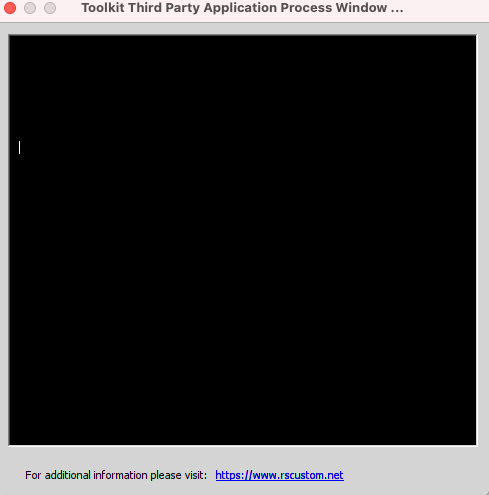
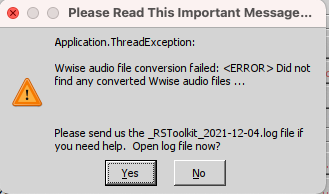
edit:currently stuck on getting wwise to work. boo! - Trying wwise 2013 windows format with exe, and i'm able to click "generate" and the wwise box pops up- but I'm getting error "wwise audio conversion failed"

(This is blank, suppose to be text displaying!)

Screen Shot 2021-12-04 at 9.46.19 PM.png

then this error

Screen Shot 2021-12-04 at 9.46.27 PM.png


posted as issue here https://github.com/helioxigen/rocksmith-toolkit-mac/issues/1

  • 3 weeks later...

Has anyone gotten it to work on Monterey Intel-based?

Can I use another computer to manage/organize songs then copy them over? Might be a good workaround temporarily for all of us having issues on mac...

  • 2 weeks later...

Hello everyone.  I updated to big sur and couldn't use cdlc no more.. nothing I did worked until I found and followed this video. Hopefully it works as well for you all.  


Hi, thanks for all your help. I can finally play custom song on my mac, using the vid from chazswp, thank you ;-).

My pc is too old to work correctly, so it's good to have it on the mac.

I used the link (&app) posted above (github) to convert the song from pc to mac. But with one song (bath salts from highly suspect), I have the bend in reverse. (goes down in place of up). 

If someone else has another method and can convert this song for me in mac version, i would really appreciate the help. It's been 3 very long days that I try to run custom dlcwith my pc or mac, now it's ok. But just this problem too figure out.

  • 4 weeks later...
On 8/8/2021 at 7:54 PM, tragio said:

"Open a Finder window and navigate to wherever you've installed the Rocksmith Tools Launcher app (looks like it's in the Applications folder). Leave that window open and launch Terminal. Paste this portion of the command into Terminal: xattr -cr

Make sure to include the space after "cr" then drag your Rocksmith Tools Launcher app into the Terminal window. This will autofill the directory and the name of the app, eliminating the chance of something going wrong due to spelling errors, use of spaces, etc.. When you drag the app into Terminal, it should appear as Rocksmith\ Tools\ Launcher.app

Give that a go, and good luck!"

This worked for me! Thank you. Monterey and M1 here.

  • 1 month later...

sadly not working for me. I downloaded the installer and am getting the 'move to trash' message when trying to run the tool launcher 😞

34 minutes ago, rockthis1990 said:

Does anyone have an updated way of converting customs songs from PC -> MAC?

I think this should work
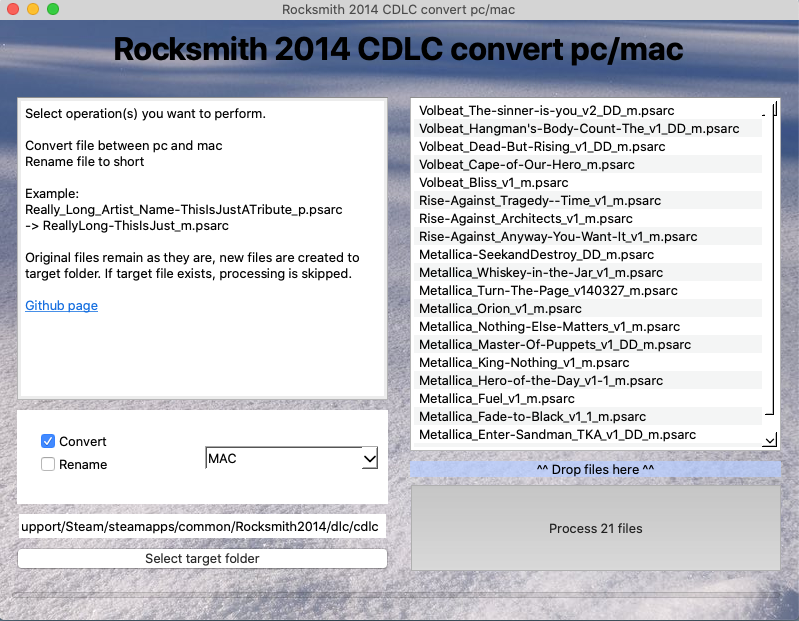
https://github.com/glebb/rocksmithconvert

Ea3cCUQ.png                                                                   「愛こそすべて ,ギルティキス」                                         Gh59blB.png

Utsu-P Discography                                           Modding thread (dead)                                        1000 songs hype

  • 8 months later...

Recently Browsing 0

  • No registered users viewing this page.


Important Information

By using this site, you agree to our Guidelines. We have placed cookies on your device to help make this website better. You can adjust your cookie settings, otherwise we'll assume you're okay to continue. - Privacy Policy

Configure browser push notifications

Chrome (Android)
  1. Tap the lock icon next to the address bar.
  2. Tap Permissions → Notifications.
  3. Adjust your preference.
Chrome (Desktop)
  1. Click the padlock icon in the address bar.
  2. Select Site settings.
  3. Find Notifications and adjust your preference.