Jump to content

  • Developer
Rocksmith Tools Launcher is compatible with macOS 10.14 (Mojave) and below ...
 
STOP - DO NOT UPGRADE to macOS 10.15 (Catalina), yet - looking for compatibility testers ...


There's a new application for Mac users named Rocksmith Tools Launcher.  The application includes and launches the Mac Wineskin ported versions of:

  1. CustomsForge Song Manager (CFSM)
  2. Custom Song Creator for Rocksmith (Rocksmith Toolkit), aka 'the toolkit'
  3. Custom Game Toolkit (CGT)

You can download RocksmithTools.dmg here.

Or Here.


After the download completes, double click on the RocksmithTools.dmg to mount the image.   (For Download Error Workaround ... LOOK HERE


The mounted image will look something like this:


RocksmithTools.png


Drag and drop the Rocksmith Tools Launcher icon onto the Applications shortcut icon to install the application.

Easter Egg: Drag the horizontal slider to the right to view the ReadMe.txt file.


ReadMe.png?width=500&height=351


Eject the RocksmithTools image.  Open the Lauchpad app, or Applications folder and double click the Rocksmith Tools Launcher icon to start the application.  WAIT PATIENTLY  for the application to start up (maybe a couple of minutes the first run so get some coffee).


RSTLauncher.png


Note: Rocksmith Tools Launcher for Mac is a replacement application for the individual Mac Wineskin ports of these tools.  The new app takes less disk space than the combined individual tools did.   Thanks goes to I)ark_Seph for his past Mac support of the individual tools.

How to use CDLC on Rocksmith 2014 Remastered Mac Version (click me)  Be sure to read and understand Steps 7 and 8.

Are you tired of AV False Positives???  Now accepting donations on my website (Click Here)  Your donation will be used towards buying a code signing certificate.   CGT is now compatible and safe to use with Rocksmith® 2014 Remastered ... 


Latest Build of Custom Game Toolkit (CGT) w/ Game Save Gigbox       Latest Build of Rocksmith Toolkit       Latest Build of Customs Forge Song Manager (CFSM)


All bug reports and help requests please include your: OS, CPU, AV, .NET Framework versions along with a description of the issue (include screenshots of error if possible).  It should go without having to say ... make sure you are using the latest build before submitting bug reports or asking for help.


*  Remember to use your magic words (please and thank you) if you would like a response.  Don't use phrases like 'thanks anyhow' as it is demeaning.

  • Replies 172
  • Views 95.9k
  • Created
  • Last Reply

Top Posters In This Topic

Most Popular Posts

  • cacafilho
    cacafilho

    hey Guys!!! I could made it work for macOS Catalina!!!  Just uploaded on my gdrive. used wineskin source (https://github.com/Gcenx/WineskinServer).. gave a lot of work, so enjoy!!!  this is for us!!!

  • rockatrubadur
    rockatrubadur

    If anyone had the same problem as me: This worked: https://www.youtube.com/watch?v=6fqzb4qpgcs&app=desktop   Edited by Dev (added  instructions from video): “App is Damaged Can’t Be Opened” or "Ap

  • l3st4t50
    l3st4t50

    Thanks a milion for your work, it just worked perfectly in my Catalina OS 10.15.4.   I would like to add a tutorial from a guy I found to stop Catalina not letting opeining it. Just watch the video an

Posted Images
Featured Replies

Hey Guys, In quarantine and want to get this going! I was doing all good until the song manager. Just having trouble changing the Installation Directory since I cant find the hidden file within the browser that pops up within CFSM if that makes sense?


*Edit* For anyone with the same problem, I uninstalled everything then restarted my macbook and it worked! 

  • 2 weeks later...

Using Catalina?

Hey Guys, In quarantine and want to get this going! I was doing all good until the song manager. Just having trouble changing the Installation Directory since I cant find the hidden file within the browser that pops up within CFSM if that makes sense?


*Edit* For anyone with the same problem, I uninstalled everything then restarted my macbook and it worked! 

Followed all trouble shooting - At this point i no longer get an error, but nothing happens after i click the icon. 


Yeah - me too. I'm on Catalina 10.15 though which doesn't seem to be compatible yet. Has anybody had success getting the tool to launch with Catalina 10.15?

@@GuitarWizard413 hey, good evening, I may be able to help you do the thing myself using app like anydesk or teamviewer
If you are willing pm me or if you really want to do it yourself you should download script, launch it run patcher script and it may prompt you any issues it has make sure it says successful or you may manually replace files inside rocksmith.app inside .dylib something should do the trick(script just automates this step)

Has anybody had any success running the Tools Luncher on Catalina? I've tried all of the recommended routes and have had no luck. I keep getting the corrupt file error. Either that or the guitar icon turns into the Wine Port icon and does nothing (no error code). Is there any other way around this issue? 

I haven't loaded up Rocksmith in over a year but wanted to give it a crack and noticed two CDLCs added for one of my favorite bands, Everything Everything. I tried for over an hour and a half to try to use the latest toolkit and failed. It's not a huge deal to use it since for the most part all of the CDLCs I want I've already converted over the past few years. 


Would anyone be willing to convert the files from PC to Mac? It would be greatly appreciated since I don't want to waste any more time fiddling with getting the toolkit to work. 


Songs:

Suffragette Suffragette 

No Pharaoh 


much appreciated. 

@@oriolesfan10 there's really easy to get toolkit and cfsm, cgst working you just have to "waste" about 2Gb of space
If you have actual issues running it just let us know what it is and it may be fixed in future releases except it's user mistake I guess?


Using Catalina?

Hey Guys, In quarantine and want to get this going! I was doing all good until the song manager. Just having trouble changing the Installation Directory since I cant find the hidden file within the browser that pops up within CFSM if that makes sense?


*Edit* For anyone with the same problem, I uninstalled everything then restarted my macbook and it worked! 


Mojave unfortunately. Hope you find success soon!

@@oriolesfan10 there's really easy to get toolkit and cfsm, cgst working you just have to "waste" about 2Gb of space

If you have actual issues running it just let us know what it is and it may be fixed in future releases except it's user mistake I guess?

I followed the steps, got the boot camp error that led me to entering the code in terminal which seemed to work fine. Then when trying to open the launcher I got at least 10 pop up error messages (but the boot camp related one seemed to be fixed) - then the launcher appeared and I tried opening the toolkit and it just sat on that screen saying it was opening for an hour so I gave up. OS X El Capitan 10.11.6.

  • 3 weeks later...


@@cacafilho Link please?

its on the end of the post!! 


https://drive.google...gUNRHdx96JlyvGY


Any doubts, just say! =]


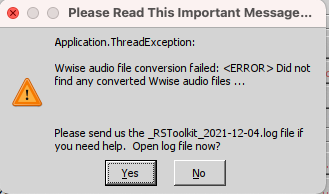
“Rocksmith Toolkit.app” is damaged and can’t be opened.


Downloaded twice (and killed the cache). Has anyone else got this to work?


it explains what to do in the first page of this topic!


Thanks

Here's how to install Rocksmith Tools Launcher by turning off Gatekeeper ...

Open the Terminal app from the /Applications/Utilities/ folder, and then enter the following command:

sudo spctl --master-disable


That worked. 

was able to get the toolkit open on Catalina, so thanks for that! Tried getting into the converter though, and none of my files showed up. any suggestions?

Still unable to get it working, tried all of the terminal commands and still nothing. Only progress is that when I launch it, it doesn't tell me it can't open it, it looks like it's opening and then nothing happens. Ever. Sigh.

hey Guys!!! I could made it work for macOS Catalina!!! 

Just uploaded on my gdrive.

used wineskin source (https://github.com/Gcenx/WineskinServer).. gave a lot of work, so enjoy!!! 

this is for us!!!


Screen-Shot-2020-05-12-at-16-14-21.png


Screen-Shot-2020-05-12-at-16-14-01.png


Screen-Shot-2020-05-12-at-16-13-48.png


The link is below:


https://drive.google.com/open?id=1OCpVFgV0AHcAYSeUpgUNRHdx96JlyvGY

Thanks a milion for your work, it just worked perfectly in my Catalina OS 10.15.4.


I would like to add a tutorial from a guy I found to stop Catalina not letting opeining it. Just watch the video and copy the commands you need from video description: https://www.youtube.com/watch?v=nkZrEdT08hg


Regards and thanks!

If you're still getting an error, try xattr -c /Applications/Rocksmith\ Toolkit.app from terminal.

Recently Browsing 0

  • No registered users viewing this page.


Important Information

By using this site, you agree to our Guidelines. We have placed cookies on your device to help make this website better. You can adjust your cookie settings, otherwise we'll assume you're okay to continue. - Privacy Policy

Configure browser push notifications

Chrome (Android)
  1. Tap the lock icon next to the address bar.
  2. Tap Permissions → Notifications.
  3. Adjust your preference.
Chrome (Desktop)
  1. Click the padlock icon in the address bar.
  2. Select Site settings.
  3. Find Notifications and adjust your preference.