Jump to content

  • Popular Post

How to Use Custom DLC (CDLC) on Mac (2023 Update)


The following instructions are for Rocksmith 2014 Remastered, with the latest update installed.  These instructions may not work for older versions or pirated versions of the game, and I will provide no support for pirated versions.  Please buy the game and support the developer.  Without the game, we would have nothing to play customs with anyway.

Download the patch here : https://github.com/aik002/RSBypass/releases/download/1.8pre2/RSBypass.zip

Video instruction :

To convert PC customs to Mac version :

https://github.com/glebb/rocksmithconvert/releases/download/2.2.0/RSConvert_GUI-2.2.zip


Here are all the steps (read them carefully) :

  • Your user account needs to be an Administrator account.
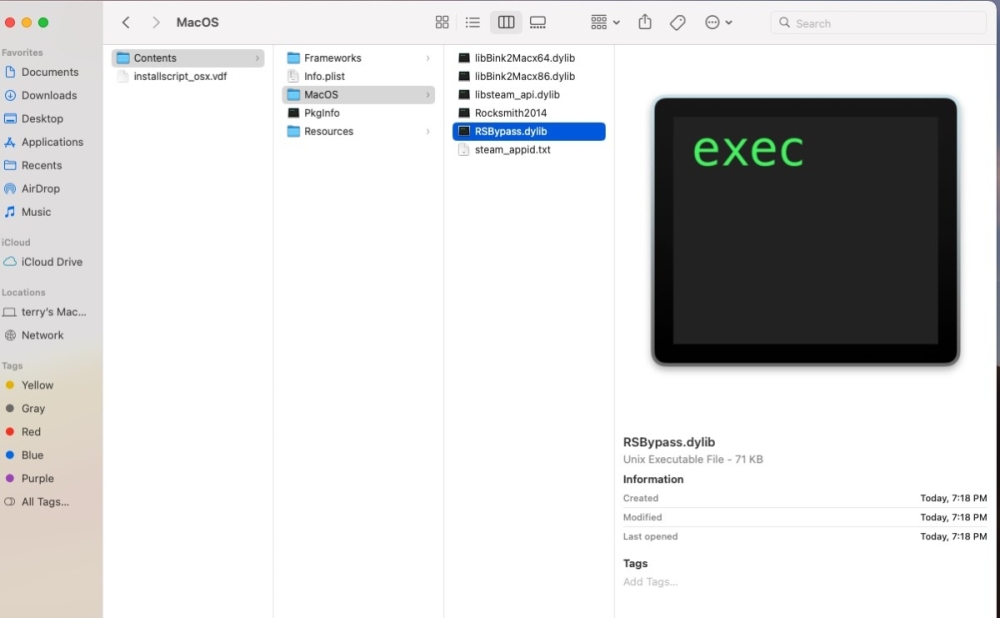
  • Download the Rocksmith Patch:  https://github.com/aik002/RSBypass/releases/download/1.8pre2/RSBypass.zip
  • Unzip the patch file and double-click on "RUN_PATCH_RS.command" to run the patch.  This will patch the Rocksmith 2014 app file to allow cDLC's to work.   **If you encounter a permissions error, see the note below**
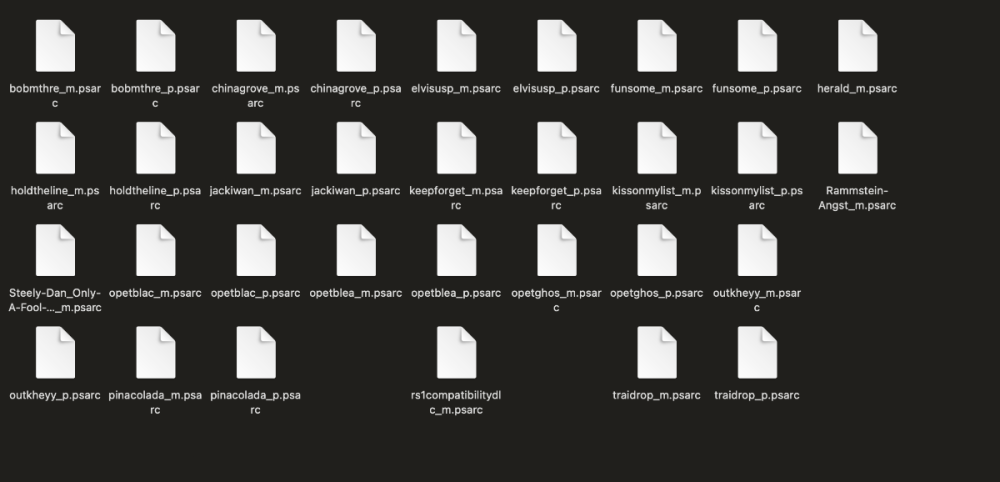
  • Download the customs you want. Make sure they end in "_m.psarc". If they end in "_p.psarc" they are PC only versions and will need to be converted with the Toolkit. I'll put instructions for that down below.
  • Place the customs in the dlc folder. The location is: ~/Library/Application Support/Steam/SteamApps/common/Rocksmith2014  
    • It is a hidden folder, so the easiest way to find it is to open Finder, and using the "Go" menu, select "Go To Folder" and paste the location in there. You can then drag the dlc folder to your sidebar to create a permanent link.
    • You can also find the folder by opening Steam and going to your games library and right-clicking on Rocksmith 2014, and choosing "Properties".  Select the "Local Files" tab and click on "Browse Local Files"
  • Launch Rocksmith 2014 by either opening Steam and running it from "Library", or launch it from the Mac Launchpad by clicking on "Rocksmith 2014"
  • Say goodbye to your family, friends, and free time. You won't be seeing any of them for a while.


**If you encounter a permissions error while running the patch:

  1. Right-click on the patch and select "Get Info"
  2. Under "Sharing & Permissions", make sure that all users listed have "Read & Write" permissions.
  3. If they do not, click the small lock icon in the bottom right corner to allow the permissions to be changed, and enter your Admin password.  Then select each user that needs to be changed and alter the permissions.
  4. Repeat for the other two files needed for the patch ("insert_dylib" and "libRYBypass.dylib")


Updated 2023/11/01, confirmed to work until Sonoma OS.

  • Replies 594
  • Views 340.7k
  • Created
  • Last Reply

Top Posters In This Topic

Most Popular Posts

  • Hey everyone! I am happy to announce that we have a fix! This zip includes the patcher: https://github.com/aik002/RSBypass/releases/tag/1.0 Thanks to help from someone on Discord we found th

  • @Zero_black_zero  For anyone with Mac 64 bit Rocksmith 2014 Remastered issues.  Here's what to do: 1) Uninstall Rocksmith.  Make sure you DELETE the steam folder/files under application support when

  • I cloned the dylib patch source code from GitHub and compiled for M1 and Monterey. Memory mapping and protection work differently on M1 and I don't have an M1 Mac (yet) so it is hard to develop for it
Posted Images
Featured Replies

2 Questions:


1. Anyone got this to work on Big Sur 11.6? on an M1?
2. How do you get around the "“insert_dylib” cannot be opened because the developer cannot be verified." error? Should I just manually insert the files?


Thanks for your time. 

  • 2 weeks later...
On 9/20/2021 at 10:51 AM, cheap_fuck said:

2 Questions:

1. Anyone got this to work on Big Sur 11.6? on an M1?
2. How do you get around the "“insert_dylib” cannot be opened because the developer cannot be verified." error? Should I just manually insert the files?

Thanks for your time. 

Just bought my Mac, so going through the process of figuring this out myself.

If you go into System Preferences -> Security & Privacy  should see a message about the file being blocked and have an option to allow anyway.

After I clicked to allow, I ran the patch again, and it seems to have worked.  Or at least the message in terminal said it completed successfully.


Haven't added any music yet to test.


  • 2 weeks later...

So with macOS Monterey (present beta, 21A5543b) it seems that the libRSBypass.dylib that is the core of the patch is not working, causes the Rocksmith2014 app to crash. Revert to the unpatched application with Steam and it is able to launch. The issue is reproducible, and I am not the only person to encounter this (I'm on a 2020 Macbook Air M1, but another user on a M1 MBP is having the same issue here - 


So it looks like the libRSBypass.dylib may need to be addressed for Monterey.


  • 2 weeks later...
On 10/13/2021 at 11:25 PM, bootstrapfm said:

So with macOS Monterey (present beta, 21A5543b) it seems that the libRSBypass.dylib that is the core of the patch is not working, causes the Rocksmith2014 app to crash. Revert to the unpatched application with Steam and it is able to launch. The issue is reproducible, and I am not the only person to encounter this (I'm on a 2020 Macbook Air M1, but another user on a M1 MBP is having the same issue here - 

So it looks like the libRSBypass.dylib may need to be addressed for Monterey.

Yup, that was me lol. 
It seems someone in the CF discord was having issues getting their Mac to work with CDLC on Big Sur, so they re-wrote the script I believe. 

I've tried using it on my M1 with Monterey and the songs show, they just don't get passed the amps. So if you're very hands on and might be able to fix it, I'm sure you'll be loved by all haha. It's in the #mac-os channel of the Discord if you wanna take a look.

Yeah no, turns out that hasn't made a difference. They show regardless and the patch is crashing cause of libRSBypass.dylib as you suggested. 

Gonna have to just hope and wait someone comes along and fixes it, unfortunately.

Hi, so I was using cDLC's for a while without any problem. Then my steam app got updated and now it wont run the patch. Is there a fix to this? The preferences are all correct.


So, yeah, Monterey has definitely broke RS2014, is there any way to understand what the patch was trying to do in  libRSBypass.dylib so that there may be a way to re-create the patch? or to get assisted by someone...?

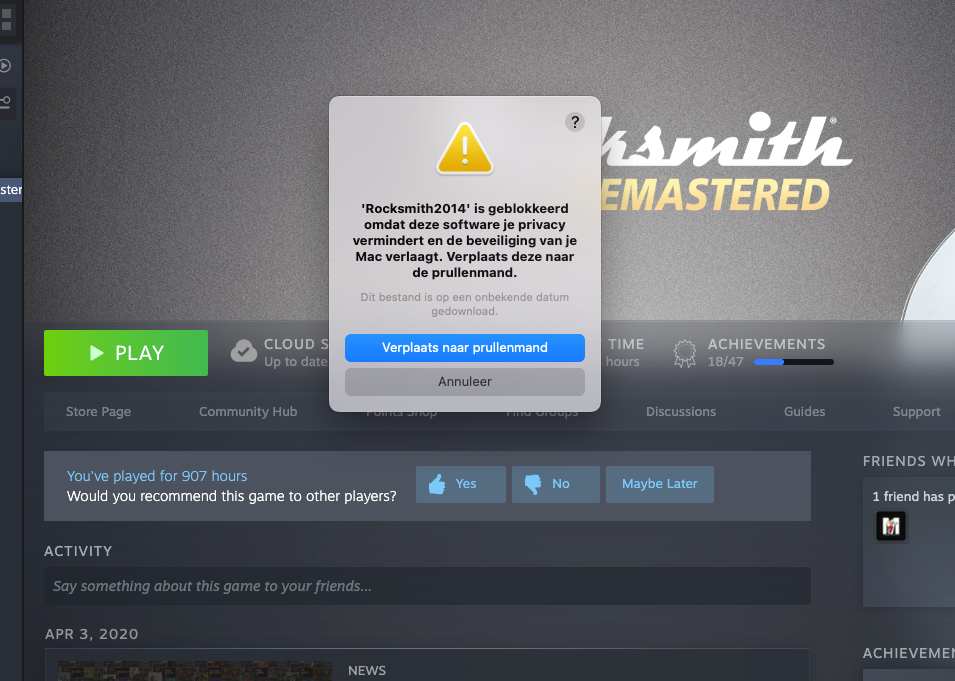
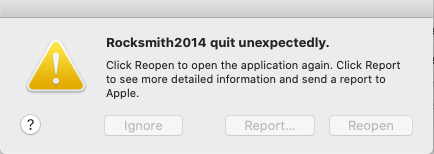
I successfully run the RUN_PATCH on an M1 mac mini, but having issue launching the game, any ideas? it is quiting unexpectedly, Running in M1, Monterey

Yeah looks like Rocksmith isn't running on Monterey at the moment. I just got the new Macbook so I've got no choice but to wait until someone (hopefully) fixes the patch. 

Without the patch, the game runs as usual, but cannot play CDLC (Sad)

Nooooo......... I was delaying updating my Mac to Monterey by ignoring the reminder but somehow it updated overnight. As 👆 the patch no longer works with the new OS. Gutted!!!! 😭

16 hours ago, LickThat said:

Nooooo......... I was delaying updating my Mac to Monterey by ignoring the reminder but somehow it updated overnight. As 👆 the patch no longer works with the new OS. Gutted!!!! 😭

that's sucks. I hope the new patch is coming out soon 😞 

I wonder if anyone is working on it...

Hi there,

New to community so looking for some help! Downloaded some custom DLC for my Mac. The songs show up on the list but when I go to play them it freezes after tuning. I can see from the very first posts on this thread I shouldn't install RSInjector but I've not even downloaded that. Any suggestions? Probably something very obvious I'm missing!

Thanks in advance!

On 11/7/2021 at 2:54 PM, BP Garage said:

Hi there,

New to community so looking for some help! Downloaded some custom DLC for my Mac. The songs show up on the list but when I go to play them it freezes after tuning. I can see from the very first posts on this thread I shouldn't install RSInjector but I've not even downloaded that. Any suggestions? Probably something very obvious I'm missing!

Thanks in advance!

Same issue. Installing the CDLC tool causes crashing on launch, assuming this is just because I'm on Monterey, willing to beta test new tools should they be in development.

2 hours ago, Hybrid__ said:

Same issue. Installing the CDLC tool causes crashing on launch, assuming this is just because I'm on Monterey, willing to beta test new tools should they be in development.


I did find that I uninstalled everything from Steam, re-downloaded Rocksmith, re-opened it, closed it, pulled across the MAC_Patch folder to the Rocksmith 2014 folder, ran it from there and it worked! Maybe give that a go!

24 minutes ago, BP Garage said:

I did find that I uninstalled everything from Steam, re-downloaded Rocksmith, re-opened it, closed it, pulled across the MAC_Patch folder to the Rocksmith 2014 folder, ran it from there and it worked! Maybe give that a go!

Unfortunately that did not fix my issue, are you on the latest version of MacOS (Monterey)? Thanks.

Just now, Hybrid__ said:

Unfortunately that did not fix my issue, are you on the latest version of MacOS (Monterey)? Thanks.

Sorry, I should have mentioned I am on Catalina 10.15.7. Apologies.

I'm on MAC version Big Sur 11.6 and have the same issues.  Nothing seems to work 😞

M1, Monterey. Not working:

-------------------------------------
Translated Report (Full Report Below)
-------------------------------------

Process:               Rocksmith2014 [52439]
Path:                  /Users/USER/Library/Application Support/Steam/*/Rocksmith2014.app/Contents/MacOS/Rocksmith2014
Identifier:            Ubisoft.Rocksmith2014
Version:               1.0 (1)
Code Type:             X86-64 (Translated)
Parent Process:        launchd [1]
User ID:               501

Date/Time:             2021-11-19 18:36:12.9313 +0200
OS Version:            macOS 12.0.1 (21A559)
Report Version:        12
Anonymous UUID:        94BBA68D-AD8C-374F-7BDE-83A3F45A7911

Sleep/Wake UUID:       2266A75C-9A92-463F-8D5A-2FA2D5E18FD3

Time Awake Since Boot: 43000 seconds
Time Since Wake:       1728 seconds

System Integrity Protection: enabled

Crashed Thread:        0  MainThrd  Dispatch queue: com.apple.main-thread

Exception Type:        EXC_BAD_ACCESS (SIGSEGV)
Exception Codes:       KERN_INVALID_ADDRESS at 0x00007ff7ffceb000
Exception Codes:       0x0000000000000001, 0x00007ff7ffceb000
Exception Note:        EXC_CORPSE_NOTIFY

Termination Reason:    Namespace SIGNAL, Code 11 Segmentation fault: 11
Terminating Process:   exc handler [52439]

VM Region Info: 0x7ff7ffceb000 is not in any region.  Bytes after previous region: 1  Bytes before following region: 249827328
      REGION TYPE                    START - END         [ VSIZE] PRT/MAX SHRMOD  REGION DETAIL
      VM_ALLOCATE              7ff7ffce5000-7ff7ffceb000 [   24K] r--/r-- SM=PRV  
--->  GAP OF 0xee41000 BYTES
      mapped file              7ff80eb2c000-7ff80eb7c000 [  320K] r-x/r-x SM=COW  ...t_id=31e4de8d

Application Specific Information:
dyld4 config: DYLD_LIBRARY_PATH= DYLD_INSERT_LIBRARIES=/Users/fishMD/Library/Application Support/Steam/Steam.AppBundle/Steam/Contents/MacOS/steamloader.dylib:/Users/fishMD/Library/Application Support/Steam/Steam.AppBundle/Steam/Contents/MacOS/gameoverlayrenderer.dylib


Thread 0 Crashed:: MainThrd Dispatch queue: com.apple.main-thread
0   libRSBypass.dylib             	       0x10d683bf1 bCompare + 49
1   libRSBypass.dylib             	       0x10d683ca6 FindPattern + 70
2   libRSBypass.dylib             	       0x10d683d67 +[RSBypass load] + 119
3   libobjc.A.dylib               	    0x7ff80ece0e92 load_images + 1538
4   dyld                          	       0x2049d241c dyld4::RuntimeState::notifyObjCInit(dyld4::Loader const*) + 170
5   dyld                          	       0x2049d7bfd dyld4::Loader::runInitializersBottomUp(dyld4::RuntimeState&, dyld3::Array<dyld4::Loader const*>&) const + 167
6   dyld                          	       0x2049d7beb dyld4::Loader::runInitializersBottomUp(dyld4::RuntimeState&, dyld3::Array<dyld4::Loader const*>&) const + 149
7   dyld                          	       0x2049d7cac dyld4::Loader::runInitializersBottomUpPlusUpwardLinks(dyld4::RuntimeState&) const + 108
8   dyld                          	       0x2049eb32e dyld4::APIs::runAllInitializersForMain() + 222
9   dyld                          	       0x2049c9358 dyld4::prepare(dyld4::APIs&, dyld3::MachOAnalyzer const*) + 3438
10  dyld                          	       0x2049c84b4 start + 388
11  dyld                          	       0x2049c3000 ???

Thread 1:: com.apple.rosetta.exceptionserver
0   runtime                       	    0x7ff7ffca78e4 0x7ff7ffca3000 + 18660
1   runtime                       	    0x7ff7ffcb4928 0x7ff7ffca3000 + 71976
2   runtime                       	    0x7ff7ffcb60a4 0x7ff7ffca3000 + 77988

Thread 2:
0   runtime                       	    0x7ff7ffcc5814 0x7ff7ffca3000 + 141332

Thread 3:
0   runtime                       	    0x7ff7ffcc5814 0x7ff7ffca3000 + 141332

Thread 4:
0   runtime                       	    0x7ff7ffcc5814 0x7ff7ffca3000 + 141332


Thread 0 crashed with X86 Thread State (64-bit):
  rax: 0x00007ff7ffceb000  rbx: 0x0000000000000001  rcx: 0x0000000000000078  rdx: 0x000000010d683f4b
  rdi: 0x00007ff7ffceb000  rsi: 0x000000010d683f28  rbp: 0x000000030b622730  rsp: 0x000000030b622730
   r8: 0x0000000000000330   r9: 0x0000000000000030  r10: 0x00000000000007fb  r11: 0x0000000000000155
  r12: 0x0000600000020008  r13: 0x000000010d6841b8  r14: 0x000000010d683cf0  r15: 0x00007ff82964e868
  rip: 0x000000010d683bf1  rfl: 0x0000000000000242
 tmp0: 0x0000000000000078 tmp1: 0x000000010d683ca6 tmp2: 0x000000010d683ca6


Binary Images:
       0x10d683000 -        0x10d683fff libRSBypass.dylib (*) <2bb05a37-161b-3f12-b98b-7e7c77475ce6> /Users/USER/Library/Application Support/Steam/*/Rocksmith2014.app/Contents/MacOS/libRSBypass.dylib
    0x7ff80ecd4000 -     0x7ff80ed10fff libobjc.A.dylib (*) <6b22efe4-18cc-3551-90ba-d18236104790> /usr/lib/libobjc.A.dylib
       0x2049c3000 -        0x204a2efff dyld (*) <1a6ae033-9438-33c0-8077-988fd885250a> /usr/lib/dyld
    0x7ff7ffca3000 -     0x7ff7ffcd2fff runtime (*) <9f5d65be-d8d0-3979-bb05-e651a67e785c> /usr/libexec/rosetta/runtime
               0x0 - 0xffffffffffffffff ??? (*) <00000000-0000-0000-0000-000000000000> ???


Runs fine for me on Monterey 12.0.1 on a MacBookPro 2015.

Upgraded from High Sierra. Steam made a update to RS2104, I reapplied the RUN_PATCH_RS and everything is fine. Before reapplying the RUN_PATCH_RS  I had the same problem with freeze after tuning. 

Hope that helps a bit.

I cloned the dylib patch source code from GitHub and compiled for M1 and Monterey. Memory mapping and protection work differently on M1 and I don't have an M1 Mac (yet) so it is hard to develop for it but I will fiddle around with the help of DeathlySin and see how far I can get.

Can't seem to get the Toolkit working on new Mac running Big Sur. I've got the patch installed and able to run DLC, but when I click on the Toolkit launcher nothing opens. Help!

Join the conversation

You can post now and register later. If you have an account, sign in now to post with your account.

Guest
Unfortunately, your content contains terms that we do not allow. Please edit your content to remove the highlighted words below.
Reply to this topic...

Recently Browsing 0

  • No registered users viewing this page.


Important Information

By using this site, you agree to our Guidelines. We have placed cookies on your device to help make this website better. You can adjust your cookie settings, otherwise we'll assume you're okay to continue. - Privacy Policy

Configure browser push notifications

Chrome (Android)
  1. Tap the lock icon next to the address bar.
  2. Tap Permissions → Notifications.
  3. Adjust your preference.
Chrome (Desktop)
  1. Click the padlock icon in the address bar.
  2. Select Site settings.
  3. Find Notifications and adjust your preference.