Jump to content

Custom Game Toolkit - Game Saves Gigbox

  • Developer

CGT is now compatible and safe to use with Rocksmith 2014 Remastered ...

Special thanks to Biermeister 44 for help with beta testing CGT in RS14R user environment.

 
Check back here for new version of Custom Game Toolkit (CGT).  NEW Features ...
 
NOTE:  Avast AV and other AV programs may interfere with CGT's installation and operation.  Please add the CGT installer and CGT application to your AV program's exclusion/white list if you receive unexpected results or error messages.  Always make sure you are logged on as master Admin when using CGT.
 
CGT Version 2.2.2 released,  Net 4.0.30319  is required.  (NOTE:  Win10 and Win8 users must install this version of .Net New features, Advance Repair Options, support for CDLC Playlists, error checking, and performance improvements.  Automatically identifies and quarantines corrupt CDLC so custom game saves can be fully repaired and synced.
 
New Custom Colors feature ...

CustomColors.jpg?width=385&height=428
 

Customize string, note, chord, and tuning peg colors.   Special thanks to coldrampage for feature POC and development assistance.

  • Image Injector supports modding the Loft and most other images
  • Added drag/drop functionality to String Colors
  • Fixed Custom Color tuning peg colorization issue
  • Added Expert User checkbox inject a modified file
  • Easily customize any in game image with Image Injector (here's just a few examples)
  • Inno Setup Installer
  • Fixed Image Injector source path bug
  • Fixed bug in Remastered Intro Screens
  • Guitar Inlays now produces working custom inlays for left handed players
  • Improved GameSaves user profile transfer tool for better compatibility with Rocksmith Remastered
  • NEW Player Progress with Song Stats and Game Stats
  • Fixed Delete Duplicates index exception and added 'Duplicates', option 'Reset View' to default
  • Added AutoUpdate feature along with toolstrip menu checkbox so feature may be enabled or disabled
  • Complete rewrite of Profile Transfer feature
  • ProfileBackup feature expanded for improved interface with Remastered and Steam
  • Added methods to automatically detect storage locations of User Profile files
  • Added new CDLC Organizer feature to FileManager - Sort CDLC into ArtistName folders
  • Updated CGT to work with Rocksmith 2014 Remastered version
  • Updated IntroScreens and ImageInjector to work properly with RS14R
  • Updated GameSaves to adjust date/time LastModified in LocalProfiles
  • Applied newest version of RocksmithToolkitLib to project

Please PM me with your feedback for this latest version.
 
--------------------
 
So after reading many post about problems with corrupted game saves or just backing up localprofiles.json and *_prfldb files.  I developed Game Saves Gigbox to make backup, transfer, repair, reset, snyc, and create new game saves much easier.  The official release is here  towards bottom of page, included as part of the Custom Game Toolkit program.  Just look for the Game Saves menu tab when you run the program. 
 
Feature List

  • Backup - make a backup copy (*.bak) of game save files before you have problems.  (Hint: remove .bak extension to restore.)  Backup option now includes support for creating CDLC playlists.
  • Transfer - move game save from one computer to another.
  • Repair - auto fix corrupt game saves.  I do personalized game save repairs if auto fix does not work.  You can send a games save repair request along with the link to your corrupt game save here ... I have a 100% repair success rate.
  • Reset - selectively restore game save settings to defaults or clear them all together.  Use it to reset DD and others.
  • Sync - synchronize the game save with currently installed CDLC.  Removes references to CDLC in the game save that are no longer installed, speeds up loading and reduces crashing.  Be sure to remove unused CDLC before running this.
  • New - Create a new default game save, or split an existing multiplayer save into separate single player saves.

New features - Look for the "Statalog" tab menu

  • Custom Song Catalog (CDLC File Manager) - catalogs CDLC files by File Name, Author, Title, Album, Year, DD, GUID into CSV file format.  Check the GUID field to find duplicates that can cause game crashes.
  • Player Stats and Song Stats - in CSV file format (Excel compatible).  Improved error checking and performance.

Latest upgrade - Look for the new "CDLC Manager" tab menu

  • CDLC File Manager GUI (with advanced CDLC corruption detection and reporting)
  • Improved processing of CDLC songs
  • Quickly find and delete duplicate CDLC files that are causing those pesky game crashes and hangs. 
  • Added option to move or delete duplicates.

Tips to avoid game save corruption:

  • Do not exit, quit or abort the game in any way other than following the in-game prompts to quit .
  • Never shut off your computer while the game is loaded.
  • Never attempt to modify/add CDLC files while the game is loaded.
  • Never attempt to modify any other game files (such as *.ini) while the game is loaded.
  • Never be the first to try new untested CDLC.  75% of corrupt game saves are caused by CDLC that are already on the List of Crashers, jammers, dead toners, and MISC problems.
  • Minimize the number of CDLC files that are installed.  Do you really need over 1500 CDLC arrangements loaded?  Backup and remove ones that are not played then use the Game Saves Gigbox - Sync feature.
  • Be patient while the game loads and shut downs properly. 

 
Thanks to @pcsmith for his detailed post at http://rsmods.oakey-dev.eu about file formats.  Special thanks to all the CST developers and to cabalistic for inspiration.  Additional, thanks to all the CGT beta testers ... you know who you are.
 
Personalized Game Save Repair Service for:
multiplayer for @@sZXZ  Donor smile.png
multiplayer for @@Tysylio  Donor  crown.png 
singleplayer for @@squallexe Donor tada.png
multiplayer for @@comp Donor plus1.png
and many more ...
 
A big THANK YOU to all the CGT supporters who donate on the Official CGT Website  smile.png

Are you tired of AV False Positives???  Now accepting donations on my website (Click Here)  Your donation will be used towards buying a code signing certificate.   CGT is now compatible and safe to use with Rocksmith® 2014 Remastered ... 


Latest Build of Custom Game Toolkit (CGT) w/ Game Save Gigbox       Latest Build of Rocksmith Toolkit       Latest Build of Customs Forge Song Manager (CFSM)


All bug reports and help requests please include your: OS, CPU, AV, .NET Framework versions along with a description of the issue (include screenshots of error if possible).  It should go without having to say ... make sure you are using the latest build before submitting bug reports or asking for help.


*  Remember to use your magic words (please and thank you) if you would like a response.  Don't use phrases like 'thanks anyhow' as it is demeaning.

  • Replies 75
  • Views 33.9k
  • Created
  • Last Reply

Top Posters In This Topic

Most Popular Posts

  • https://mega.nz/file/UHoH0IYT#JrLVB8lbDchKDTHc6k6PmWZqbTcZwZDrAgcptahHFL0  

  • @sZXZ  Wow that is one mother game save  in the "0b6d*_prfldb" file.  You may have broke the roadies back.  Try renaming  the "0b6d*_prfldb" file to "0b6d*_prfldb.bak" and see if the game will load wi

  • If you are running XP ... Go under Set Program Settings and Access.  Next look under Change or Remove Programs.   If you are running Win7 or higher.  Look here.   Make sure that Net Framework 4.0 is i

Posted Images
Featured Replies

  • Author
  • Developer

62 out of 62 common AV programs claim the site is clean.


Only 1 out of 55 common AV programs claim the app is a virus.


Your AV is giving a false positive.  Add the installer and the application to your AV's whitelist of approved apps and you won't have any issues.


Thanks to @@raynebc for the link to virustotal website.

Are you tired of AV False Positives???  Now accepting donations on my website (Click Here)  Your donation will be used towards buying a code signing certificate.   CGT is now compatible and safe to use with Rocksmith® 2014 Remastered ... 


Latest Build of Custom Game Toolkit (CGT) w/ Game Save Gigbox       Latest Build of Rocksmith Toolkit       Latest Build of Customs Forge Song Manager (CFSM)


All bug reports and help requests please include your: OS, CPU, AV, .NET Framework versions along with a description of the issue (include screenshots of error if possible).  It should go without having to say ... make sure you are using the latest build before submitting bug reports or asking for help.


*  Remember to use your magic words (please and thank you) if you would like a response.  Don't use phrases like 'thanks anyhow' as it is demeaning.

  • 2 weeks later...
  • Author
  • Developer

CGT for Remaster version 2.0.4 released.

  • Added new CDLC Organizer feature to FileManager - Sort CDLC into ArtistName folders
  • Updated CGT to work with Rocksmith 2014 Remastered version

Are you tired of AV False Positives???  Now accepting donations on my website (Click Here)  Your donation will be used towards buying a code signing certificate.   CGT is now compatible and safe to use with Rocksmith® 2014 Remastered ... 


Latest Build of Custom Game Toolkit (CGT) w/ Game Save Gigbox       Latest Build of Rocksmith Toolkit       Latest Build of Customs Forge Song Manager (CFSM)


All bug reports and help requests please include your: OS, CPU, AV, .NET Framework versions along with a description of the issue (include screenshots of error if possible).  It should go without having to say ... make sure you are using the latest build before submitting bug reports or asking for help.


*  Remember to use your magic words (please and thank you) if you would like a response.  Don't use phrases like 'thanks anyhow' as it is demeaning.

  • 2 weeks later...
  • Author
  • Developer

I just downloaded CustomGameToolkitSetup.rar and check the installer.  It is working on my computer.  Redownload and try again. 


Anyone else having trouble?

Are you tired of AV False Positives???  Now accepting donations on my website (Click Here)  Your donation will be used towards buying a code signing certificate.   CGT is now compatible and safe to use with Rocksmith® 2014 Remastered ... 


Latest Build of Custom Game Toolkit (CGT) w/ Game Save Gigbox       Latest Build of Rocksmith Toolkit       Latest Build of Customs Forge Song Manager (CFSM)


All bug reports and help requests please include your: OS, CPU, AV, .NET Framework versions along with a description of the issue (include screenshots of error if possible).  It should go without having to say ... make sure you are using the latest build before submitting bug reports or asking for help.


*  Remember to use your magic words (please and thank you) if you would like a response.  Don't use phrases like 'thanks anyhow' as it is demeaning.

Can you post the download link oft the last update?


Im bought the Version for ps3...


I have locking for ps3.edat ... Ehen always people are the download link online...


Crap the most people are playing the PC Version....


Get more ps3 rocker pls. XD

  • Author
  • Developer

Can you post the download link oft the last update?


Im bought the Version for ps3...


I have locking for ps3.edat ... Ehen always people are the download link online...


Crap the most people are playing the PC Version....


Get more ps3 rocker pls. XD


ps3 version is not supported.


Are you tired of AV False Positives???  Now accepting donations on my website (Click Here)  Your donation will be used towards buying a code signing certificate.   CGT is now compatible and safe to use with Rocksmith® 2014 Remastered ... 


Latest Build of Custom Game Toolkit (CGT) w/ Game Save Gigbox       Latest Build of Rocksmith Toolkit       Latest Build of Customs Forge Song Manager (CFSM)


All bug reports and help requests please include your: OS, CPU, AV, .NET Framework versions along with a description of the issue (include screenshots of error if possible).  It should go without having to say ... make sure you are using the latest build before submitting bug reports or asking for help.


*  Remember to use your magic words (please and thank you) if you would like a response.  Don't use phrases like 'thanks anyhow' as it is demeaning.

Why is the cdlc only for PC and xbox?


Get are a alternative to Using PS cdlcs??

Can i convert a PC cdlc in a ps3 cdlc


Get psarc in ps3 .edat???


Some cdlcs for ps3 are working on my ps3 and some norhing work why is the Problem by the downloading files or by my ps3

  • Author
  • Developer

Can i convert a PC cdlc in a ps3 cdlc


Get psarc in ps3 .edat???


Some cdlcs for ps3 are working on my ps3 and some norhing work why is the Problem by the downloading files or by my ps3

Custom Game Toolkit (CGT) which is what this thread is about, is used to make custom inlays and repair game saves. CGT does not support ps3. 


This has nothing to do with CDLC for the ps3 which can be created with the Custom Song Toolkit (toolkit) which is a completely different application.  You can use the toolkit to produce or convert CDLC for the ps3, xbox, mac or pc.  ;)

Are you tired of AV False Positives???  Now accepting donations on my website (Click Here)  Your donation will be used towards buying a code signing certificate.   CGT is now compatible and safe to use with Rocksmith® 2014 Remastered ... 


Latest Build of Custom Game Toolkit (CGT) w/ Game Save Gigbox       Latest Build of Rocksmith Toolkit       Latest Build of Customs Forge Song Manager (CFSM)


All bug reports and help requests please include your: OS, CPU, AV, .NET Framework versions along with a description of the issue (include screenshots of error if possible).  It should go without having to say ... make sure you are using the latest build before submitting bug reports or asking for help.


*  Remember to use your magic words (please and thank you) if you would like a response.  Don't use phrases like 'thanks anyhow' as it is demeaning.

  • 8 months later...

Each time I try to delete a duplicate file I get an error that Index xx has no value. A single file is deleted even if I have marked multiple files for deletion.

This is the error log (Windows 8.1):


************** Undantagstext **************
System.IndexOutOfRangeException: Index 194 har inget värde.
vid System.Windows.Forms.CurrencyManager.get_Item(Int32 index)
vid System.Windows.Forms.DataGridViewRow.get_DataBoundItem()
vid DataGridViewTools.DgvExtensions.GetObjectFromRow[T](DataGridView dgvCurrent, Int32 rowIndex)
vid CustomGameToolkit.FileManager.ctrlFileManager.tsmiDeleteSelected_Click(Object sender, EventArgs e)
vid System.Windows.Forms.ToolStripItem.RaiseEvent(Object key, EventArgs e)
vid System.Windows.Forms.ToolStripMenuItem.OnClick(EventArgs e)
vid CustomControls.ToolStripEnhancedMenuItem.OnClick(EventArgs e)
vid System.Windows.Forms.ToolStripItem.HandleClick(EventArgs e)
vid System.Windows.Forms.ToolStripItem.HandleMouseUp(MouseEventArgs e)
vid System.Windows.Forms.ToolStripItem.FireEventInteractive(EventArgs e, ToolStripItemEventType met)
vid System.Windows.Forms.ToolStripItem.FireEvent(EventArgs e, ToolStripItemEventType met)
vid System.Windows.Forms.ToolStrip.OnMouseUp(MouseEventArgs mea)
vid System.Windows.Forms.ToolStripDropDown.OnMouseUp(MouseEventArgs mea)
vid System.Windows.Forms.Control.WmMouseUp(Message& m, MouseButtons button, Int32 clicks)
vid System.Windows.Forms.Control.WndProc(Message& m)
vid System.Windows.Forms.ScrollableControl.WndProc(Message& m)
vid System.Windows.Forms.ToolStrip.WndProc(Message& m)
vid System.Windows.Forms.ToolStripDropDown.WndProc(Message& m)
vid System.Windows.Forms.Control.ControlNativeWindow.OnMessage(Message& m)
vid System.Windows.Forms.Control.ControlNativeWindow.WndProc(Message& m)
vid System.Windows.Forms.NativeWindow.Callback(IntPtr hWnd, Int32 msg, IntPtr wparam, IntPtr lparam)


************** Inlästa sammansättningar **************
mscorlib
Sammansättningsversion: 4.0.0.0
Win32-version: 4.0.30319.34014 built by: FX45W81RTMGDR
CodeBase: file:///C:/Windows/Microsoft.NET/Framework/v4.0.30319/mscorlib.dll
----------------------------------------
CustomGameToolkit
Sammansättningsversion: 2.0.8.0
Win32-version: 2.0.8.0
CodeBase: file:///C:/Program%20Files%20(x86)/CustomGameToolkit/CustomGameToolkit.exe
----------------------------------------
bSZXLIkdCSIDFBTsUsYPvjkyhaUN
Sammansättningsversion: 0.0.0.0
Win32-version: 2.0.8.0
CodeBase: file:///C:/Program%20Files%20(x86)/CustomGameToolkit/CustomGameToolkit.exe
----------------------------------------
System.Windows.Forms
Sammansättningsversion: 4.0.0.0
Win32-version: 4.0.30319.33440 built by: FX45W81RTMREL
CodeBase: file:///C:/Windows/Microsoft.Net/assembly/GAC_MSIL/System.Windows.Forms/v4.0_4.0.0.0__b77a5c561934e089/System.Windows.Forms.dll
----------------------------------------
System.Drawing
Sammansättningsversion: 4.0.0.0
Win32-version: 4.0.30319.33440 built by: FX45W81RTMREL
CodeBase: file:///C:/Windows/Microsoft.Net/assembly/GAC_MSIL/System.Drawing/v4.0_4.0.0.0__b03f5f7f11d50a3a/System.Drawing.dll
----------------------------------------
System
Sammansättningsversion: 4.0.0.0
Win32-version: 4.0.30319.34003 built by: FX45W81RTMGDR
CodeBase: file:///C:/Windows/Microsoft.Net/assembly/GAC_MSIL/System/v4.0_4.0.0.0__b77a5c561934e089/System.dll
----------------------------------------
CustomControls
Sammansättningsversion: 1.0.0.4
Win32-version: 1.0.0.4
CodeBase: file:///C:/Program%20Files%20(x86)/CustomGameToolkit/CustomControls.DLL
----------------------------------------
hgiMdqsBphDTFkGdibsoonfcboZC
Sammansättningsversion: 0.0.0.0
Win32-version: 1.0.0.4
CodeBase: file:///C:/Program%20Files%20(x86)/CustomGameToolkit/CustomControls.dll
----------------------------------------
System.Core
Sammansättningsversion: 4.0.0.0
Win32-version: 4.0.30319.33440 built by: FX45W81RTMREL
CodeBase: file:///C:/Windows/Microsoft.Net/assembly/GAC_MSIL/System.Core/v4.0_4.0.0.0__b77a5c561934e089/System.Core.dll
----------------------------------------
DataGridViewTools
Sammansättningsversion: 1.0.0.1
Win32-version: 1.0.0.1
CodeBase: file:///C:/Program%20Files%20(x86)/CustomGameToolkit/DataGridViewTools.DLL
----------------------------------------
JfegyTICmeHOzfFZCdwoFXnrrDhhA
Sammansättningsversion: 0.0.0.0
Win32-version: 1.0.0.1
CodeBase: file:///C:/Program%20Files%20(x86)/CustomGameToolkit/DataGridViewTools.dll
----------------------------------------
System.Windows.Forms.resources
Sammansättningsversion: 4.0.0.0
Win32-version: 4.0.30319.33440 built by: FX45W81RTMREL
CodeBase: file:///C:/Windows/Microsoft.Net/assembly/GAC_MSIL/System.Windows.Forms.resources/v4.0_4.0.0.0_sv_b77a5c561934e089/System.Windows.Forms.resources.dll
----------------------------------------
System.Xml
Sammansättningsversion: 4.0.0.0
Win32-version: 4.0.30319.33440 built by: FX45W81RTMREL
CodeBase: file:///C:/Windows/Microsoft.Net/assembly/GAC_MSIL/System.Xml/v4.0_4.0.0.0__b77a5c561934e089/System.Xml.dll
----------------------------------------
System.Configuration
Sammansättningsversion: 4.0.0.0
Win32-version: 4.0.30319.33440 built by: FX45W81RTMREL
CodeBase: file:///C:/Windows/Microsoft.Net/assembly/GAC_MSIL/System.Configuration/v4.0_4.0.0.0__b03f5f7f11d50a3a/System.Configuration.dll
----------------------------------------
Microsoft.GeneratedCode
Sammansättningsversion: 1.0.0.0
Win32-version: 4.0.30319.33440 built by: FX45W81RTMREL
CodeBase: file:///C:/Windows/Microsoft.Net/assembly/GAC_MSIL/System.Xml/v4.0_4.0.0.0__b77a5c561934e089/System.Xml.dll
----------------------------------------
GenTools
Sammansättningsversion: 1.0.0.4
Win32-version: 1.0.0.4
CodeBase: file:///C:/Program%20Files%20(x86)/CustomGameToolkit/GenTools.DLL
----------------------------------------
lgTCbQWWjiwlyGHaWaOITrjynSVT
Sammansättningsversion: 0.0.0.0
Win32-version: 1.0.0.4
CodeBase: file:///C:/Program%20Files%20(x86)/CustomGameToolkit/GenTools.dll
----------------------------------------
System.Management
Sammansättningsversion: 4.0.0.0
Win32-version: 4.0.30319.33440 built by: FX45W81RTMREL
CodeBase: file:///C:/Windows/Microsoft.Net/assembly/GAC_MSIL/System.Management/v4.0_4.0.0.0__b03f5f7f11d50a3a/System.Management.dll
----------------------------------------
RocksmithToolkitLib
Sammansättningsversion: 2.8.4.1
Win32-version: 2.8.4.1
CodeBase: file:///C:/Program%20Files%20(x86)/CustomGameToolkit/RocksmithToolkitLib.DLL
----------------------------------------
RSTKTools
Sammansättningsversion: 1.0.0.4
Win32-version: 1.0.0.4
CodeBase: file:///C:/Program%20Files%20(x86)/CustomGameToolkit/RSTKTools.DLL
----------------------------------------
VGBBpAJlxmhzOCpQWDWmwMBPYFnO
Sammansättningsversion: 0.0.0.0
Win32-version: 1.0.0.4
CodeBase: file:///C:/Program%20Files%20(x86)/CustomGameToolkit/RSTKTools.dll
----------------------------------------
System.Data
Sammansättningsversion: 4.0.0.0
Win32-version: 4.0.30319.33440 built by: FX45W81RTMREL
CodeBase: file:///C:/Windows/Microsoft.Net/assembly/GAC_32/System.Data/v4.0_4.0.0.0__b77a5c561934e089/System.Data.dll
----------------------------------------
System.Runtime.Serialization
Sammansättningsversion: 4.0.0.0
Win32-version: 4.0.30319.33440 built by: FX45W81RTMREL
CodeBase: file:///C:/Windows/Microsoft.Net/assembly/GAC_MSIL/System.Runtime.Serialization/v4.0_4.0.0.0__b77a5c561934e089/System.Runtime.Serialization.dll
----------------------------------------
Newtonsoft.Json
Sammansättningsversion: 10.0.0.0
Win32-version: 10.0.3.21018
CodeBase: file:///C:/Program%20Files%20(x86)/CustomGameToolkit/Newtonsoft.Json.DLL
----------------------------------------
Microsoft.GeneratedCode
Sammansättningsversion: 1.0.0.0
Win32-version: 4.0.30319.33440 built by: FX45W81RTMREL
CodeBase: file:///C:/Windows/Microsoft.Net/assembly/GAC_MSIL/System.Xml/v4.0_4.0.0.0__b77a5c561934e089/System.Xml.dll
----------------------------------------
zlib.net
Sammansättningsversion: 1.0.3.0
Win32-version: 1.0.3.0
CodeBase: file:///C:/Program%20Files%20(x86)/CustomGameToolkit/zlib.net.DLL
----------------------------------------
System.Numerics
Sammansättningsversion: 4.0.0.0
Win32-version: 4.0.30319.33440 built by: FX45W81RTMREL
CodeBase: file:///C:/Windows/Microsoft.Net/assembly/GAC_MSIL/System.Numerics/v4.0_4.0.0.0__b77a5c561934e089/System.Numerics.dll
----------------------------------------
mscorlib.resources
Sammansättningsversion: 4.0.0.0
Win32-version: 4.0.30319.33440 built by: FX45W81RTMREL
CodeBase: file:///C:/Windows/Microsoft.Net/assembly/GAC_MSIL/mscorlib.resources/v4.0_4.0.0.0_sv_b77a5c561934e089/mscorlib.resources.dll
----------------------------------------
Microsoft.CSharp
Sammansättningsversion: 4.0.0.0
Win32-version: 4.0.30319.33440
CodeBase: file:///C:/Windows/Microsoft.Net/assembly/GAC_MSIL/Microsoft.CSharp/v4.0_4.0.0.0__b03f5f7f11d50a3a/Microsoft.CSharp.dll
----------------------------------------
Anonymously Hosted DynamicMethods Assembly
Sammansättningsversion: 0.0.0.0
Win32-version: 4.0.30319.34014 built by: FX45W81RTMGDR
CodeBase: file:///C:/Windows/Microsoft.Net/assembly/GAC_32/mscorlib/v4.0_4.0.0.0__b77a5c561934e089/mscorlib.dll
----------------------------------------
System.Dynamic
Sammansättningsversion: 4.0.0.0
Win32-version: 4.0.30319.33440
CodeBase: file:///C:/Windows/Microsoft.Net/assembly/GAC_MSIL/System.Dynamic/v4.0_4.0.0.0__b03f5f7f11d50a3a/System.Dynamic.dll
----------------------------------------
Accessibility
Sammansättningsversion: 4.0.0.0
Win32-version: 4.0.30319.33440 built by: FX45W81RTMREL
CodeBase: file:///C:/Windows/Microsoft.Net/assembly/GAC_MSIL/Accessibility/v4.0_4.0.0.0__b03f5f7f11d50a3a/Accessibility.dll
----------------------------------------


  • Author
  • Developer

@@Kammerbulle Thanks for feedback.  Try the latest version of CGT and let me know if it is working for you.  Try clicking new option 'Duplicates' 'Reset View' after you have delete the duplicates to reset the FileManager view back to it's default.

Are you tired of AV False Positives???  Now accepting donations on my website (Click Here)  Your donation will be used towards buying a code signing certificate.   CGT is now compatible and safe to use with Rocksmith® 2014 Remastered ... 


Latest Build of Custom Game Toolkit (CGT) w/ Game Save Gigbox       Latest Build of Rocksmith Toolkit       Latest Build of Customs Forge Song Manager (CFSM)


All bug reports and help requests please include your: OS, CPU, AV, .NET Framework versions along with a description of the issue (include screenshots of error if possible).  It should go without having to say ... make sure you are using the latest build before submitting bug reports or asking for help.


*  Remember to use your magic words (please and thank you) if you would like a response.  Don't use phrases like 'thanks anyhow' as it is demeaning.

  • 1 year later...
  • Author
  • Developer

CGT Version 2.1.7 released

New Custom Colors feature ...
Customize string, note, chord, and tuning peg colors.   Special thanks to coldrampage for feature POC and development assistance.


CustomColors.jpg?width=385&height=428
 

Are you tired of AV False Positives???  Now accepting donations on my website (Click Here)  Your donation will be used towards buying a code signing certificate.   CGT is now compatible and safe to use with Rocksmith® 2014 Remastered ... 


Latest Build of Custom Game Toolkit (CGT) w/ Game Save Gigbox       Latest Build of Rocksmith Toolkit       Latest Build of Customs Forge Song Manager (CFSM)


All bug reports and help requests please include your: OS, CPU, AV, .NET Framework versions along with a description of the issue (include screenshots of error if possible).  It should go without having to say ... make sure you are using the latest build before submitting bug reports or asking for help.


*  Remember to use your magic words (please and thank you) if you would like a response.  Don't use phrases like 'thanks anyhow' as it is demeaning.

  • 3 weeks later...

Does the CGT know what the default values are for string colours?


Asking since my strings are modified from the Proof of concept builds, and applying your changes via the toolkit, doesn't correct the issues the POC builds had, can I use CGT to revert those changes easily, or will I have to do that manually, then run your tool?

Edited by ZagatoZee
added more info

  • 2 weeks later...
  • Author
  • Developer

@@ZagatoZee Yes.  You can use CGT to revert your string colors to the defaults.  Just use the 'Restore button.

Are you tired of AV False Positives???  Now accepting donations on my website (Click Here)  Your donation will be used towards buying a code signing certificate.   CGT is now compatible and safe to use with Rocksmith® 2014 Remastered ... 


Latest Build of Custom Game Toolkit (CGT) w/ Game Save Gigbox       Latest Build of Rocksmith Toolkit       Latest Build of Customs Forge Song Manager (CFSM)


All bug reports and help requests please include your: OS, CPU, AV, .NET Framework versions along with a description of the issue (include screenshots of error if possible).  It should go without having to say ... make sure you are using the latest build before submitting bug reports or asking for help.


*  Remember to use your magic words (please and thank you) if you would like a response.  Don't use phrases like 'thanks anyhow' as it is demeaning.

  • 3 months later...
  • Author
  • Developer

CGT Version 2.2.2 released

  • File Manager and Player Progress bug fixes
  • Image Injector supports modding the Loft and most other images
  • Added additional button functionality to Custom String Colors feature

  Left Mouse Click - to select/change a String color

  Right Mouse Click +  Drag/Drop - to copy an existing String color to any other String

  • Added Expert User checkbox to Image Injector which enables injecting a modified file  of same name and type to a modifiable archive.

Are you tired of AV False Positives???  Now accepting donations on my website (Click Here)  Your donation will be used towards buying a code signing certificate.   CGT is now compatible and safe to use with Rocksmith® 2014 Remastered ... 


Latest Build of Custom Game Toolkit (CGT) w/ Game Save Gigbox       Latest Build of Rocksmith Toolkit       Latest Build of Customs Forge Song Manager (CFSM)


All bug reports and help requests please include your: OS, CPU, AV, .NET Framework versions along with a description of the issue (include screenshots of error if possible).  It should go without having to say ... make sure you are using the latest build before submitting bug reports or asking for help.


*  Remember to use your magic words (please and thank you) if you would like a response.  Don't use phrases like 'thanks anyhow' as it is demeaning.

  • 1 year later...

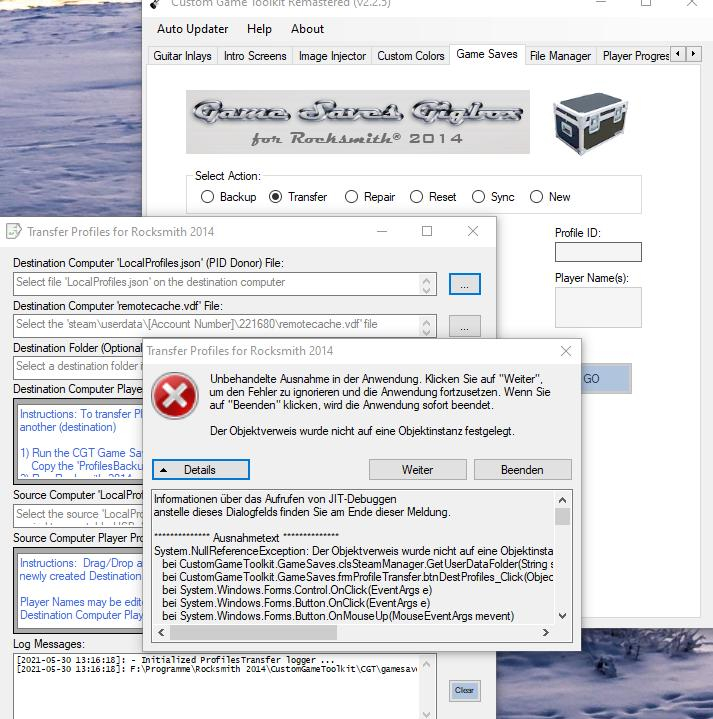
I have Win10 and Win8 machines, but neither does support the save game transfer. Back Up works tho.

As soon as you need to choose the path for the PID donor file, unhandled exception is thrown. Sadly, one cannot writhe the path directly into the corresponding fields.


.NET 4.8 is installed on all machines.

CGTR225.jpg

  • 3 months later...
  • 3 weeks later...
  • 6 months later...
  • 1 month later...

Sorry to necro but is there any updated/current way to change string colors in Rocksmith?

4 hours ago, nd4spd said:

Sorry to necro but is there any updated/current way to change string colors in Rocksmith?

RSMods can change string/note colours and has a bunch of other features

Ea3cCUQ.png                                                                   「愛こそすべて ,ギルティキス」                                         Gh59blB.png

Utsu-P Discography                                           Modding thread (dead)                                        1000 songs hype

  • 4 weeks later...

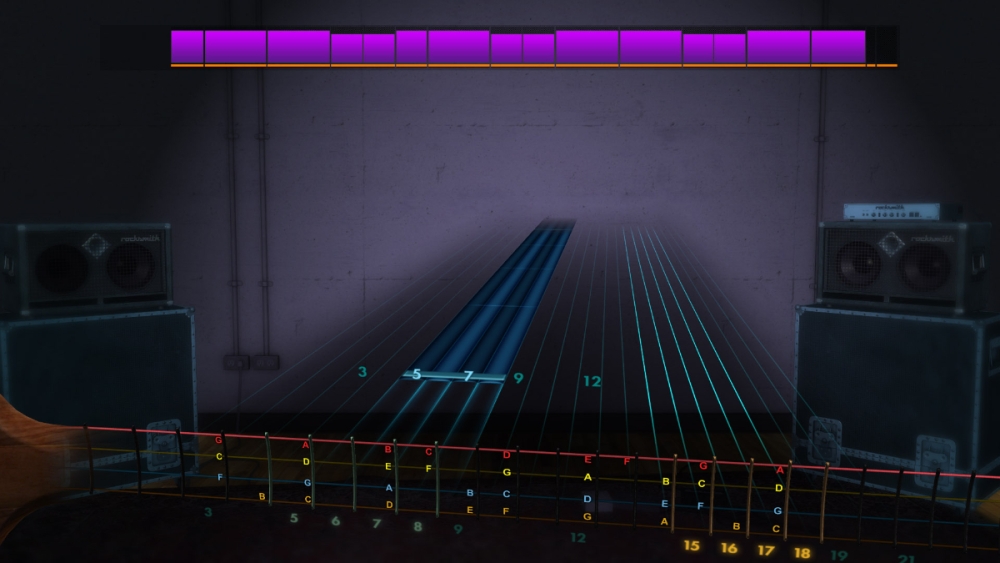
This thread seems pretty active with folks who know how to change inlays.  I'm looking for an inlay that shows all the notes for E standard tuning on a bass.  Does anyone here have one or know who might?  Thanks for any help pointing me in the right direction.

Here's exactly what I'm looking for - but this image is from a 2015 Imgur post and I haven't been able to find a source on it:


pmF0byg.jpeg

  • 3 months later...

Recently Browsing 0

  • No registered users viewing this page.


Important Information

By using this site, you agree to our Guidelines. We have placed cookies on your device to help make this website better. You can adjust your cookie settings, otherwise we'll assume you're okay to continue. - Privacy Policy

Configure browser push notifications

Chrome (Android)
  1. Tap the lock icon next to the address bar.
  2. Tap Permissions → Notifications.
  3. Adjust your preference.
Chrome (Desktop)
  1. Click the padlock icon in the address bar.
  2. Select Site settings.
  3. Find Notifications and adjust your preference.